# Agenda View
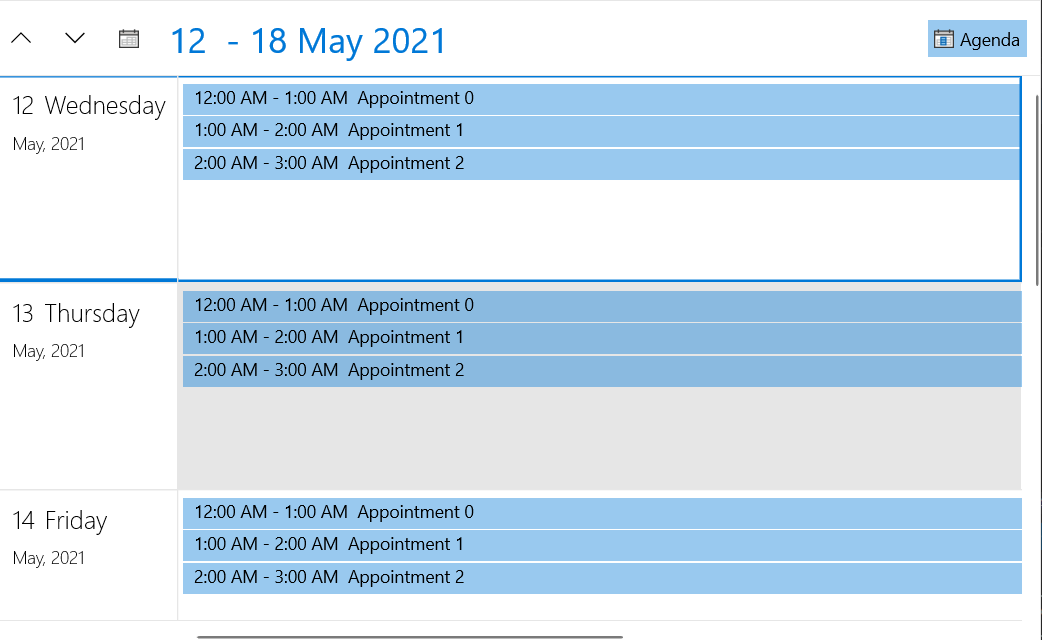
**AgendaViewDefinition** allows you to display a set of appointments for a specific period of time.
> tip See the [Configuration](https://www.telerik.com/winui/documentation/controls/radscheduler/features/viewdefinitions/configuration) article to see the functionality that is shared accross the different views.
## Setting up the View
To set any of the RadScheduler's view definition objects, add it in the ViewDefinitions collection. The following example shows how to setup RadScheduler in a basic scenario and use the AgendaViewDefinition element.
#### **Example 1: Define RadScheduler and set AgendaViewDefinition in the ViewDefinitions collection**
```XAML
```
#### **Example 2: Setting the AppointmentSource of RadScheduler**
```C#
var currentDate = DateTime.Today;
var source = new BindableCollection();
for (int i = 0; i < 5; i++)
{
currentDate = DateTime.Today.AddDays(i);
for (int k = 0; k < 3; k++)
{
source.Add(new Appointment() { Subject = "Appointment " + k , Start = currentDate.AddHours(k), End = currentDate.AddHours(k + 1)});
}
}
this.radScheduler.AppointmentsSource = source;
```
#### Figure 1: AgendaViewDefinition
## Number of Visible Days
To set the number of visible days, set the **VisibleDays** property of AgendaViewDefinition. This determines how many rows with days will be visible in the current view. The default value of VisibleDays is 7.
#### **Example 3: Setting visible days number**
```XAML
```
## Hide Empty Days
The agenda view displays empty days by default. You can alter this behavior and hide days that don't contain appointments, by setting the **ShowEmptyDays** property to **False**.
#### **Example 4: Hiding empty days**
```XAML
```
## See Also
* [Getting Started](https://www.telerik.com/winui/documentation/controls/radscheduler/getting-started)
* [ViewDefinitions Overview](https://www.telerik.com/winui/documentation/controls/radscheduler/features/viewdefinitions/overview)
* [ViewDefinitions Configuration](https://www.telerik.com/winui/documentation/controls/radscheduler/features/viewdefinitions/configuration)