# Bar Indicators

The **RadialBarGaugeIndicator** and **LinearBarGaugeIndicator** represent a specific value on the gauge scale as a bar that fills the axis up to this value.

## RadialBarGaugeIndicator

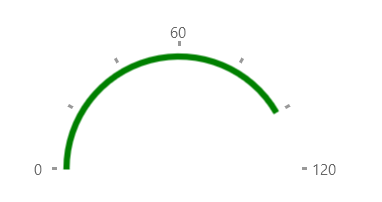
**Example 1** shows how to add a RadialBarGaugeIndicator to a RadRadialGauge.

#### **Example 1: Creating RadialBarGaugeIndicator**

```XAML
<Grid xmlns:dataVisualization="using:Telerik.UI.Xaml.Controls.DataVisualization">
	<dataVisualization:RadRadialGauge LabelStep="60" TickStep="20" MaxValue="120" Width="200" LabelRadiusScale="1.10">
		<dataVisualization:RadialBarGaugeIndicator Value="100" Brush="Green" Thickness="5" Margin="10"/>
	</dataVisualization:RadRadialGauge>
</Grid>
```

#### **Figure 1: RadialBarGaugeIndicator**
![WinUI RadGauge RadialBarGaugeIndicator](https://www.telerik.com/winui/documentation/assets/d46123f8dccf1f5b94cc9828c2bb6430/radgauge-radialbargaugeindicator.png)

## LinearBarGaugeIndicator

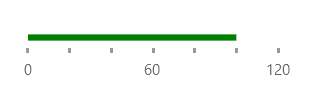
**Example 2** shows how to add a LinearBarGaugeIndicator to a RadLinearGauge.

#### **Example 2: Creating LinearBarGaugeIndicator**

```XAML
<telerik:RadLinearGauge LabelStep="60" TickStep="20" MaxValue="120"Width="200">
	<telerik:LinearBarGaugeIndicator Value="100" Brush="Green" Thickness="5" telerik:RadLinearGauge.IndicatorOffset="-10"/>
</telerik:RadLinearGauge>
```

#### **Figure 2: LinearBarGaugeIndicator**
![WinUI RadGauge LinearBarGaugeIndicator](https://www.telerik.com/winui/documentation/assets/5c8b52f027a74a4b734f07ab26fd611e/radgauge-linearbargaugeindicator.png)

## See Also

* [BarGaugeIndicator Class](https://www.telerik.com/winui/documentation/controls/radgauge/indicators/gaugeindicatorclass)
