# Validation
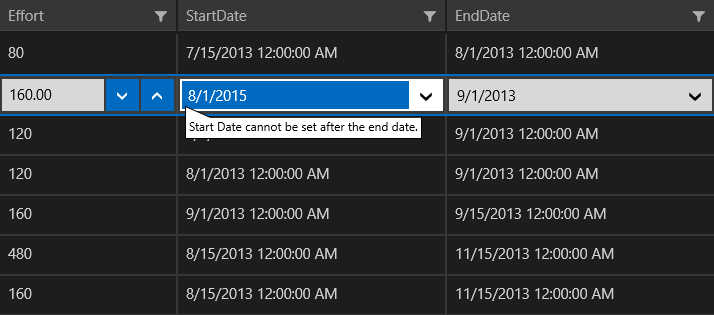
The DataGrid allows you to validate the data and display hints if the validation is not passed. To benefit from this feature, the objects populating the `ItemsSource` of the component need to implement the `INotifyDataErrorInfo` interface.
## ValidateViewModelBase
You can use the `ValidateViewModelBase` class, which provides an implementation of `INotifyDataErrorInfo` to quickly set up your objects. The following examples demonstrate how to populate the DataGrid with objects that include some custom validation logic.
#### **Define the DataGrid in XAML**
```XAML
```
#### **Define the Model and ViewModel**
```C#
public class ViewModel
{
public ViewModel()
{
this.Items = this.GetData();
}
public ObservableCollection Items { get; set; }
private ObservableCollection GetData()
{
var data = new ObservableCollection();
for (var i = 0; i < 10; i++)
{
data.Add(new Data { Date = DateTime.Today.AddDays(-i) });
}
return data;
}
}
public class Data : ValidateViewModelBase
{
private readonly DateTimeOffset maxDate = DateTime.Today.AddDays(10);
private DateTimeOffset date;
public DateTimeOffset Date
{
get
{
return this.date;
}
set
{
this.date = value;
if (this.date > this.maxDate)
{
this.AddError("Date", string.Format("Date cannot be set after {0:d}.", this.maxDate));
}
else
{
this.RemoveErrors("Date");
}
this.OnPropertyChanged();
}
}
}
```
**Result from the Examples**
## See Also
* [Editing](https://www.telerik.com/winui/documentation/controls/raddatagrid/editing/datagrid-overview)