# Radio Button
The `RadRadioButton` control is a checkable button that extends the native `RadioButton` component by providing an additional command target support and consistent theming with the other Telerik components.
By grouping the **RadioButtons** the user will be allowed to check only one button in the group. To group several **RadioButtons**, place them into the same [layout panel](https://docs.microsoft.com/en-us/windows/winui/api/microsoft.ui.xaml.controls.panel?view=winui-3.0) (`StackPanel`, `Grid`, etc.) or set their `GroupName` to the same value.
The following examples shows how to define several buttons and group them. The first example demonstrates how to use the automatic group when the buttons are placed into the same panel.
#### **Grouping RadioButtons using StackPanel**
```XAML
```
**A single group of RadioButtons**

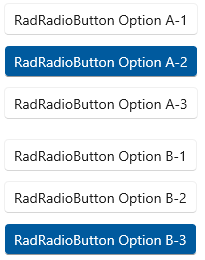
In the second example, the buttons are grouped with the `GroupName` property in order to create two sets of buttons in the same panel.
#### **Grouping RadioButtons using the GroupName property**
```XAML
```
**Two groups of RadioButtons**
## See Also
* [Events](https://www.telerik.com/winui/documentation/controls/radbuttons/events)
* [Customizing Appearance](https://www.telerik.com/winui/documentation/controls/radbuttons/apperance)
* [DropDownButton](https://www.telerik.com/winui/documentation/controls/radbuttons/dropdown-button)
* [ToggleButton](https://www.telerik.com/winui/documentation/controls/radbuttons/toggle-button)
* [SplitButton](https://www.telerik.com/winui/documentation/controls/radbuttons/split-button)