# Test Properties (VS Plugin)
## 2017 R2 Version or Later
Test properties can be reviewed from a button in the test ribbon as shown on the following screenshot.
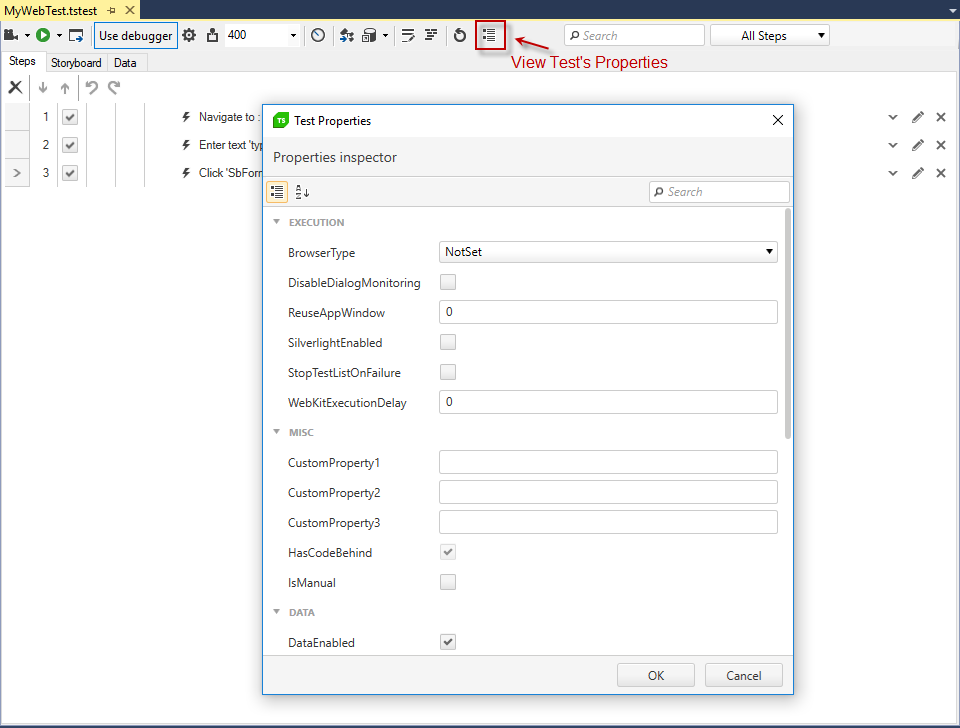
Here are the test properties with a brief description of each:
**Execution**
* **BrowserType** - sets the browser the test executes on. Overrides the Settings.DefaultBrowser.
* **DisableDialogMonitoring** - whether to disable dialog monitoring and handling.
* **ReuseAppWindow** - useful in data-driven execution to define the number of iterations to reuse the application window. By default ('0') keeps the same application open during the entire test run.
* **StopTestListOnFailure** - gets or sets whether to stop test list execution if this test fails.
* **WebKitExecutionDelay** - explicit commands delay in milliseconds for the WebKit browsers (Safari & Chrome).
**Misc**
* **CustomProperty** - three user defined values.
* **HasCodeBehind**\* - whether this test has code/script associated with it.
* **IsManual** - switch between manual and automated to designate whether to execute the test with the manual or automated test runner.
**Data**
* **DataEnabled** - whether data driven testing is enabled (if test is bound to a source).
* **DataRange** - defines a data range to execute within the data source set on a data driven test. Range is 1 based. Format: 'StartRow:EndRow' \[i.e. '3:5'] or 'SingleRow' or ':3' (first three) or '3:' (three to end).
* **DataType**\* - the data source type associated with this test.
* **DefaultToGrid** - when the BuiltInGrid is created in addition to an external data source, if set will default to the BuiltInGrid, else the external source.
* **HasBuiltInGrid**\* - whether a BuiltInGrid is attached to this test.
* **InheritParentDataSource** - gets or sets whether this data-bound test will inherit the data source from its parent data-bound test.
* **IsDataDriven**\* - whether the test is data driven.
* **Source**\* - the data source bound to this test.
**Attributes**
* **Description** - description of this test.
* **Name**\* - the name of this test.
* **Owner** - this test's owner.
* **Path**\* - the test file path relative to the project.
* **Priority** - this test's priority (default is 0).
* **UniqueId** - the test case unique identifier generated by Test Studio.
> \*Indicates field is read-only.
## 2017 R1 Version and Earlier
### Visual Studio 2012
1. Create a **.vsmdi** file.
2. Double click TestList.vsmdi and which brings up the 'Test List Editor' in Visual Studio.
3. Select a test from the 'Test List Editor' to see the properties.
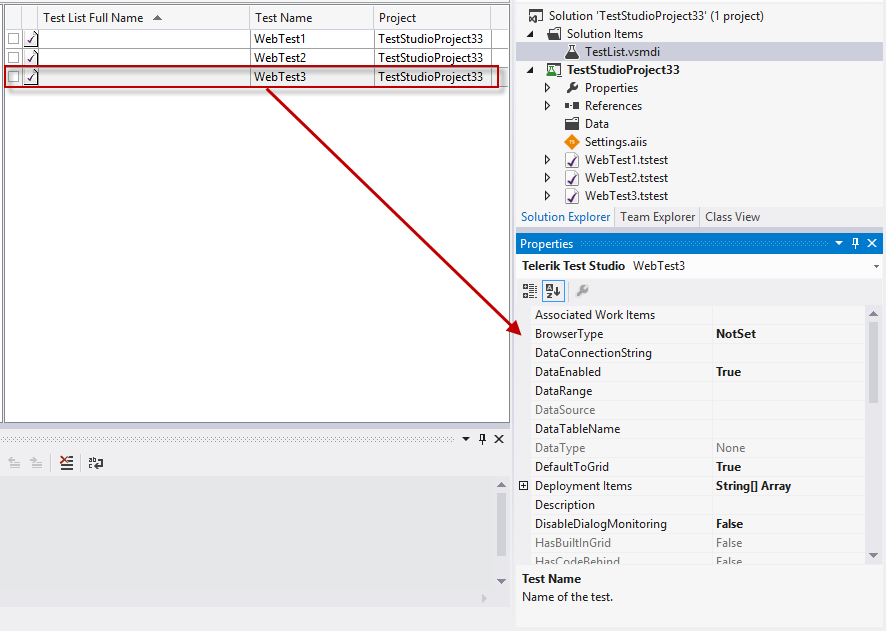
Here are the test properties with a brief description of each:
**Execution**
* BrowserType - set the browser to execute the test with.
**Misc**
* Associated Work Items - work items with which this test is associated in the Team Foundation Server work item database.
* Deployment Items - files to be deployed with the test.
* Description - test description.
* DisableDialogMonitoring - whether the test should monitor for dialogs.
* HasCodeBehind - whether this test has code/script associated with it..
* Host Data - custom data to pass to the host adapter.
* Host Type - a host is a test execution environment. Default means the default test host, VSTestHost.exe.
* ID - unique name of the test.
* IsTestFragment
* Iteration - iteration in the project lifecycle to which this test belongs.
* Non-runnable Error - for a test that cannot be run, this property describes why it cannot be run. For a test that can be run, this property is empty.
* Owner - owner of the test.
* Priority - relative importance of the test.
* Project - test project that contains this test.
* Project Area - nod in the team project hierarchy to which this test belongs.
* Project Relative Path - path on disk to the project file, relative to the solution.
* Solution - solution that contains the test project to which this test belongs.
* Test Categories - list of test categories assigned to this test.
* Test Enabled - true = enabled; false = disabled.
* Test Name - name of the test.
* Test Storage - path on disk to the file that contains this test.
* Test Type - type of test (Test Studio, unit, Web, etc.).
* Timeout - timeout value of the test (hours:minutes:seconds) which represents the maximum amount of time the test can take, after which the test will fail.
**Data**
* DataConnectionString
* DataEnabled - whether to use the data source associated with this test to data drive the test.
* DataRange - defines a data range to execute within the data source set on a data driven test. Range is 1 based. Format: 'StartRow:EndRow' \[i.e. '3:5'] or 'SingleRow' or ':3' (first three) or '3:' (three to end).
* DataSource - the data source bound to this test.
* DataTableName -
* DataType - the data source type associated with this test.
* DefaultToGrid - when the BuiltInGrid is created in addition to an external data source, if set will default to the BuiltInGrid, else the external source.
* HasBuiltInGrid - whether a BuiltInGrid is attached to this test.
* InheritParentDataSource - gets or sets whether this data-bound test will inherit the data source from its parent data-bound test.
* IsDataDriven - whether the test is data driven.