# Test Studio Project Settings

Use the **Project Settings** to configure how tests are recorded, fine tune how web page elements are located, extend Test Studio with new translators, and get information about the current installation. We recommend using the default settings as you get started with Test Studio and apply changes when you are sure you need any.

> These settings only apply to tests in the current project. </br>
> </br>
> As of release **R3 2019 SP2 (v.2019.3.1405)** Test Studio project settings can be imported to a new project through the <a href="/features/project-explorer/overview#project-context-menu-options" target="_blank">project context menu options</a>.

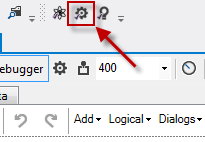
On the **Project** ribbon in Test Studio Standalone version find the **Settings** button which opens the Project Settings window. In the Visual Studio plugin, the gear icon in the toolbar loads the same Project Settings window.

<table id="no-table" style="border:none;">
<tr style="text-align: center; background-color: transparent; border:none;">
<td>

<img src="/teststudio/documentation/assets/a8de515afd58a269ccafefddb392f029/proj-settings-icon.png" alt="Standalone" /><br>**Standalone version**</td>

<td>

<img src="/teststudio/documentation/assets/556053a397fa487499f5838c9ea53409/vs-proj-setting-icons.png" alt="VS Plugin" /><br>**VS Plugin**</td>

<tr>
</table>

The available settings are divided in few areas:

* <a href="/features/project-settings/general" target="_blank">General Project Settings</a>
* <a href="/features/project-settings/recording-options" target="_blank">Recording Settings</a>
* <a href="/features/project-settings/element-images" target="_blank">Element Images Settings</a>
* <a href="/features/project-settings/browsers" target="_blank">Browsers Configuration Settings</a>
* <a href="/features/project-settings/emulated-device" target="_blank">Emulated Device Settings</a>
* <a href="/features/project-settings/find-logic" target="_blank">Smart Find Logic Settings</a>
* <a href="/features/project-settings/script-options" target="_blank">Script Project Settings</a>
* <a href="/features/project-settings/translators" target="_blank">Translators Project Settings</a>
* <a href="/features/project-settings/analytics" target="_blank">Analytics Product Settings</a>
* <a href="/features/project-settings/theme" target="_blank">Theme Settings</a>
* <a href="/features/project-settings/updates" target="_blank">Software Update</a>
