# Style Aggregate Results Displayed in the GroupHeaderRow
## Environment
| Product |
RadGridView for WPF |
## Description
How to change the style of the aggregates based on the results.
## Solution
The approach would differ depending on the value of the [ColumnAggregatesAlignment](https://www.telerik.com/products/wpf/documentation/controls/radgridview/grouping/aggregates#align-aggregates-in-groupheaderrow) property of the RadGridView. If its value is **NoAlignment** (which is the default), the aggregate results are shown in **GridViewAggregateResultCell** elements. If its value is **NextToGroupKey** or **BelowToGroupKey**, the results are displayed in **GridViewGroupHeaderCell** elements. This article will show how you can conditionally style both elements.
**Example 1** demonstrates a sample model and viewmodel that will be used for demonstration purposes.
**Example 1: The model and viewmodel**
```C#
public class Product
{
public Product(string name, int id)
{
this.Name = name;
this.ID = id;
}
public string Name
{
get;
set;
}
public int ID
{
get;
set;
}
public static ObservableCollection GetProducts()
{
ObservableCollection products = new ObservableCollection();
var id = 0;
for (int i = 1; i < 7; i++)
{
products.Add(new Product("Socks", ++id));
}
products.Add(new Product("T-shirts", ++id));
products.Add(new Product("Shoes", ++id));
products.Add(new Product("Hats", ++id));
return products;
}
}
public class ViewModel
{
private ObservableCollection products;
public ObservableCollection Products
{
get
{
if(this.products == null)
{
this.products = Product.GetProducts();
}
return this.products;
}
}
}
```
```VB.NET
Public Class Product
Public Sub New(ByVal name As String, ByVal id As Integer)
Me.Name = name
Me.ID = id
End Sub
Public Property Name() As String
Public Property ID() As Integer
Public Shared Function GetProducts() As ObservableCollection(Of Product)
Dim products As New ObservableCollection(Of Product)()
Dim _id = 0
For i As Integer = 1 To 6
id += 1
products.Add(New Product("Socks", _id))
Next i
id += 1
products.Add(New Product("T-shirts", _id))
id += 1
products.Add(New Product("Shoes", _id))
id += 1
products.Add(New Product("Hats", _id))
Return products
End Function
End Class
Public Class ViewModel
Private _products As ObservableCollection(Of Product)
Public ReadOnly Property Products() As ObservableCollection(Of Product)
Get
If Me._products Is Nothing Then
Me._products = Product.GetProducts()
End If
Return Me._products
End Get
End Property
End Class
```
#### Styling the GridViewAggregateResultCell elements
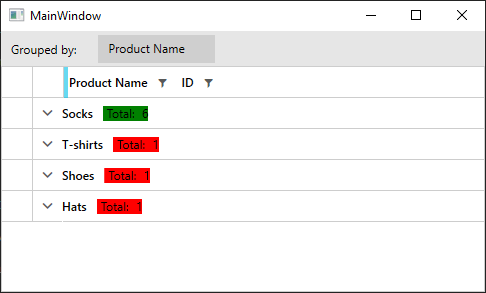
This approach is valid when the [ColumnAggregatesAlignment](https://www.telerik.com/products/wpf/documentation/controls/radgridview/grouping/aggregates#align-aggregates-in-groupheaderrow) of the RadGridView is **NoAlignment**. **Example 2** shows how to create a style targeting GridViewAggregateResultCell and change its Background depending on its DataContext.
**Example 2: Conditionally styling GridViewAggregateResultCell**
```XAML
```
**Example 3: AggregateResultsListItemCountToBackgroundConverter implementation**
```C#
public class AggregateResultsListItemCountToBackgroundConverter : IValueConverter
{
public object Convert(object value, Type targetType, object parameter, CultureInfo culture)
{
var aggregateResult = value as AggregateResult;
if (aggregateResult.ItemCount <= 1)
{
return Brushes.Red;
}
else
{
return Brushes.Green;
}
}
public object ConvertBack(object value, Type targetType, object parameter, CultureInfo culture)
{
throw new NotImplementedException();
}
}
```
```VB.NET
Public Class AggregateResultsListItemCountToBackgroundConverter
Implements IValueConverter
Public Function Convert(ByVal value As Object, ByVal targetType As Type, ByVal parameter As Object, ByVal culture As CultureInfo) As Object
Dim aggregateResult = TryCast(value, AggregateResult)
If aggregateResult.ItemCount <= 1 Then
Return Brushes.Red
Else
Return Brushes.Green
End If
End Function
Public Function ConvertBack(ByVal value As Object, ByVal targetType As Type, ByVal parameter As Object, ByVal culture As CultureInfo) As Object
Throw New NotImplementedException()
End Function
End Class
```
> caption Result from example 2 in the fluent theme
#### Styling the GridViewGroupHeaderCell elements
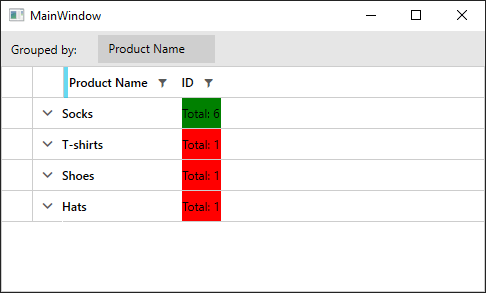
This approach is valid when the [ColumnAggregatesAlignment](https://www.telerik.com/products/wpf/documentation/controls/radgridview/grouping/aggregates#align-aggregates-in-groupheaderrow) of the RadGridView is **NextToGroupKey** or **BelowToGroupKey**. **Example 4** shows how to create a style targeting GridViewGroupHeaderCell and change its Background depending on its DataContext.
**Example 4: Conditionally styling GridViewGroupHeaderCell**
```XAML
```
**Example 5: Implementation of converters used in Example 4**
```C#
public class ItemCountToBackgroundConverter : IValueConverter
{
public object Convert(object value, Type targetType, object parameter, CultureInfo culture)
{
var group = value as QueryableCollectionViewGroup;
if (group.ItemCount > 5)
{
return Brushes.Green;
}
else
{
return Brushes.Red;
}
}
public object ConvertBack(object value, Type targetType, object parameter, CultureInfo culture)
{
throw new NotImplementedException();
}
}
public class IsNullConverter : IValueConverter
{
public object Convert(object value, Type targetType, object parameter, CultureInfo culture)
{
return value == null;
}
public object ConvertBack(object value, Type targetType, object parameter, CultureInfo culture)
{
throw new InvalidOperationException("IsNullConverter can only be used OneWay.");
}
}
```
```VB.NET
Public Class ItemCountToBackgroundConverter
Implements IValueConverter
Public Function Convert(ByVal value As Object, ByVal targetType As Type, ByVal parameter As Object, ByVal culture As CultureInfo) As Object
Dim group = TryCast(value, QueryableCollectionViewGroup)
If group.ItemCount > 5 Then
Return Brushes.Green
Else
Return Brushes.Red
End If
End Function
Public Function ConvertBack(ByVal value As Object, ByVal targetType As Type, ByVal parameter As Object, ByVal culture As CultureInfo) As Object
Throw New NotImplementedException()
End Function
End Class
Public Class IsNullConverter
Implements IValueConverter
Public Function Convert(ByVal value As Object, ByVal targetType As Type, ByVal parameter As Object, ByVal culture As CultureInfo) As Object
Return value Is Nothing
End Function
Public Function ConvertBack(ByVal value As Object, ByVal targetType As Type, ByVal parameter As Object, ByVal culture As CultureInfo) As Object
Throw New InvalidOperationException("IsNullConverter can only be used OneWay.")
End Function
End Class
```
> caption Result from example 3 in the fluent theme
## See Also
* [Aggregate Functions](https://www.telerik.com/products/wpf/documentation/controls/radgridview/columns/aggregate-functions)
* [Group Aggregates](https://www.telerik.com/products/wpf/documentation/controls/radgridview/grouping/aggregates)