# How to change the Foreground of the day short names

## Environment

<table>
    <tbody>
	    <tr>
	    	<td>Product</td>
	    	<td>RadDateTimePicker for WPF</td>
	    </tr>
    </tbody>
</table>

## Description

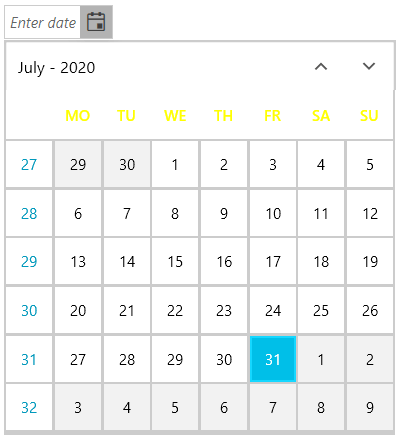
How to change the Foreground of the buttons for the day short names in RadCalendar or RadDateTimePicker.

## Solution

Create a custom DataTemplate that sets the Foreground of a TextBlock element inside its Triggers and assign the template to the **DayTemplate** of the RadCalendar. If you are using a RadDateTimePicker, you can do that through its **CalendarStyle** property.

**Example 1: Conditionally coloring the day short names**

```XAML

    <Grid xmlns:calendar="clr-namespace:Telerik.Windows.Controls.Calendar;assembly=Telerik.Windows.Controls.Input">
        <Grid.Resources>
            <DataTemplate x:Key="DayTemplate">
                <TextBlock x:Name="buttonTextBlock" Text="{Binding}"  />
                <DataTemplate.Triggers>
                    <DataTrigger Binding="{Binding ButtonType, RelativeSource={RelativeSource AncestorType=calendar:CalendarButton}}" Value="WeekName">
                        <Setter TargetName="buttonTextBlock" Property="Foreground" Value="Yellow" />
                    </DataTrigger>
                </DataTemplate.Triggers>
            </DataTemplate>

            
            <Style x:Key="CalendarStyle" TargetType="telerik:RadCalendar" >
                <Setter Property="DayTemplate" Value="{StaticResource DayTemplate}" />
            </Style>
        </Grid.Resources>
        
        <telerik:RadDateTimePicker InputMode="DatePicker" CalendarStyle="{StaticResource CalendarStyle}"  VerticalAlignment="Center" HorizontalAlignment="Center" />
    </Grid>
```

> caption Result from example 1

![RadCalendar with colored day short names](https://www.telerik.com/products/wpf/documentation/assets/ce71212e279c0f71beee17ca1a607336/kb-datetimepicker-calendar-foreground-short-names.png)

## See Also

* [How to Customize the Calendar Buttons](https://www.telerik.com/products/wpf/documentation/controls/radcalendar/styles-and-templates/daybuttonstyleselector)