# Restore Focus When RadBusyIndicator Is Hidden
## Environment
Product
Progress® Telerik® UI for WPF
## Description
Restore keyboard focus to a control in `RadBusyIndicator` content after the busy indicator disappears.
## Solution
Use the read-only `IsBusyIndicationVisible` property to detect when the busy content is displayed. The property is updated after `IsBusy`, so use it when the focus change must follow the display state of the indicator.
### Return Focus to a Specific Control
The following attached property behavior returns focus to a `TextBox` when `RadBusyIndicator` is no longer visible:
```C#
public class FocusHelper
{
private static void OnEnsureFocusChanged(DependencyObject d, DependencyPropertyChangedEventArgs e)
{
if (!(bool)e.NewValue)
{
var control = d as Control;
control.Dispatcher.BeginInvoke(new Action(() =>
{
control.Focus();
}));
}
}
public static bool GetEnsureFocus(DependencyObject obj)
{
return (bool)obj.GetValue(EnsureFocusProperty);
}
public static void SetEnsureFocus(DependencyObject obj, bool value)
{
obj.SetValue(EnsureFocusProperty, value);
}
public static readonly DependencyProperty EnsureFocusProperty =
DependencyProperty.RegisterAttached(
"EnsureFocus",
typeof(bool),
typeof(FocusHelper),
new PropertyMetadata(OnEnsureFocusChanged));
}
```
Bind the attached property to `IsBusyIndicationVisible` on a control inside the busy indicator's content:
```XAML
```
### Return Focus to the Last Focused Control
To restore focus to whichever control was focused before the busy indicator appeared, save that control and focus it again after `RadBusyIndicator` is hidden. The following example uses a `DispatcherTimer` to show and hide the indicator:
Define the sample layout and `RadBusyIndicator`:
```XAML
```
Add a property to store the control that had focus:
```C#
private DispatcherTimer dispatcherTimer { get; set; }
public void Example()
{
this.dispatcherTimer = new DispatcherTimer();
dispatcherTimer.Interval = new TimeSpan(0, 0, 5);
dispatcherTimer.Tick += new EventHandler(timerTick);
dispatcherTimer.Start();
}
private void timerTick(object sender, EventArgs e)
{
var isBusy = this.BusyIndicator.IsBusy;
if (!isBusy)
{
this.focusedElement = FocusManagerHelper.GetFocusedElement(this.StackPanel) as Control;
this.BusyIndicator.IsBusy = true;
}
else
{
this.BusyIndicator.IsBusy = false;
if (this.focusedElement != null)
{
this.focusedElement.IsEnabledChanged += focusedElement_IsEnabledChanged;
}
}
}
private void focusedElement_IsEnabledChanged(object sender, DependencyPropertyChangedEventArgs e)
{
this.focusedElement.Focus();
this.focusedElement.IsEnabledChanged -= focusedElement_IsEnabledChanged;
}
```
Use a `DispatcherTimer` to enable and disable the busy indicator, then return focus to the saved control:
```C#
private DispatcherTimer dispatcherTimer { get; set; }
public void Example()
{
this.dispatcherTimer = new DispatcherTimer();
dispatcherTimer.Interval = new TimeSpan(0, 0, 5);
dispatcherTimer.Tick += new EventHandler(timerTick);
dispatcherTimer.Start();
}
private void timerTick(object sender, EventArgs e)
{
var isBusy = this.BusyIndicator.IsBusy;
if (!isBusy)
{
this.focusedElement = FocusManagerHelper.GetFocusedElement(this.StackPanel) as Control;
this.BusyIndicator.IsBusy = true;
}
else
{
this.BusyIndicator.IsBusy = false;
if (this.focusedElement != null)
{
this.focusedElement.IsEnabledChanged += focusedElement_IsEnabledChanged;
}
}
}
private void focusedElement_IsEnabledChanged(object sender, DependencyPropertyChangedEventArgs e)
{
this.focusedElement.Focus();
this.focusedElement.IsEnabledChanged -= focusedElement_IsEnabledChanged;
}
```
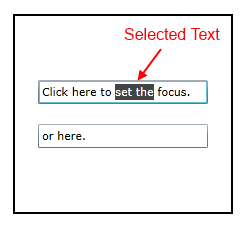
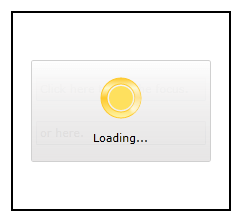
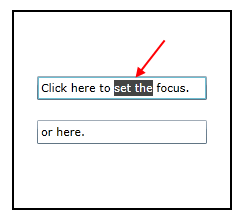
The screenshots show the focus before, during, and after the busy state:
> caption TextBox before RadBusyIndicator appears
> caption RadBusyIndicator displayed over its content
> caption TextBox focused after RadBusyIndicator is hidden
Find a runnable project for the example in the [WPF Samples GitHub repository](https://github.com/telerik/xaml-sdk/tree/master/BusyIndicator/RestoreFocus).
## See Also
* [Enabling the Indicator](https://www.telerik.com/products/wpf/documentation/controls/radbusyindicator/features/enabling-the-indicator)
* [Delayed Display](https://www.telerik.com/products/wpf/documentation/controls/radbusyindicator/features/delayed-display)
* [Integrate RadBusyIndicator with a Service Call in RadWindow](https://www.telerik.com/products/wpf/documentation/knowledge-base/kb-busyindicator-integrate-with-services-and-radwindow)