# Label

The label feature allows you to display additional information about the text.

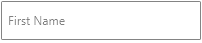
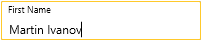
The label displays as a watermark content (placeholder) when the RadWatermarkTextBox control is unfocused and the text is empty. When the control gets focused or any text is entered, the label is positioned on top (floating) of the text input area.

**Setting the Label property**

```XAML
<telerik:RadWatermarkTextBox Label="First Name" />
```

> caption Label default visualization
![WPF RadWatermarkTextBox Label Default Visualization](https://www.telerik.com/products/wpf/documentation/assets/7edb376b7a13a06044fdc0826efe1857/radwatermarktextbox-features-label-0.png)

> caption Label visualization when floated
![WPF RadWatermarkTextBox Label Visualization When Floated](https://www.telerik.com/products/wpf/documentation/assets/7a6beccb3bf654768a7b5ff47bcad2de/radwatermarktextbox-features-label-1.png)

To keep the label always positioned on top of the text input area, set the **KeepLabelFloated** property of RadWatermarkTextBox to True.

**Setting the KeepLabelFloated property**

```XAML
<telerik:RadWatermarkTextBox KeepLabelFloated="True" />
```

To get the current state of the label, use the **IsLabelFloated** property of RadWatermarkTextBox.

**Getting the state of the label**

```C#
bool isLabelFloated = this.watermarkTextBox.IsLabelFloated;
```

## Customizing Appearance

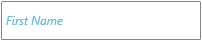
The label visual element is of type `Telerik.Windows.Controls.Label`. To customize its appearance, use the `LabelStyle` property of `RadWatermarkTextBox`.

**Customizing the label**

```XAML
<telerik:RadWatermarkTextBox Label="First Name">
    <telerik:RadWatermarkTextBox.LabelStyle>
        
        
        <Style TargetType="telerik:Label">
            <Setter Property="Foreground" Value="#5CB9DE" />
            <Setter Property="FontStyle" Value="Italic" />
        </Style>
    </telerik:RadWatermarkTextBox.LabelStyle>
</telerik:RadWatermarkTextBox>
```

> caption Customized label

![WPF RadWatermarkTextBox Customized Label](https://www.telerik.com/products/wpf/documentation/assets/2cced9d152db4b8e8ba1b6e158b8c15e/radwatermarktextbox-features-label-2.png)

## Animation

The label comes with a built-in animation that moves the label on top of the input text and then return it back to the center when necessary. This feature is enabled using Telerik's `AnimationManager` class. To change the animation, set the attached `AnimationManager.AnimationSelector` property on the RadWatermarkTextBox control. The property allows you to define an `AnimationSelector` with two groups describing the two animations that appear - make the label floating and return it to the text input area (the center).

The following example shows the default `AnimationSelector` used with the control but with slightly changed `Duration` of the animations.

**Customizing the label**

```XAML
<telerik:RadWatermarkTextBox Label="First Name">
    <telerik:AnimationManager.AnimationSelector>
        <telerik:AnimationSelector>
            <telerik:AnimationGroup AnimationName="LabelFloatAnimation">
                <telerik:LabelPositionAnimation TargetElementName="PART_LabelVisualElement" Duration="00:00:00.500" Direction="Out"  />
                <telerik:FontSizeAnimation TargetElementName="PART_LabelVisualElement" Duration="00:00:00.500" Direction="Out" />
            </telerik:AnimationGroup>
            <telerik:AnimationGroup AnimationName="LabelCenterAnimation">
                <telerik:LabelPositionAnimation TargetElementName="PART_LabelVisualElement" Duration="00:00:00.500" Direction="In"  />
                <telerik:FontSizeAnimation TargetElementName="PART_LabelVisualElement" Duration="00:00:00.500" Direction="In" />
            </telerik:AnimationGroup>
        </telerik:AnimationSelector>
    </telerik:AnimationManager.AnimationSelector>
</telerik:RadWatermarkTextBox>
```

## See also

* [Overview](https://www.telerik.com/products/wpf/documentation/controls/radwatermarktextbox/overview)
* [Getting Started](https://www.telerik.com/products/wpf/documentation/controls/radwatermarktextbox/getting-started)