# ItemTemplateSelector
When binding your **RadTreeView** to a collection, you are able to configure the visualization of the data and the appearance of the **RadTreeViewItems** via the **ItemTemplate** and the **ItemTemplateSelectior** properties.
If you want to read about the **ItemTemplate**, see the main topic [ItemTemplate](https://www.telerik.com/products/wpf/documentation/controls/radtreeview/populating-with-data/item-template).
The purpose of this tutorial is to show you how to create and apply an **ItemTemplateSelector**.
## ItemTemplateSelector Property
The most common use of the "selectors" is to display different kind of data (different kind of items).
To create your own selector you have to use Visual Studio.
* Create a class and name it **LeagueDataTemplateSelector**. The **LeagueDataTemplateSelector** must inherit from the **DataTemplateSelector** class.
```C#
public class LeagueDataTemplateSelector : DataTemplateSelector
{
}
```
```VB.NET
Public Class LeagueDataTemplateSelector
Inherits DataTemplateSelector
End Class
```
* Override the **SelectTemplate** method and implement your custom logic in it. The method accepts as arguments an **object** and a **DependencyObject**. The object argument is the actual object being bound and the **DependecyObject** is the container for it.
```C#
private HierarchicalDataTemplate leagueTemplate;
private HierarchicalDataTemplate divisionTemplate;
private DataTemplate teamTemplate;
public LeagueDataTemplateSelector()
{
}
public override DataTemplate SelectTemplate(object item, DependencyObject container)
{
if (item is League)
return this.leagueTemplate;
else if (item is Division)
return this.divisionTemplate;
else if (item is Team)
return this.teamTemplate;
return null;
}
public HierarchicalDataTemplate LeagueTemplate
{
get
{
return this.leagueTemplate;
}
set
{
this.leagueTemplate = value;
}
}
public HierarchicalDataTemplate DivisionTemplate
{
get
{
return this.divisionTemplate;
}
set
{
this.divisionTemplate = value;
}
}
public DataTemplate TeamTemplate
{
get
{
return teamTemplate;
}
set
{
this.teamTemplate = value;
}
}
```
```VB.NET
Private leagueTemplate As HierarchicalDataTemplate
Private divisionTemplate As HierarchicalDataTemplate
Private teamTemplate As DataTemplate
Public Sub New()
End Sub
Public Overloads Overrides Function SelectTemplate(ByVal item As Object, ByVal container As DependencyObject) As DataTemplate
If TypeOf item Is League Then
Return Me.leagueTemplate
ElseIf TypeOf item Is Division Then
Return Me.divisionTemplate
ElseIf TypeOf item Is Team Then
Return Me.teamTemplate
End If
Return Nothing
End Function
Public Property LeagueTemplate() As HierarchicalDataTemplate
Get
Return Me.leagueTemplate
End Get
Set(ByVal value As HierarchicalDataTemplate)
Me.leagueTemplate = value
End Set
End Property
Public Property DivisionTemplate() As HierarchicalDataTemplate
Get
Return Me.divisionTemplate
End Get
Set(ByVal value As HierarchicalDataTemplate)
Me.divisionTemplate = value
End Set
End Property
Public Property TeamTemplate() As DataTemplate
Get
Return teamTemplate
End Get
Set(ByVal value As DataTemplate)
Me.teamTemplate = value
End Set
End Property
```
> Please note that in order to use the **HierarchicalDataTemplate** class, you need to add a using for the **System.Windows** namespace.
* Define the created selector as a resource in your XAML and set it to the **ItemTemplateSelector** property.
```XAML
```
The data source class **RadTreeViewSampleData** assigned to the **RadTreeView** is covered in greater details in the chapter [Binding to Object](https://www.telerik.com/products/wpf/documentation/controls/radtreeview/populating-with-data/data-binding-to-object).
```XAML
```
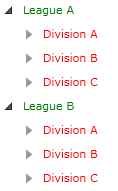
And the result of the demo can be seen on the next figure:
## See Also
* [ItemTemplate](https://www.telerik.com/products/wpf/documentation/controls/radtreeview/populating-with-data/item-template)
* [ItemEditTemplate](https://www.telerik.com/products/wpf/documentation/controls/radtreeview/populating-with-data/item-edit-template)
* [DataBinding - Overview](https://www.telerik.com/products/wpf/documentation/controls/radtreeview/populating-with-data/databinding-overview)