# ItemEditTemplateSelector

Telerik **RadTreeView** also supports **ItemEditTemplateSelector**. This tutorial will walk you through the common task of creating and applying **ItemEditTemplateSelector**.

If you want to read about **ItemEditTemplate**, see the main topic [ItemEditTemplate](https://www.telerik.com/products/wpf/documentation/controls/radtreeview/populating-with-data/item-edit-template).

## ItemEditTemplateSelector

The most common use of the "selectors" is to display different kind of data (different kind of items).

For the purpose of this tutorial will be used the following treeview declaration:

```XAML
<UserControl.Resources>

    <sampleData:RadTreeViewSampleData x:Key="DataSource"/>

    <DataTemplate x:Key="Team">
        <StackPanel Orientation="Horizontal">
            <TextBlock Text="{Binding TeamName}" Foreground="{Binding TeamColor}"/>
            <TextBlock Text=" | Count#"/>
            <TextBlock Text="{Binding Count}"/>
        </StackPanel>
    </DataTemplate>

    <HierarchicalDataTemplate x:Key="Division" ItemTemplate="{StaticResource Team}"
	        ItemsSource="{Binding Teams}">
        <StackPanel Orientation="Horizontal">
            <TextBlock Text="{Binding DivisionName}" Foreground="{Binding DivisionColor}"/>
            <TextBlock Text=" | Count#"/>
            <TextBlock Text="{Binding Count}"/>
        </StackPanel>
    </HierarchicalDataTemplate>

    <HierarchicalDataTemplate x:Key="League" ItemTemplate="{StaticResource Division}"
	        ItemsSource="{Binding Divisions}">
        <StackPanel Orientation="Horizontal">
            <TextBlock Text="{Binding LeagueName}" Foreground="{Binding LeagueColor}"/>
            <TextBlock Text=" | Count#"/>
            <TextBlock Text="{Binding Count}"/>
        </StackPanel>
    </HierarchicalDataTemplate>

</UserControl.Resources>

<Grid x:Name="LayoutRoot" Background="White">

    <telerik:RadTreeView x:Name="radTreeView"
	           IsEditable="True" Margin="8"
	           ItemsSource="{Binding Source={StaticResource DataSource}, Path=LeaguesDataSource}"
	           ItemTemplate="{StaticResource League}"/>

</Grid>
```

If you want to read more about **HierarchicalDataTemplate** and **DataBinding**, see the main topics about [HierarchicalDataTemplate](https://www.telerik.com/products/wpf/documentation/controls/radtreeview/populating-with-data/hierarchical-data-templates) and [Binding to Object](https://www.telerik.com/products/wpf/documentation/controls/radtreeview/populating-with-data/data-binding-to-object).

* Create three **DataTemplates** in the resources of your application. These templates will be used by the selector as edit templates.

  * **LeagueItemEditTemplate**

  ```XAML
  <Grid>
      <Grid.Resources>
          <DataTemplate x:Key="LeagueItemEditTemplate">
              <Grid>
                  <StackPanel Orientation="Horizontal">
                      <TextBox Text="{Binding LeagueName, Mode=TwoWay}"/>
                      <telerik:RadMaskedNumericInput Mask="#" Value="{Binding Count, Mode=OneWay}"/>
                  </StackPanel>
              </Grid>
          </DataTemplate>
  ```

  * **DivisionItemEditTemplate**

  ```XAML
  <DataTemplate x:Key="DivisionItemEditTemplate">
      <Grid>
          <StackPanel Orientation="Horizontal">
              <telerik:RadMaskedNumericInput Mask="#" Value="{Binding Count, Mode=OneWay}"/>
              <TextBox Text="{Binding DivisionName, Mode=TwoWay}"/>
          </StackPanel>
      </Grid>
  </DataTemplate>
  ```

  * **TeamItemEditTemplate**

  ```XAML
  <DataTemplate x:Key="TeamItemEditTemplate">
      <Grid>
          <StackPanel Orientation="Horizontal">
              <TextBox Text="{Binding TeamName, Mode=TwoWay}"/>
              <TextBlock Text=" | "/>
              <telerik:RadMaskedNumericInput Mask="#" Value="{Binding Count, Mode=OneWay}"/>
          </StackPanel>
      </Grid>
  </DataTemplate>
  ```

  > In order to use the Telerik **RadMaskedNumericInput** you need to add a reference to the **Telerik.Windows.Controls.Input** assembly in your user control.

  These are the three **DataTemplates**, which will be used as edit templates. Accordingly, when the object type is League, then the **LeagueItemEditTemplate** will be applied; when the object type is **Division**, then the **DivisionItemEditTemplate** will be applied; when the object type is **Team**, then the **TeamItemEditTemplate** will be applied.

The next step is to create a selector where the logic about selecting the right template will be.

* Create a new class, named **LeagueItemEditTemplateSelector**, which derives from **DataTemplateSelector**.

  ```C#
  public class LeagueDataTemplateSelector : DataTemplateSelector
  {
      public DataTemplate LeagueTemplate { get; set; }
      public DataTemplate DivisionTemplate { get; set; }
      public DataTemplate TeamTemplate { get; set; }
      public override DataTemplate SelectTemplate(object item, DependencyObject container)
      {
          if (item is League)
              return this.LeagueTemplate;
          else if (item is Division)
              return this.DivisionTemplate;
          else
          {
              return this.TeamTemplate;
          }

      }
  }
  ```

  ```VB.NET
  		Public Class LeagueDataTemplateSelector
  			Inherits DataTemplateSelector
  		End Class
  ```

* Override the **SelectTemplate** method and implement your custom logic in it. The method accepts as arguments an **object** and a **DependencyObject**. The object argument is the actual object being bound and the **DependecyObject** is the container for it.

  ```XAML
  <UserControl.Resources>

      <sampleData:RadTreeViewSampleData x:Key="DataSource"/>

      <DataTemplate x:Key="Team">
          <StackPanel Orientation="Horizontal">
              <TextBlock Text="{Binding TeamName}" Foreground="{Binding TeamColor}"/>
              <TextBlock Text=" | Count#"/>
              <TextBlock Text="{Binding Count}"/>
          </StackPanel>
      </DataTemplate>

      <HierarchicalDataTemplate x:Key="Division" ItemTemplate="{StaticResource Team}"
  				ItemsSource="{Binding Teams}">
          <StackPanel Orientation="Horizontal">
              <TextBlock Text="{Binding DivisionName}" Foreground="{Binding DivisionColor}"/>
              <TextBlock Text=" | Count#"/>
              <TextBlock Text="{Binding Count}"/>
          </StackPanel>
      </HierarchicalDataTemplate>

      <HierarchicalDataTemplate x:Key="League" ItemTemplate="{StaticResource Division}"
  				ItemsSource="{Binding Divisions}">
          <StackPanel Orientation="Horizontal">
              <TextBlock Text="{Binding LeagueName}" Foreground="{Binding LeagueColor}"/>
              <TextBlock Text=" | Count#"/>
              <TextBlock Text="{Binding Count}"/>
          </StackPanel>
      </HierarchicalDataTemplate>

  </UserControl.Resources>

  <Grid x:Name="LayoutRoot2" Background="White">

      <telerik:RadTreeView x:Name="radTreeView2"
  				   IsEditable="True" Margin="8"
  				   ItemsSource="{Binding Source={StaticResource DataSource}, Path=LeaguesDataSource}"
  				   ItemTemplate="{StaticResource League}"/>

  </Grid>
  ```

  ```C#
  public class LeagueItemEditTemplateSelector : DataTemplateSelector
  {
      private DataTemplate leagueTemplate;
      private DataTemplate divisionTemplate;
      private DataTemplate teamTemplate;
      public override DataTemplate SelectTemplate(object item, DependencyObject container)
      {
          if (item is League)
              return this.leagueTemplate;
          else if (item is Division)
              return this.divisionTemplate;
          else if (item is Team)
              return this.teamTemplate;
          return null;
      }
      public DataTemplate LeagueTemplate
      {
          get
          {
              return leagueTemplate;
          }
          set
          {
              leagueTemplate = value;
          }
      }
      public DataTemplate DivisionTemplate
      {
          get
          {
              return divisionTemplate;
          }
          set
          {
              divisionTemplate = value;
          }
      }
      public DataTemplate TeamTemplate
      {
          get
          {
              return teamTemplate;
          }
          set
          {
              teamTemplate = value;
          }
      }
  }
  ```

  ```VB.NET
  		Public Class LeagueItemEditTemplateSelector
  			Inherits DataTemplateSelector
  			Private m_leagueTemplate As DataTemplate
  			Private m_divisionTemplate As DataTemplate
  			Private m_teamTemplate As DataTemplate
  		
  			Public Overloads Overrides Function SelectTemplate(ByVal item As Object, ByVal container As DependencyObject) As DataTemplate
  				If TypeOf item Is League Then
  					Return Me.m_leagueTemplate
  				ElseIf TypeOf item Is Division Then
  					Return Me.m_divisionTemplate
  				ElseIf TypeOf item Is Team Then
  					Return Me.m_teamTemplate
  				End If
  		
  				Return Nothing
  			End Function
  		
  			Public Property LeagueTemplate() As DataTemplate
  				Get
  					Return m_leagueTemplate
  				End Get
  				Set(ByVal value As DataTemplate)
  					m_leagueTemplate = value
  				End Set
  			End Property
  		
  			Public Property DivisionTemplate() As DataTemplate
  				Get
  					Return m_divisionTemplate
  				End Get
  				Set(ByVal value As DataTemplate)
  					m_divisionTemplate = value
  				End Set
  			End Property
  		
  			Public Property TeamTemplate() As DataTemplate
  				Get
  					Return m_teamTemplate
  				End Get
  				Set(ByVal value As DataTemplate)
  					m_teamTemplate = value
  				End Set
  			End Property
  		End Class
  ```

* Define the created selector as a resource in your XAML and set it to the **ItemEditTemplateSelector** property.

  ```XAML
  <UserControl.Resources>

      <sampleData:LeagueItemEditTemplateSelector x:Key="myEditDataTemplateSelector"
  			LeagueTemplate="{StaticResource LeagueItemEditTemplate}"
  			DivisionTemplate="{StaticResource DivisionItemEditTemplate}"
  			TeamTemplate="{StaticResource TeamItemEditTemplate}"/>

  </UserControl.Resources>
  ```

  ```XAML
  <telerik:RadTreeView x:Name="radTreeView3"
  		   IsEditable="True" Margin="8"
  		   ItemsSource="{Binding Source={StaticResource DataSource}, Path=LeaguesDataSource}"
  		   ItemTemplate="{StaticResource League}"
  		   ItemEditTemplate="{x:Null}"
  		   ItemEditTemplateSelector="{StaticResource myEditDataTemplateSelector}"/>
  ```

> caution The Telerik RadTreeView provides a default ItemEditTemplate which takes precedence. That's why in order to use ItemEditTemplateSelector, you need to null the ItemEditTemplate. In code this is trivial, in XAML can be done with the following: `ItemEditTemplate="{x:Null}"`

> Don't forget to null the ItemEditTemplate, because otherwise your template selector won't be applied.

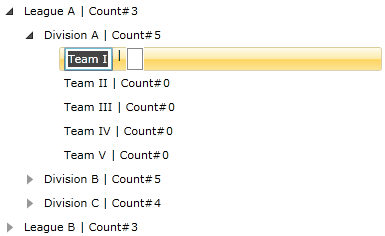
Here are some snapshots when you edit an object of type League and when you edit an object of type **Team**:
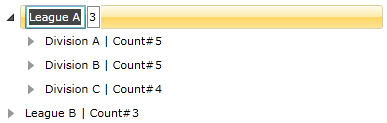
![WPF RadTreeView Editing Item of Type League](https://www.telerik.com/products/wpf/documentation/assets/d200ec7ec77b34609251bc4f79d5802c/radtreeview_templatingitemedittemplateselector_001.png)

![WPF RadTreeView Editing Item of Type Team](https://www.telerik.com/products/wpf/documentation/assets/393e5d9ee4568bc06b54cb68bd4c8b5f/radtreeview_templatingitemedittemplateselector_010.png)

## See Also

* [ItemEditTemplate](https://www.telerik.com/products/wpf/documentation/controls/radtreeview/populating-with-data/item-edit-template)
* [ItemTemplate](https://www.telerik.com/products/wpf/documentation/controls/radtreeview/populating-with-data/item-template)
* [DataBinding - Overview](https://www.telerik.com/products/wpf/documentation/controls/radtreeview/populating-with-data/databinding-overview)