# ItemContainerStyleSelector
The Telerik **RadTreeView** supports [ItemContainerStyle](https://www.telerik.com/products/wpf/documentation/controls/radtreeview/styles-and-templates/styling-and-appearance-item-container-style). The **ItemContainerStyle** property gives you the ability to change the treeview items' header. The container created by the **RadTreeView** for each item in the collection is of type **RadTreeViewItem**.
If you have different items and/or you prefer to display items with different styles, then you should use the **ItemContainerStyleSelector** property. This tutorial will walk you through the common task of creating and applying **ItemContainerStyleSelector**.
For the purpose of this tutorial will be used the following treeview declaration:
```XAML
```
The data source class **RadTreeViewSampleData** assigned to the **RadTreeView** is covered in greater details in the chapter [Binding to Object](https://www.telerik.com/products/wpf/documentation/controls/radtreeview/populating-with-data/data-binding-to-object).
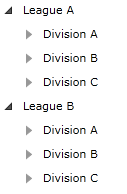
## ItemContainerStyleSelector
The most common use of the "selectors" is to display different kind of data (different kind of items).
If you want to read more about **HierarchicalDataTemplate** and **DataBinding**, see the main topics about [HierarchicalDataTemplate](https://www.telerik.com/products/wpf/documentation/controls/radtreeview/populating-with-data/hierarchical-data-templates) and [ Binding to Object](https://www.telerik.com/products/wpf/documentation/controls/radtreeview/populating-with-data/data-binding-to-object).
* Create three **styles** in the resources of your application.
* **LeagueItemContainerStyle**
```XAML
```
* **DivisionItemContainerStyle**
```XAML
```
* **TeamItemContainerStyle**
```XAML
```
> The style defined for the **ItemContainerStyle** property should have as **TargetType** the **RadTreeViewItem** class.
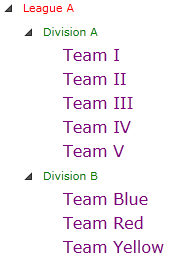
These are the three **Styles**, which will be used as item container style. Accordingly, when the object type is League, then the **LeagueItemContainerStyle** will be applied; when the object type is **Division**, then the **DivisionItemContainerStyle** will be applied; when the object type is **Team**, then the **TeamItemContainerStyle** will be applied.
The next step is to create a selector where the logic about selecting the right style will be.
* Create a new class, named **LeagueItemContainerStyleSelector**, which derives from **StyleSelector**.
> If you create an **ItemTemplateSelector** or **ItemEditTemplateSelector**, you must derive from the **DataTemplateSelector** class. But if you want to create **ItemContainerStyleSelector**, you must derive from the **StyleSelector** class.
```C#
public class LeagueItemContainerStyleSelector : StyleSelector
{
}
```
```VB.NET
Public Class LeagueItemContainerStyleSelector
Inherits StyleSelector
End Class
```
* Override the **SelectStyle** method and implement your custom logic in it. The method accepts as arguments an **object** and a **DependencyObject**. The object argument is the actual object being bound and the **DependecyObject** is the container for it.
```C#
public class LeagueItemContainerStyleSelector : StyleSelector
{
private Style leagueStyle;
private Style divisionStyle;
private Style teamStyle;
public override Style SelectStyle(object item, DependencyObject container)
{
if (item is League)
return this.leagueStyle;
else if (item is Division)
return this.divisionStyle;
else if (item is Team)
return this.teamStyle;
return null;
}
public Style LeagueStyle
{
get
{
return this.leagueStyle;
}
set
{
this.leagueStyle = value;
}
}
public Style DivisionStyle
{
get
{
return this.divisionStyle;
}
set
{
this.divisionStyle = value;
}
}
public Style TeamStyle
{
get
{
return this.teamStyle;
}
set
{
this.teamStyle = value;
}
}
}
```
```VB.NET
Public Class LeagueItemContainerStyleSelector
Inherits StyleSelector
Private m_leagueStyle As Style
Private m_divisionStyle As Style
Private m_teamStyle As Style
Public Overloads Overrides Function SelectStyle(ByVal item As Object, ByVal container As DependencyObject) As Style
If TypeOf item Is League Then
Return Me.m_leagueStyle
ElseIf TypeOf item Is Division Then
Return Me.m_divisionStyle
ElseIf TypeOf item Is Team Then
Return Me.m_teamStyle
End If
Return Nothing
End Function
Public Property LeagueStyle() As Style
Get
Return Me.m_leagueStyle
End Get
Set(ByVal value As Style)
Me.m_leagueStyle = value
End Set
End Property
Public Property DivisionStyle() As Style
Get
Return Me.m_divisionStyle
End Get
Set(ByVal value As Style)
Me.m_divisionStyle = value
End Set
End Property
Public Property TeamStyle() As Style
Get
Return Me.m_teamStyle
End Get
Set(ByVal value As Style)
Me.m_teamStyle = value
End Set
End Property
End Class
```
* Define the created selector as a resource in your XAML and set it to the **ItemContainerStyleSelector** property.
```XAML
```
```XAML
```
## See Also
* [ItemContainerStyle](https://www.telerik.com/products/wpf/documentation/controls/radtreeview/styles-and-templates/styling-and-appearance-item-container-style)
* [Editing Control Templates](https://www.telerik.com/products/wpf/documentation/styling-and-appearance/styling-apperance-editing-control-templates)
* [Styling the Expander](https://www.telerik.com/products/wpf/documentation/controls/radtreeview/styles-and-templates/styling-and-appearance-styling-expander)