# Binding to WCF Service
The purpose of this tutorial is to show you how to populate a **RadTreeView** with data from a **WCF Service**.
> This tutorial will use the **Northwind** database, which can be downloaded from [here](http://www.microsoft.com/downloads/details.aspx?FamilyID=06616212-0356-46A0-8DA2-EEBC53A68034\&displaylang=en).
Here will be examined "best practice" for using **RadTreeView** with load on demand and WCF Service.
* Add a new **RadTreeView** declaration in your XAML and add an event handler for **LoadOnDemand** event. Also set the following properties to **True**:
* **IsLoadOnDemandEnabled**
* **IsExpandOnSingleClickEnabled**
```XAML
```
The treeview will be bound to a data source object, that has a property **Categories**. When the **LoadOnDemand** event of **RadTreeView** is fired, the selected category asynchronously loads its related products.
* Create a new class named **NorthwindDataSource**.
```C#
public class NorthwindDataSource
{
}
```
* Add a reference to your WCF Service
* In the **NorthwindDataSource** class add a reference to an **ObservableCollection** of **Categories.**
* In the **NorthwindDataSource** class add a reference to your WCF Service client:
```C#
public class NorthwindDataSource
{
private SampleWcfServiceClient serviceClient;
public NorthwindDataSource()
{
serviceClient = new SampleWcfServiceClient();
this.Categories = new ObservableCollection();
}
public ObservableCollection Categories
{
get;
set;
}
}
```
* Add the following code in the constructor of the **NorthwindDataSource**. It will make the initial load of all **Categories** from the database:
```C#
this.serviceClient.LoadCategoriesCompleted += new EventHandler(serviceClient_LoadCategoriesCompleted);
this.serviceClient.LoadCategoriesAsync();
```
```C#
foreach (Categories c in serviceClient.LoadCategories())
{
this.Categories.Add(c);
}
```
* Update your treeview declaration - set the **ItemsSource** and **ItemTemplate** properties.
```XAML
```
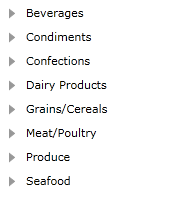
Run your demo, the result can be seen on the next picture:
If you try to expand any of the loaded categories, the default load on demand animation will be started:

The next step is to handle the load on demand event.
* Add the following method to the **NorthwindDataSource** class, which aims to load the products for the expanded category:
```C#
public void BeginLoadingProducts(Categories category)
{
serviceClient.LoadProductsByCategoryIdCompleted += new EventHandler(serviceClient_LoadProductsByCategoryIdCompleted);
serviceClient.LoadProductsByCategoryIdAsync(category.CategoryID, category);
}
private void serviceClient_LoadProductsByCategoryIdCompleted(object sender, LoadProductsByCategoryIdCompletedEventArgs e)
{
if (e.Error == null && e.Result != null)
{
Categories currentCategory = e.UserState as Categories;
foreach (Products p in e.Result)
{
currentCategory.Products.Add(p);
}
}
}
```
```C#
public void LoadProducts(Categories category)
{
category.Products = new ObservableCollection();
foreach (Products p in serviceClient.LoadProductsByCategoryId(category.CategoryID))
{
category.Products.Add(p);
}
}
```
The body of the exposed **LoadProductsByCategoryId()** method is shown on the code snippet below.
```C#
[OperationContract]
public List LoadProductsByCategoryId(int categoryId)
{
NorthwindEntities ent = new NorthwindEntities();
var q = from p in ent.Products
where p.Categories.CategoryID == categoryId
orderby p.ProductName
select p;
return q.ToList();
}
```
* Add the following code to the load on demand event handler, which you declared on step 1.
```C#
private void radTreeView_LoadOnDemand(object sender, Telerik.Windows.RadRoutedEventArgs e)
{
RadTreeViewItem item = e.OriginalSource as RadTreeViewItem;
Categories category = item.Item as Categories;
if (category != null)
{
(this.Resources["DataSource"] as NorthwindDataSource).BeginLoadingProducts(category);
}
else
{
item.IsLoadOnDemandEnabled = false;
}
}
```
> When there are no items to add, and you want to prevent the **LoadOnDemand** event to fire again, set the **IsLoadOnDemandEnabled** property to **False** to the **RadTreeViewItem** that has fired the **LoadOnDemand** event.
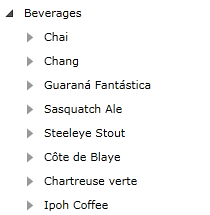
And here is the result:
## See Also
* [DataBinding - Overview](https://www.telerik.com/products/wpf/documentation/controls/radtreeview/populating-with-data/databinding-overview)
* [Populating with Data - Declaratively](https://www.telerik.com/products/wpf/documentation/controls/radtreeview/populating-with-data/declaratively)
* [Populating with Data - In Code-Behind](https://www.telerik.com/products/wpf/documentation/controls/radtreeview/populating-with-data/in-code-behind)
* [Binding to XML](https://www.telerik.com/products/wpf/documentation/controls/radtreeview/populating-with-data/data-binding-to-xml)
* [Binding to Object](https://www.telerik.com/products/wpf/documentation/controls/radtreeview/populating-with-data/data-binding-to-object)
* [Binding to ADO.NET Data Service](https://www.telerik.com/products/wpf/documentation/controls/radtreeview/populating-with-data/databinding-to-adonet-service)