# Binding to ADO.NET Data Service
The purpose of this tutorial is to show you how to populate a **RadTreeView** with data from an **ADO.NET Data Service**.
> This tutorial will use the **Northwind** database, which can be downloaded from [here](http://www.microsoft.com/downloads/details.aspx?FamilyID=06616212-0356-46A0-8DA2-EEBC53A68034\&displaylang=en).
Here will be also examined "best practice" for using **RadTreeView** with load on demand and ADO.NET Data Service. You can read more information about the load on demand behavior [here](https://www.telerik.com/products/wpf/documentation/controls/radtreeview/features/load-on-demand).
* Add a new **RadTreeView** declaration in your XAML and add an event handler for **LoadOnDemand** event. Also set the following properties to **True**:
* **IsLoadOnDemandEnabled**
* **IsExpandOnSingleClickEnabled**
```XAML
```
The **RadTreeView** will be bound to a data source object, that has a property **Categories**. When the **LoadOnDemand** event of **RadTreeView** is fired, the selected category asynchronously loads its related products.
* Create a new class named **NorthwindDataSource**.
```C#
public class NorthwindDataSource
{
}
```
```VB.NET
Public Class NorthwindDataSource
End Class
```
* Add a reference to your ADO.NET Data Service.
* In the **NorthwindDataSource** class add a reference to an **ObservableCollection** of **Categories**.
* In the **NorthwindDataSource** class add a reference to the **NorthwindEntities** object:
```C#
private NorthwindEntities northwindEntity;
public NorthwindDataSource()
{
this.northwindEntity = new NorthwindEntities(new Uri("Enter your service address here"));
this.Categories = new ObservableCollection();
}
public ObservableCollection Categories
{
get;
set;
}
```
```VB.NET
Private northwindEntity As NorthwindEntities
Public Sub New()
Me.northwindEntity = New NorthwindEntities(New Uri("Enter your service address here"))
Me.Categories = New ObservableCollection(Of Categories)()
End Sub
Private _Categories As ObservableCollection(Of Categories)
Public Property Categories() As ObservableCollection(Of Categories)
Get
Return _Categories
End Get
Set(ByVal value As ObservableCollection(Of Categories))
_Categories = value
End Set
End Property
```
* Add the following code in the constructor of the **NorthwindDataSource**. It will make the initial load of all **Categories** from the database:
```C#
northwindEntity.Categories.BeginExecute(
(IAsyncResult result) => EntitiesLoaded(result, this.Categories),
northwindEntity.Categories);
```
```VB.NET
northwindEntity.Categories.BeginExecute(Function(ByVal result As IAsyncResult) EntitiesLoaded(Of Categories)(result, Me.Categories), northwindEntity.Categories)
```
```C#
foreach (Categories c in northwindEntity.Categories.Execute())
{
this.Categories.Add(c);
}
```
```VB.NET
For Each c As Categories In northwindEntity.Categories.Execute()
Me.Categories.Add(c)
Next
```
```C#
private static void EntitiesLoaded(IAsyncResult result, Collection entities)
{
DataServiceQuery query = result.AsyncState as DataServiceQuery;
foreach (T entity in query.EndExecute(result))
{
entities.Add(entity);
}
}
```
```VB.NET
Private Shared Sub EntitiesLoaded(Of T)(ByVal result As IAsyncResult, ByVal entities As Collection(Of T))
Dim query As DataServiceQuery(Of T) = TryCast(result.AsyncState, DataServiceQuery(Of T))
For Each entity As T In query.EndExecute(result)
entities.Add(entity)
Next
End Sub
```
> Since the first load of the categories is also asynchronous, it takes some time to display the treeview for the first time. You may consider adding some loading animation in your application.
* Declare the **NorthwindDataSource** object as a resource in your application.
```XAML
```
* Declare [HierarchicalDataTemplates](https://www.telerik.com/products/wpf/documentation/controls/radtreeview/populating-with-data/hierarchical-data-templates) which will describe the **RadTreeView** structure.
```XAML
```
* Update your RadTreeView declaration - set the ItemsSource and **ItemTemplate** properties.
```XAML
```
Run your demo, the result can be seen on the next picture:

If you try to expand any of the loaded categories, the default load on demand animation will be started:

The next step is to handle the load on demand event.
* Add the following method to the **NorthwindDataSource** class, which aims to load the products for the expanded category:
```C#
public static void BeginLoadingProducts(Categories category)
{
DataServiceQuery categoryProducts = northwindEntity
.CreateQuery(string.Format("Categories({0})/Products", category.CategoryID))
.Expand("Suppliers")
.Expand("Categories");
categoryProducts.BeginExecute(
(IAsyncResult result) => EntitiesLoaded(result, category.Products),
categoryProducts);
}
```
```VB.NET
Public Shared Sub BeginLoadingProducts(ByVal category As Categories)
Dim categoryProducts As DataServiceQuery(Of Products) = northwindEntity.CreateQuery(Of Products)(String.Format("Categories({0})/Products", category.CategoryID)).Expand("Suppliers").Expand("Categories")
categoryProducts.BeginExecute(Function(ByVal result As IAsyncResult) EntitiesLoaded(Of Products)(result, category.Products), categoryProducts)
End Sub
```
```C#
public static void LoadProducts(Categories category)
{
DataServiceQuery categoryProducts = northwindEntity
.CreateQuery(string.Format("Categories({0})/Products", category.CategoryID))
.Expand("Suppliers")
.Expand("Categories");
category.Products = new ObservableCollection();
foreach (Products p in categoryProducts.Execute())
{
category.Products.Add(p);
}
}
```
```VB.NET
Public Shared Sub LoadProducts(ByVal category As Categories)
Dim categoryProducts As DataServiceQuery(Of Products) = northwindEntity.CreateQuery(Of Products)(String.Format("Categories({0})/Products", category.CategoryID)).Expand("Suppliers").Expand("Categories")
category.Products = New ObservableCollection(Of Products)()
For Each p As Products In categoryProducts.Execute()
category.Products.Add(p)
Next
End Sub
```
* Add the following code to the load on demand event handler, which you declared on step 1.
```C#
private void radTreeView_LoadOnDemand(object sender, Telerik.Windows.RadRoutedEventArgs e)
{
RadTreeViewItem item = e.OriginalSource as RadTreeViewItem;
Categories category = item.Item as Categories;
if (category != null)
{
NorthwindDataSource.BeginLoadingProducts(category);
}
else
{
item.IsLoadOnDemandEnabled = false;
}
}
```
```VB.NET
Private Sub radTreeView_LoadOnDemand(ByVal sender As Object, ByVal e As Telerik.Windows.RadRoutedEventArgs)
Dim item As RadTreeViewItem = TryCast(e.OriginalSource, RadTreeViewItem)
Dim category As Categories = TryCast(item.Item, Categories)
If category IsNot Nothing Then
NorthwindDataSource.BeginLoadingProducts(category)
Else
item.IsLoadOnDemandEnabled = False
End If
End Sub
```
> When there are no items to add, and you want to prevent the **LoadOnDemand** event to fire again, set the **IsLoadOnDemandEnabled** property to **False** to the **RadTreeViewItem** that has fired the **LoadOnDemand** event.
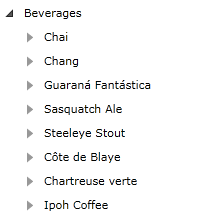
And here is the result:
## See Also
* [DataBinding - Overview](https://www.telerik.com/products/wpf/documentation/controls/radtreeview/populating-with-data/databinding-overview)
* [Populating with Data - Declaratively](https://www.telerik.com/products/wpf/documentation/controls/radtreeview/populating-with-data/declaratively)
* [Populating with Data - In Code-Behind](https://www.telerik.com/products/wpf/documentation/controls/radtreeview/populating-with-data/in-code-behind)
* [Binding to XML](https://www.telerik.com/products/wpf/documentation/controls/radtreeview/populating-with-data/data-binding-to-xml)
* [Binding to Object](https://www.telerik.com/products/wpf/documentation/controls/radtreeview/populating-with-data/data-binding-to-object)
* [Binding to WCF Service](https://www.telerik.com/products/wpf/documentation/controls/radtreeview/populating-with-data/databinding-to-wcf-service)