# Binding to XML
To bind the **RadTreeView** to a XML you will need to convert the XML to a collection and then to bind that collection using the **ItemsSource** property of the **RadTreeView**. This tutorial will show you how to do this.
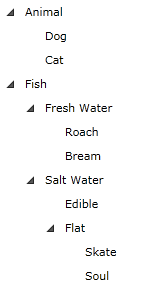
The final result should look like the snapshot below:
* The first step is to add references to the following assemblies:
* **Telerik.Windows.Controls.Navigation**
* **Telerik.Windows.Controls**
* Then add the xml file describing the data that will be displayed in the **RadTreeView** control. Below you can find a simple XML declaration, that we will use in this tutorial:
```XML
```
* Create a new class named **XmlNodeItem**. The class is pretty simple and it represents a separate node from the XML document. It has a **Header** property and a collection of **XmlNodeItem**. Here is the source code:
```C#
public class XmlNodeItem
{
public XmlNodeItem()
{
this.Items = new ObservableCollection();
}
[XmlAttribute(AttributeName = "Header")]
public string Header
{
get;
set;
}
public ObservableCollection Items
{
get;
set;
}
}
```
```VB.NET
Public Class XmlNodeItem
Public Sub New()
Me.Items = New ObservableCollection(Of XmlNodeItem)()
End Sub
Private _Header As String
_
Public Property Header() As String
Get
Return _Header
End Get
Set(ByVal value As String)
_Header = value
End Set
End Property
Private _Items As ObservableCollection(Of XmlNodeItem)
Public Property Items() As ObservableCollection(Of XmlNodeItem)
Get
Return _Items
End Get
Set(ByVal value As ObservableCollection(Of XmlNodeItem))
_Items = value
End Set
End Property
End Class
```
* Create a new class named **XmlNodeItemList**, which derives from **ObservableCollection** of **XmlNodeItem**. This is a collection that will be created from the XML file. The **RadTreeView** will be bound to this collection.
```C#
[XmlRoot(ElementName = "Items")]
public class XmlNodeItemList : ObservableCollection
{
public void AddRange(IEnumerable range)
{
foreach (XmlNodeItem node in range)
{
this.Add(node);
}
}
}
```
```VB.NET
_
Public Class XmlNodeItemList
Inherits ObservableCollection(Of XmlNodeItem)
Public Sub AddRange(ByVal range As IEnumerable(Of XmlNodeItem))
For Each node As XmlNodeItem In range
Me.Add(node)
Next
End Sub
End Class
```
* Create a new class named **RadTreeViewXmlDataSource**, which derives from **XmlNodeItemList**. Practically, this will be the data source (the model) for the treeview. The class takes a path to the XML file and deserialize the data in the private method **RetrieveData**.
```C#
public class RadTreeViewXmlDataSource : XmlNodeItemList
{
private string source;
public string Source
{
get
{
return this.source;
}
set
{
this.source = value;
AddRange(RetrieveData(Application.GetResourceStream(new Uri(value, UriKind.Relative)).Stream));
}
}
private XmlNodeItemList RetrieveData(Stream xmlStream)
{
XmlSerializer serializer = new XmlSerializer(typeof(XmlNodeItemList));
StreamReader reader = new StreamReader(xmlStream);
XmlNodeItemList list = (XmlNodeItemList)serializer.Deserialize(reader);
return list;
}
}
```
```VB.NET
Public Class RadTreeViewXmlDataSource
Inherits XmlNodeItemList
Private m_source As String
Public Property Source() As String
Get
Return Me.m_source
End Get
Set(ByVal value As String)
Me.m_source = value
AddRange(RetrieveData(Application.GetResourceStream(New Uri(value, UriKind.Relative)).Stream))
End Set
End Property
Private Function RetrieveData(ByVal xmlStream As Stream) As XmlNodeItemList
Dim serializer As New XmlSerializer(GetType(XmlNodeItemList))
Dim reader As New StreamReader(xmlStream)
Dim list As XmlNodeItemList = DirectCast(serializer.Deserialize(reader), XmlNodeItemList)
Return list
End Function
End Class
```
* The next step is to declare the **RadTreeViewXmlDataSource** as a resource in your application.
```XAML
```
> The **example** alias points to the **local** namespace used in your project.
* Since the data is hierarchical, you need to declare a **HierarchicalDataTemplate**. If you want to learn about the hierarchical data template, read the topic about [Hierarchical Data Templates](https://www.telerik.com/products/wpf/documentation/controls/radtreeview/populating-with-data/hierarchical-data-templates).
```XAML
```
* Finally, here is the treeview declaration. For **ItemsSource** is used the **treeViewData** resource. For **ItemTemplate** is set the created in the previous step hierarchical data template.
```XAML
```
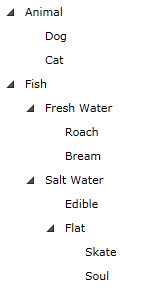
* Here is the final result.
## See Also
* [DataBinding - Overview](https://www.telerik.com/products/wpf/documentation/controls/radtreeview/populating-with-data/databinding-overview)
* [Populating with Data - Declaratively](https://www.telerik.com/products/wpf/documentation/controls/radtreeview/populating-with-data/declaratively)
* [Populating with Data - In Code-Behind](https://www.telerik.com/products/wpf/documentation/controls/radtreeview/populating-with-data/in-code-behind)
* [Binding to Object](https://www.telerik.com/products/wpf/documentation/controls/radtreeview/populating-with-data/data-binding-to-object)
* [Binding to WCF Service](https://www.telerik.com/products/wpf/documentation/controls/radtreeview/populating-with-data/databinding-to-wcf-service)
* [Binding to ADO.NET Data Service](https://www.telerik.com/products/wpf/documentation/controls/radtreeview/populating-with-data/databinding-to-adonet-service)