# Get Previous, Next, Parent and Sibling Node of a Specific TreeView Item
The **RadTreeViewItem** class exposes properties which allow you to access:
* Previous node
* Previous sibling node
* Next node
* Next sibling node
* Parent node
* Root node
Here is a simple treeview declaration:
```XAML
```
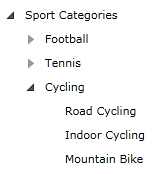
For example, you should attach to the **SelectionChanged** event and in the event handler get the selected items. Find the treeview declaration and add the following attribute:
```XAML
```
```C#
private void radTreeView_SelectionChanged(object sender, SelectionChangedEventArgs e)
{
// Get a reference to the treeview
Telerik.Windows.Controls.RadTreeView treeView = sender as Telerik.Windows.Controls.RadTreeView;
// Get the currently selected items
ObservableCollection selectedItems = treeView.SelectedItems;
RadTreeViewItem item = selectedItems[0] as RadTreeViewItem;
}
```
```VB.NET
Private Sub radTreeView_SelectionChanged(ByVal sender As Object, ByVal e As Telerik.Windows.Controls.SelectionChangedEventArgs)
' Get a reference to the treeview '
Dim treeView As Telerik.Windows.Controls.RadTreeView = TryCast(sender, Telerik.Windows.Controls.RadTreeView)
' Get the currently selected items '
Dim selectedItems As ObservableCollection(Of [Object]) = treeView.SelectedItems
Dim item As RadTreeViewItem = TryCast(selectedItems(0), RadTreeViewItem)
End Sub
```
## Accessing the PreviousItem and PreviousSiblingItem
When you want to get the previous item in the hierarchy (no matter the level) you need to use the **PreviousItem** property, while the **PreviousSiblingItem** property will return you the previous item on the same level. For example:
* If you select the treeview item with header "Road Cycling", then the **PreviousItem** property will return you the treeview item with header "Cycling", while the **PreviousSiblingItem** property will return you null.
* If you select the treeview item with header "Indoor Cycling", then both of the properties will return you the treeview item with header "Road Cycling".
```C#
private void radTreeView_SelectionChanged2(object sender, SelectionChangedEventArgs e)
{
// Get a reference to the treeview
Telerik.Windows.Controls.RadTreeView treeView = sender as Telerik.Windows.Controls.RadTreeView;
// Get the currently selected items
ObservableCollection selectedItems = treeView.SelectedItems;
RadTreeViewItem item = selectedItems[0] as RadTreeViewItem;
// Get the previous item and the previous sibling item
RadTreeViewItem previousItem = item.PreviousItem;
RadTreeViewItem previousSiblingItem = item.PreviousSiblingItem;
}
```
```VB.NET
Private Sub radTreeView_SelectionChanged(ByVal sender As Object, ByVal e As Telerik.Windows.Controls.SelectionChangedEventArgs)
' Get a reference to the treeview '
Dim treeView As Telerik.Windows.Controls.RadTreeView = TryCast(sender, Telerik.Windows.Controls.RadTreeView)
' Get the currently selected items '
Dim selectedItems As ObservableCollection(Of [Object]) = treeView.SelectedItems
Dim item As RadTreeViewItem = TryCast(selectedItems(0), RadTreeViewItem)
' Get the previous item and the previous sibling item '
Dim previousItem As RadTreeViewItem = item.PreviousItem
Dim previousSiblingItem As RadTreeViewItem = item.PreviousSiblingItem
End Sub
```
## Accessing the NextItem and NextSiblingItem
When you want to get the next item in the hierarchy (no matter the level) you need to use the **NextItem** property, while the **NextSiblingItem** property will return you the next item on the same level. For example:
* If you select the treeview item with header "Soccer", then the **NextItem** property will return you the treeview item with header "Tennis", while the **NextSiblingItem** property will return you null.
* If you select the treeview item with header "Futsal", then both of the properties will return you the treeview item with header "Soccer".
```C#
private void radTreeView_SelectionChanged3(object sender, SelectionChangedEventArgs e)
{
// Get a reference to the treeview
Telerik.Windows.Controls.RadTreeView treeView = sender as Telerik.Windows.Controls.RadTreeView;
// Get the currently selected items
ObservableCollection selectedItems = treeView.SelectedItems;
RadTreeViewItem item = selectedItems[0] as RadTreeViewItem;
// Get the previous item and the previous sibling item
RadTreeViewItem previousItem = item.PreviousItem;
RadTreeViewItem previousSiblingItem = item.PreviousSiblingItem;
// Get the next item and the next sibling item
RadTreeViewItem nextItem = item.NextItem;
RadTreeViewItem nextSiblingItem = item.NextSiblingItem;
}
```
```VB.NET
Private Sub radTreeView_SelectionChanged(ByVal sender As Object, ByVal e As Telerik.Windows.Controls.SelectionChangedEventArgs)
' Get a reference to the treeview '
Dim treeView As Telerik.Windows.Controls.RadTreeView = TryCast(sender, Telerik.Windows.Controls.RadTreeView)
' Get the currently selected items '
Dim selectedItems As ObservableCollection(Of [Object]) = treeView.SelectedItems
Dim item As RadTreeViewItem = TryCast(selectedItems(0), RadTreeViewItem)
' Get the previous item and the previous sibling item '
Dim previousItem As RadTreeViewItem = item.PreviousItem
Dim previousSiblingItem As RadTreeViewItem = item.PreviousSiblingItem
End Sub
```
## Accessing the ParentItem and RootItem
If you want to get the parent item of the currently selected item, you should use the **ParentItem** property. If you want to get the root item of the treeview, you should use the **RootItem** property. For example:
* If you select the treeview item with header "Soccer", then the **ParentItem** property will return you the treeview item with header "Football", while the **RootItem** property will return you the treeview item with header "Sport Categories".
* If you select the treeview item with header "Sport Categories", then the **ParentItem** property will return you null, while the **RootItem** property will return you the same treeview item (with header "Sport Categories").
```C#
private void radTreeView_SelectionChanged4(object sender, SelectionChangedEventArgs e)
{
// Get a reference to the treeview
Telerik.Windows.Controls.RadTreeView treeView = sender as Telerik.Windows.Controls.RadTreeView;
// Get the currently selected items
ObservableCollection selectedItems = treeView.SelectedItems;
RadTreeViewItem item = selectedItems[0] as RadTreeViewItem;
// Get the previous item and the previous sibling item
RadTreeViewItem previousItem = item.PreviousItem;
RadTreeViewItem previousSiblingItem = item.PreviousSiblingItem;
// Get the next item and the next sibling item
RadTreeViewItem nextItem = item.NextItem;
RadTreeViewItem nextSiblingItem = item.NextSiblingItem;
// Get the parent item and the root item
RadTreeViewItem parentItem = item.ParentItem;
RadTreeViewItem rootItem = item.RootItem;
}
```
```VB.NET
Private Sub radTreeView_SelectionChanged(ByVal sender As Object, ByVal e As Telerik.Windows.Controls.SelectionChangedEventArgs)
' Get a reference to the treeview '
Dim treeView As Telerik.Windows.Controls.RadTreeView = TryCast(sender, Telerik.Windows.Controls.RadTreeView)
' Get the currently selected items '
Dim selectedItems As ObservableCollection(Of [Object]) = treeView.SelectedItems
Dim item As RadTreeViewItem = TryCast(selectedItems(0), RadTreeViewItem)
' Get the previous item and the previous sibling item '
Dim previousItem As RadTreeViewItem = item.PreviousItem
Dim previousSiblingItem As RadTreeViewItem = item.PreviousSiblingItem
' Get the next item and the next sibling item '
Dim nextItem As RadTreeViewItem = item.NextItem
Dim nextSiblingItem As RadTreeViewItem = item.NextSiblingItem
' Get the parent item and the root item '
Dim parentItem As RadTreeViewItem = item.ParentItem
Dim rootItem As RadTreeViewItem = item.RootItem
End Sub
```
## See Also
* [Expand and Collapse Items](https://www.telerik.com/products/wpf/documentation/controls/radtreeview/how-to/expand-and-collapse-items)
* [Implement Drag and Drop Between TreeView and ListBox](https://www.telerik.com/products/wpf/documentation/controls/radtreeview/how-to/drag-and-drop/implement-between-treeview-and-listbox)
* [Add Check Boxes (Radio Buttons) Next to Each Item](https://www.telerik.com/products/wpf/documentation/controls/radtreeview/how-to/add-checkboxes-next-to-each-item)