# Implement Drag and Drop Between TreeView and ListBox
The goal of this tutorial is to show you how to implement drag and drop between **RadTreeView** and **ListBox**.
The final result should look like this 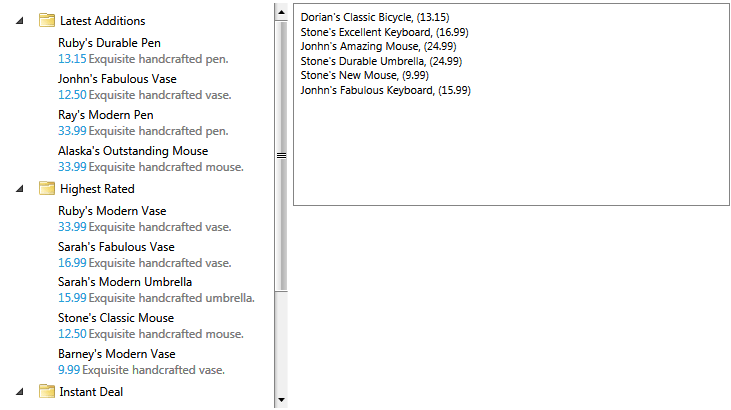
## Implement Drag and Drop Between TreeView and ListBox
For the purpose of this example, you will need to create an empty application project and open it in Visual Studio.
The first step is to add references to the following assemblies:
* **Telerik.Windows.Controls.Navigation**
* **Telerik.Windows.Controls**
* **Telerik.Windows.Data**
Then you can define the controls in your view. As the purpose of this tutorial is to demonstrate how to implement drag and drop operations, we won't focus on the definitions of the controls in xaml. However, please note to set the **RadTreeView IsDragDropEnabled** property to **true**.
```XAML
```
The next step is to use the **DragDropManager** to enable the **drop** operation on the **ListBox** control.
Find the **ListBox** declaration and set its **AllowDrop** property to **True**.
Now that the **ListBox** allows drop operations, we need to make sure that the **ListItems** are draggable. We can do so by applying an implicit style that sets the **DragDropManager.AllowCapturedDrag** attached property to **True** on every **ListItem**:
```XAML
```
> tip **telerik** is alias for the following namespace declaration: `xmlns:telerik="http://schemas.telerik.com/2008/xaml/presentation"`
Next we'll need to populate the controls with data but as the **ViewModels** definitions are outside the scope of this tutorial, we'll omit them for clarity. We'll only assume that the **RadTreeView** is populated with categories and each category displays a list of products. While, the **ListBox** displays a collection of products. This means that we'll have to implement a logic that allows you to drag a product from the **ListBox** and drop it inside a category in the tree.
> Please have in mind that if the **ItemsSource** of the **RadTreeView** (**RadTreeViewItem**) is not an **IList**, then the **drop** operation won't be allowed. Moreover, we recommend using a collection that implements the **INotifyCollectionChanged** interface, for instance an **ObservableCollection**, as only then the changes implemented in the **RadTreeView** underlying data collection will be reflected in the UI of the control.
Now we're getting to the actual DragDrop implementation. And we'll start with configuring the **ListBox** as a participant in drag and drop operations.
> Please note that this article is based on the [TreeToGrid demo](https://demos.telerik.com/wpf/#DragAndDrop/TreeToGrid), which you can find by navigating to the DragAndDrop examples ->Tree To Grid Drag.
In this tutorial we'll use a custom behavior to define the **ListBox** DragDrop behavior. Essentially the behavior will attach handlers for the following events:
* DragInitialize
* GiveFeedback
* Drop
* DragDropCompleted
* DragOver
> tip You can find more information about the **DragDropManager** events in [this tutorial](http://www.telerik.com/help/wpf/dragdropmanager-events.html).
So we basically need a class that provides:
* a **ListBox** object that will be associated with the **ListBox** instance that enables the behavior
* **IsEnabled** property to control the enabled state of the behavior
* a **Dictionary** that holds all **ListBox** instances enabling the behavior
* methods that attach and detach the **DragDropManager** event handlers.
```C#
using Telerik.Windows.DragDrop;
using Telerik.Windows.Controls;
using Telerik.Windows.DragDrop.Behaviors;
using Telerik.Windows.Controls.TreeView;
public class ListBoxDragDropBehavior
{
private System.Windows.Controls.ListBox _associatedObject;
///
/// object that will be associated with the ListBox instance that enables the behavior
///
public System.Windows.Controls.ListBox AssociatedObject
{
get
{
return _associatedObject;
}
set
{
_associatedObject = value;
}
}
private static Dictionary instances;
static ListBoxDragDropBehavior()
{
instances = new Dictionary();
}
public static bool GetIsEnabled(DependencyObject obj)
{
return (bool)obj.GetValue(IsEnabledProperty);
}
public static void SetIsEnabled(DependencyObject obj, bool value)
{
ListBoxDragDropBehavior behavior = GetAttachedBehavior(obj as System.Windows.Controls.ListBox);
behavior.AssociatedObject = obj as System.Windows.Controls.ListBox;
if (value)
{
behavior.Initialize();
}
else
{
behavior.CleanUp();
}
obj.SetValue(IsEnabledProperty, value);
}
// Using a DependencyProperty as the backing store for IsEnabled state of the behavior
public static readonly DependencyProperty IsEnabledProperty =
DependencyProperty.RegisterAttached("IsEnabled", typeof(bool), typeof(ListBoxDragDropBehavior),
new PropertyMetadata(new PropertyChangedCallback(OnIsEnabledPropertyChanged)));
public static void OnIsEnabledPropertyChanged(DependencyObject dependencyObject, DependencyPropertyChangedEventArgs e)
{
SetIsEnabled(dependencyObject, (bool)e.NewValue);
}
private static ListBoxDragDropBehavior GetAttachedBehavior(System.Windows.Controls.ListBox listBox)
{
if (!instances.ContainsKey(listBox))
{
instances[listBox] = new ListBoxDragDropBehavior();
instances[listBox].AssociatedObject = listBox;
}
return instances[listBox];
}
//initializes the behavior by detaching from any existing DragDropManager event handlers and attaching new DragDropManager event handlers
protected virtual void Initialize()
{
this.UnsubscribeFromDragDropEvents();
this.SubscribeToDragDropEvents();
}
//cleans up after disabling the behavior by detaching from the DragDropManager event handlers
protected virtual void CleanUp()
{
this.UnsubscribeFromDragDropEvents();
}
//attaching new DragDropManager event handlers
private void SubscribeToDragDropEvents()
{
}
//unsubscribing from the DragDropManager event handlers
private void UnsubscribeFromDragDropEvents()
{
}
}
```
```VB.NET
Imports Telerik.Windows.DragDrop
Imports Telerik.Windows.Controls
Imports Telerik.Windows.DragDrop.Behaviors
Imports Telerik.Windows.Controls.TreeView
Public Class ListBoxDragDropBehavior
Private _associatedObject As System.Windows.Controls.ListBox
''' '''
''' object that will be associated with the ListBox instance that enables the behavior '''
''' '''
Public Property AssociatedObject() As System.Windows.Controls.ListBox
Get
Return _associatedObject
End Get
Set(value As System.Windows.Controls.ListBox)
_associatedObject = value
End Set
End Property
Private Shared instances As Dictionary(Of System.Windows.Controls.ListBox, ListBoxDragDropBehavior)
Shared Sub New()
instances = New Dictionary(Of System.Windows.Controls.ListBox, ListBoxDragDropBehavior)()
End Sub
Public Shared Function GetIsEnabled(obj As DependencyObject) As Boolean
Return CBool(obj.GetValue(IsEnabledProperty))
End Function
Public Shared Sub SetIsEnabled(obj As DependencyObject, value As Boolean)
Dim behavior As ListBoxDragDropBehavior = GetAttachedBehavior(TryCast(obj, System.Windows.Controls.ListBox))
behavior.AssociatedObject = TryCast(obj, System.Windows.Controls.ListBox)
If value Then
behavior.Initialize()
Else
behavior.CleanUp()
End If
obj.SetValue(IsEnabledProperty, value)
End Sub
' Using a DependencyProperty as the backing store for IsEnabled state of the behavior '
Public Shared ReadOnly IsEnabledProperty As DependencyProperty = DependencyProperty.RegisterAttached("IsEnabled", GetType(Boolean), GetType(ListBoxDragDropBehavior), New PropertyMetadata(New PropertyChangedCallback(AddressOf OnIsEnabledPropertyChanged)))
Public Shared Sub OnIsEnabledPropertyChanged(dependencyObject As DependencyObject, e As DependencyPropertyChangedEventArgs)
SetIsEnabled(dependencyObject, CBool(e.NewValue))
End Sub
Private Shared Function GetAttachedBehavior(listBox As System.Windows.Controls.ListBox) As ListBoxDragDropBehavior
If Not instances.ContainsKey(listBox) Then
instances(listBox) = New ListBoxDragDropBehavior()
instances(listBox).AssociatedObject = listBox
End If
Return instances(listBox)
End Function
'initializes the behavior by detaching from any existing DragDropManager event handlers and attaching new DragDropManager event handlers'
Protected Overridable Sub Initialize()
Me.UnsubscribeFromDragDropEvents()
Me.SubscribeToDragDropEvents()
End Sub
'cleans up after disabling the behavior by detaching from the DragDropManager event handlers'
Protected Overridable Sub CleanUp()
Me.UnsubscribeFromDragDropEvents()
End Sub
'attaching new DragDropManager event handlers'
Private Sub SubscribeToDragDropEvents()
End Sub
'unsubscribing from the DragDropManager event handlers'
Private Sub UnsubscribeFromDragDropEvents()
End Sub
End Class
```
Now let's attach handlers for the **DragDropManager** events listed above. We'll do that in the **SubscribeToDragDropEvents()** method and we'll detach from these handlers in the implementation of the **UnsubscribeFromDragDropEvents()** method.
```C#
//attaching new DragDropManager event handlers
private void SubscribeToDragDropEvents2()
{
DragDropManager.AddDragInitializeHandler(this.AssociatedObject, OnDragInitialize2);
DragDropManager.AddGiveFeedbackHandler(this.AssociatedObject, OnGiveFeedback2);
DragDropManager.AddDropHandler(this.AssociatedObject, OnDrop2);
DragDropManager.AddDragDropCompletedHandler(this.AssociatedObject, OnDragDropCompleted2);
DragDropManager.AddDragOverHandler(this.AssociatedObject, OnDragOver2);
}
//unsubscribing from the DragDropManager event handlers
private void UnsubscribeFromDragDropEvents2()
{
DragDropManager.RemoveDragInitializeHandler(this.AssociatedObject, OnDragInitialize2);
DragDropManager.RemoveGiveFeedbackHandler(this.AssociatedObject, OnGiveFeedback2);
DragDropManager.RemoveDropHandler(this.AssociatedObject, OnDrop2);
DragDropManager.RemoveDragDropCompletedHandler(this.AssociatedObject, OnDragDropCompleted2);
DragDropManager.RemoveDragOverHandler(this.AssociatedObject, OnDragOver2);
}
private void OnDragInitialize2(object sender, DragInitializeEventArgs e)
{
}
private void OnGiveFeedback2(object sender, Telerik.Windows.DragDrop.GiveFeedbackEventArgs e)
{
}
private void OnDragDropCompleted2(object sender, DragDropCompletedEventArgs e)
{
}
private void OnDrop2(object sender, Telerik.Windows.DragDrop.DragEventArgs e)
{
}
private void OnDragOver2(object sender, Telerik.Windows.DragDrop.DragEventArgs e)
{
}
```
```VB.NET
'attaching new DragDropManager event handlers'
Private Sub SubscribeToDragDropEvents()
DragDropManager.AddDragInitializeHandler(Me.AssociatedObject, AddressOf OnDragInitialize)
DragDropManager.AddGiveFeedbackHandler(Me.AssociatedObject, AddressOf OnGiveFeedback)
DragDropManager.AddDropHandler(Me.AssociatedObject, AddressOf OnDrop)
DragDropManager.AddDragDropCompletedHandler(Me.AssociatedObject, AddressOf OnDragDropCompleted)
DragDropManager.AddDragOverHandler(Me.AssociatedObject, AddressOf OnDragOver)
End Sub
'unsubscribing from the DragDropManager event handlers'
Private Sub UnsubscribeFromDragDropEvents()
DragDropManager.RemoveDragInitializeHandler(Me.AssociatedObject, AddressOf OnDragInitialize)
DragDropManager.RemoveGiveFeedbackHandler(Me.AssociatedObject, AddressOf OnGiveFeedback)
DragDropManager.RemoveDropHandler(Me.AssociatedObject, AddressOf OnDrop)
DragDropManager.RemoveDragDropCompletedHandler(Me.AssociatedObject, AddressOf OnDragDropCompleted)
DragDropManager.RemoveDragOverHandler(Me.AssociatedObject, AddressOf OnDragOver)
End Sub
Private Sub OnDragInitialize(sender As Object, e As DragInitializeEventArgs)
End Sub
Private Sub OnGiveFeedback(sender As Object, e As Telerik.Windows.DragDrop.GiveFeedbackEventArgs)
End Sub
Private Sub OnDragDropCompleted(sender As Object, e As DragDropCompletedEventArgs)
End Sub
Private Sub OnDrop(sender As Object, e As Telerik.Windows.DragDrop.DragEventArgs)
End Sub
Private Sub OnDragOver(sender As Object, e As Telerik.Windows.DragDrop.DragEventArgs)
End Sub
```
Once we do so, we can start implementing our drag/drop logic. And we'll always have to keep in mind that we need to drag items from the **RadTreeView** and drop them in the **ListBox** and vice versa. This means that when we initialize a drag, we need to access the data displayed in the dragged **ListBoxItem** and add the data to the **DragInitializeEventArgs Data** object. This will allow us to pass the dragged information during the drag/drop operation. Also, in order to provide the user with elaborate visual information during the drag operation, we can create a helper class that describes the currently dragged item, the item that the drag is passing over, the drop position and the drop index calculated based on the drop position. For instance, we can use the following class definition:
```C#
using Telerik.Windows.Controls;
public class DropIndicationDetails : ViewModelBase
{
private object currentDraggedItem;
private DropPosition currentDropPosition;
private object currentDraggedOverItem;
public object CurrentDraggedOverItem
{
get
{
return currentDraggedOverItem;
}
set
{
if (this.currentDraggedOverItem != value)
{
currentDraggedOverItem = value;
OnPropertyChanged("CurrentDraggedOverItem");
}
}
}
public int DropIndex { get; set; }
public DropPosition CurrentDropPosition
{
get
{
return this.currentDropPosition;
}
set
{
if (this.currentDropPosition != value)
{
this.currentDropPosition = value;
OnPropertyChanged("CurrentDropPosition");
}
}
}
public object CurrentDraggedItem
{
get
{
return this.currentDraggedItem;
}
set
{
if (this.currentDraggedItem != value)
{
this.currentDraggedItem = value;
OnPropertyChanged("CurrentDraggedItem");
}
}
}
}
```
```VB.NET
Imports Telerik.Windows.Controls
Public Class DropIndicationDetails
Inherits ViewModelBase
Private m_currentDraggedItem As Object
Private m_currentDropPosition As DropPosition
Private m_currentDraggedOverItem As Object
Public Property CurrentDraggedOverItem() As Object
Get
Return m_currentDraggedOverItem
End Get
Set(value As Object)
If Me.m_currentDraggedOverItem IsNot value Then
m_currentDraggedOverItem = value
OnPropertyChanged("CurrentDraggedOverItem")
End If
End Set
End Property
Public Property DropIndex() As Integer
Get
Return m_DropIndex
End Get
Set(value As Integer)
m_DropIndex = Value
End Set
End Property
Private m_DropIndex As Integer
Public Property CurrentDropPosition() As DropPosition
Get
Return Me.m_currentDropPosition
End Get
Set(value As DropPosition)
If Me.m_currentDropPosition <> value Then
Me.m_currentDropPosition = value
OnPropertyChanged("CurrentDropPosition")
End If
End Set
End Property
Public Property CurrentDraggedItem() As Object
Get
Return Me.m_currentDraggedItem
End Get
Set(value As Object)
If Me.m_currentDraggedItem IsNot value Then
Me.m_currentDraggedItem = value
OnPropertyChanged("CurrentDraggedItem")
End If
End Set
End Property
End Class
```
We can use this definition to also pass and keep the drag operation details in the **Data** object provided by the **DragDropManager**. This means that we can implement the following drag initialization:
```C#
private void OnDragInitialize(object sender, DragInitializeEventArgs e)
{
DropIndicationDetails details = new DropIndicationDetails();
var listBoxItem = e.OriginalSource as System.Windows.Controls.ListBoxItem ?? (e.OriginalSource as FrameworkElement).ParentOfType();
var item = listBoxItem != null ? listBoxItem.DataContext : (sender as System.Windows.Controls.ListBox).SelectedItem;
details.CurrentDraggedItem = item;
IDragPayload dragPayload = DragDropPayloadManager.GeneratePayload(null);
dragPayload.SetData("DraggedData", item);
dragPayload.SetData("DropDetails", details);
e.Data = dragPayload;
e.DragVisual = new Telerik.Windows.Controls.DragVisual()
{
Content = details,
ContentTemplate = this.AssociatedObject.Resources["DraggedItemTemplate"] as DataTemplate
};
e.DragVisualOffset = e.RelativeStartPoint;
e.AllowedEffects = DragDropEffects.All;
e.Handled = true;
}
```
```VB.NET
Private Sub OnDragInitialize(sender As Object, e As DragInitializeEventArgs)
Dim details As New DropIndicationDetails()
Dim listBoxItem = If(TryCast(e.OriginalSource, System.Windows.Controls.ListBoxItem), TryCast(e.OriginalSource, FrameworkElement).ParentOfType(Of System.Windows.Controls.ListBoxItem)())
Dim item = If(listBoxItem IsNot Nothing, listBoxItem.DataContext, TryCast(sender, System.Windows.Controls.ListBox).SelectedItem)
details.CurrentDraggedItem = item
Dim dragPayload As IDragPayload = DragDropPayloadManager.GeneratePayload(Nothing)
dragPayload.SetData("DraggedData", item)
dragPayload.SetData("DropDetails", details)
e.Data = dragPayload
e.DragVisual = New DragVisual() With {
.Content = details,
.ContentTemplate = TryCast(Me.AssociatedObject.Resources("DraggedItemTemplate"), DataTemplate)
}
e.DragVisualOffset = e.RelativeStartPoint
e.AllowedEffects = DragDropEffects.All
End Sub
```
Then we can implement the **GiveFeedback** event handler, which is quite straight-forward. As this event enables the drop source to give feedback information to the user, we'll use it to change the appearance of the mouse pointer to indicate the effects allowed by the drop target.
```C#
private void OnGiveFeedback(object sender, Telerik.Windows.DragDrop.GiveFeedbackEventArgs e)
{
e.SetCursor(Cursors.Arrow);
e.Handled = true;
}
```
```VB.NET
Private Sub OnGiveFeedback(sender As Object, e As Telerik.Windows.DragDrop.GiveFeedbackEventArgs)
e.SetCursor(Cursors.Arrow)
e.Handled = True
End Sub
```
Next, we have to handle the DragOver event and implement a logic that decides if the current drag operation is supported over the current drop destination. In this example, we won't allow a drag operation within the **ListBox**, which means that we have to make sure that the drag operation is allowed only if it originates from the **RadTreeView** control.
> tip **RadTreeView** drag operation creates an object of type **TreeViewDragDropOptions** that holds all information related to the drag. You can read more about the properties exposed by the type in the [Drag and Drop](https://www.telerik.com/products/wpf/documentation/controls/radtreeview/features/dragdrop/drag-and-drop) article.
As the data object passed by a drag operation started in **RadTreeView** should be of type **TreeViewDragDropOptions**, this means that you can try to extract this object and if the operation is unsuccessful, then the drag doesn't originate from a **RadTreeView**. Furthermore, we'll have to make sure that the dragged data type matches the data type displayed in the **ListBox** - in our example this means that we'll make sure we're dragging products. So finally, we can create the following **OnDragOver()** implementation:
```C#
private void OnDragOver(object sender, Telerik.Windows.DragDrop.DragEventArgs e)
{
TreeViewDragDropOptions options = DragDropPayloadManager.GetDataFromObject(e.Data, TreeViewDragDropOptions.Key) as TreeViewDragDropOptions;
if (options == null)
{
e.Effects = DragDropEffects.None;
e.Handled = true;
return;
}
var draggedItem = options.DraggedItems.FirstOrDefault();
var itemsType = (this.AssociatedObject.ItemsSource as IList).AsQueryable().ElementType;
if (draggedItem.GetType() != itemsType)
{
e.Effects = DragDropEffects.None;
}
else
{
(options.DragVisual as TreeViewDragVisual).IsDropPossible = true;
options.DropAction = DropAction.Move;
options.UpdateDragVisual();
}
e.Handled = true;
}
```
```VB.NET
Private Sub OnDragOver(sender As Object, e As Telerik.Windows.DragDrop.DragEventArgs)
Dim options As TreeViewDragDropOptions = TryCast(DragDropPayloadManager.GetDataFromObject(e.Data, TreeViewDragDropOptions.Key), TreeViewDragDropOptions)
If options Is Nothing Then
e.Effects = DragDropEffects.None
e.Handled = True
Return
End If
Dim draggedItem = options.DraggedItems.FirstOrDefault()
Dim itemsType = TryCast(Me.AssociatedObject.ItemsSource, IList).AsQueryable().ElementType
If draggedItem.[GetType]() <> itemsType Then
e.Effects = DragDropEffects.None
Else
TryCast(options.DragVisual, TreeViewDragVisual).IsDropPossible = True
options.DropAction = DropAction.Move
options.UpdateDragVisual()
End If
e.Handled = True
End Sub
```
Finally we'll have to implement the actual drop logic and we'll also have to update the collection displayed in the source of the drag operation accordingly. We'll do that in the handlers of the **Drop** and **DragDropCompleted** events.
```C#
private void OnDrop(object sender, Telerik.Windows.DragDrop.DragEventArgs e)
{
TreeViewDragDropOptions options = DragDropPayloadManager.GetDataFromObject(e.Data, TreeViewDragDropOptions.Key) as TreeViewDragDropOptions;
if (options == null) return;
var draggedItem = options.DraggedItems.FirstOrDefault();
if (draggedItem == null)
{
return;
}
if (e.Effects != DragDropEffects.None)
{
var collection = (sender as System.Windows.Controls.ListBox).ItemsSource as IList;
collection.Add(draggedItem);
}
e.Handled = true;
}
private void OnDragDropCompleted(object sender, DragDropCompletedEventArgs e)
{
var draggedItem = DragDropPayloadManager.GetDataFromObject(e.Data, "DraggedData");
if (e.Effects != DragDropEffects.None)
{
var collection = (sender as System.Windows.Controls.ListBox).ItemsSource as IList;
collection.Remove(draggedItem);
}
}
```
```VB.NET
Private Sub OnDrop(sender As Object, e As Telerik.Windows.DragDrop.DragEventArgs)
Dim options As TreeViewDragDropOptions = TryCast(DragDropPayloadManager.GetDataFromObject(e.Data, TreeViewDragDropOptions.Key), TreeViewDragDropOptions)
If options Is Nothing Then
Return
End If
Dim draggedItem = options.DraggedItems.FirstOrDefault()
If draggedItem Is Nothing Then
Return
End If
If e.Effects <> DragDropEffects.None Then
Dim collection = TryCast(TryCast(sender, System.Windows.Controls.ListBox).ItemsSource, IList)
collection.Add(draggedItem)
End If
e.Handled = True
End Sub
Private Sub OnDragDropCompleted(sender As Object, e As DragDropCompletedEventArgs)
Dim draggedItem = DragDropPayloadManager.GetDataFromObject(e.Data, "DraggedData")
If e.Effects <> DragDropEffects.None Then
Dim collection = TryCast(TryCast(sender, System.Windows.Controls.ListBox).ItemsSource, IList)
collection.Remove(draggedItem)
End If
End Sub
```
With this the **ListBox** drag/drop logic is complete. All we have finalize now, is the definition of the control to enable the **ListBoxDragDropBehavior**. So please find the declaration of the **ListBox** and add the following line:
'example:ListBoxDragDropBehavior.IsEnabled="True"', where **example** is an alias pointing to the namespace in which we've defined the **ListBoxDragDropBehavior** class.
If you run the solution now, you should be able to drag items from the **RadTreeView** and drop them in the **ListBox**.
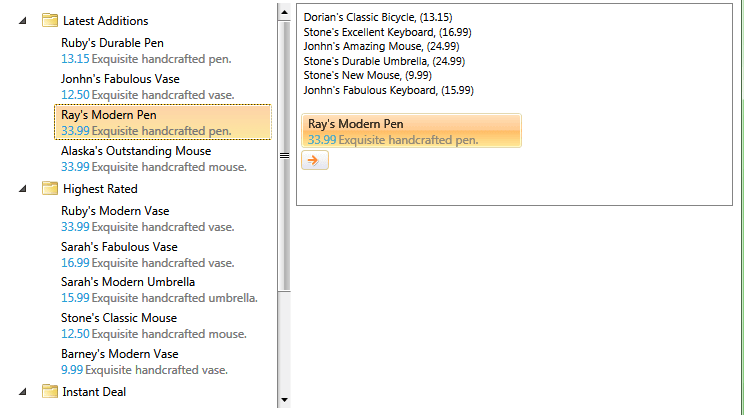
And if you start dragging an item from the **ListBox**, you'll be able to get the item's data and even display an informative tooltip describing the dragged item. However, this tooltip won't be updated while dragging over the **RadTreeView** and you won't be able to drop the item among the tree items. This is due to the fact that the **RadTreeView** built-in drag/drop logic is implemented to handle only drag originating from a **RadTreeView**. Therefore, you will also have to set up the tree to process a drag coming from a **ListBox**.
In order to configure the **RadTreeView** to process the drop of an item coming from another control, you need to attach a handler for the **DragDropManager Drop** event.
```C#
DragDropManager.AddDropHandler(allProductsView, OnDrop);
```
```VB.NET
DragDropManager.AddDropHandler(allProductsView, OnDrop)
```
In the handler you need to get the dragged data, find the position where the item should be dropped at - before, after or inside a particular **RadTreeViewItem** and implement the drop by adding the dragged data in the **RadTreeView** ItemsSource collection:
```C#
IList destinationItems = null;
private void OnDrop(object sender, Telerik.Windows.DragDrop.DragEventArgs e)
{
var data = DragDropPayloadManager.GetDataFromObject(e.Data, "DraggedData");
if (data == null) return;
if (e.Effects != DragDropEffects.None)
{
var destinationItem = (e.OriginalSource as FrameworkElement).ParentOfType();
var dropDetails = DragDropPayloadManager.GetDataFromObject(e.Data, "DropDetails") as DropIndicationDetails;
if (destinationItems != null)
{
int dropIndex = dropDetails.DropIndex >= destinationItems.Count ? destinationItems.Count : dropDetails.DropIndex < 0 ? 0 : dropDetails.DropIndex;
this.destinationItems.Insert(dropIndex, data);
}
}
}
```
```VB.NET
Dim destinationItems As IList = Nothing
Private Sub OnDrop(sender As Object, e As Telerik.Windows.DragDrop.DragEventArgs)
Dim data = DragDropPayloadManager.GetDataFromObject(e.Data, "DraggedData")
If data Is Nothing Then
Return
End If
If e.Effects <> DragDropEffects.None Then
Dim destinationItem = TryCast(e.OriginalSource, FrameworkElement).ParentOfType(Of RadTreeViewItem)()
Dim dropDetails = TryCast(DragDropPayloadManager.GetDataFromObject(e.Data, "DropDetails"), DropIndicationDetails)
If destinationItems IsNot Nothing Then
Dim dropIndex As Integer = If(dropDetails.DropIndex >= destinationItems.Count, destinationItems.Count, If(dropDetails.DropIndex < 0, 0, dropDetails.DropIndex))
Me.destinationItems.Insert(dropIndex, data)
End If
End If
End Sub
```
And to make the dragging operation more informative, we can also subscribe to the **DragDropManager DragOver** event to update the drag operation information tooltip while dragging over the **RadTreeView**.
```C#
private void OnItemDragOver(object sender, Telerik.Windows.DragDrop.DragEventArgs e)
{
var item = (e.OriginalSource as FrameworkElement).ParentOfType();
if (item == null)
{
e.Effects = DragDropEffects.None;
e.Handled = true;
return;
}
var position = GetPosition(item, e.GetPosition(item));
if (item.Level == 0 && position != DropPosition.Inside)
{
e.Effects = DragDropEffects.None;
e.Handled = true;
return;
}
RadTreeView tree = sender as RadTreeView;
var draggedData = DragDropPayloadManager.GetDataFromObject(e.Data, "DraggedData");
var dropDetails = DragDropPayloadManager.GetDataFromObject(e.Data, "DropDetails") as DropIndicationDetails;
if ((draggedData == null && dropDetails == null))
{
return;
}
if (position != DropPosition.Inside)
{
e.Effects = DragDropEffects.All;
destinationItems = item.Level > 0 ? (IList)item.ParentItem.ItemsSource : (IList)tree.ItemsSource;
int index = destinationItems.IndexOf(item.Item);
dropDetails.DropIndex = position == DropPosition.Before ? index : index + 1;
}
else
{
destinationItems = (IList)item.ItemsSource;
int index = 0;
if (destinationItems == null)
{
e.Effects = DragDropEffects.None;
}
else
{
e.Effects = DragDropEffects.All;
dropDetails.DropIndex = index;
}
}
dropDetails.CurrentDraggedOverItem = item.Item;
dropDetails.CurrentDropPosition = position;
e.Handled = true;
}
private DropPosition GetPosition(RadTreeViewItem item, Point point)
{
double treeViewItemHeight = 24;
if (point.Y < treeViewItemHeight / 4)
{
return DropPosition.Before;
}
else if (point.Y > treeViewItemHeight * 3 / 4)
{
return DropPosition.After;
}
return DropPosition.Inside;
}
```
```VB.NET
Private Sub OnItemDragOver(sender As Object, e As Telerik.Windows.DragDrop.DragEventArgs)
Dim item = TryCast(e.OriginalSource, FrameworkElement).ParentOfType(Of RadTreeViewItem)()
If item Is Nothing Then
e.Effects = DragDropEffects.None
e.Handled = True
Return
End If
Dim position = GetPosition(item, e.GetPosition(item))
If item.Level = 0 AndAlso position <> DropPosition.Inside Then
e.Effects = DragDropEffects.None
e.Handled = True
Return
End If
Dim tree As RadTreeView = TryCast(sender, RadTreeView)
Dim draggedData = DragDropPayloadManager.GetDataFromObject(e.Data, "DraggedData")
Dim dropDetails = TryCast(DragDropPayloadManager.GetDataFromObject(e.Data, "DropDetails"), DropIndicationDetails)
If (draggedData Is Nothing AndAlso dropDetails Is Nothing) Then
Return
End If
If position <> DropPosition.Inside Then
e.Effects = DragDropEffects.All
destinationItems = If(item.Level > 0, DirectCast(item.ParentItem.ItemsSource, IList), DirectCast(tree.ItemsSource, IList))
Dim index As Integer = destinationItems.IndexOf(item.Item)
dropDetails.DropIndex = If(position = DropPosition.Before, index, index + 1)
Else
destinationItems = DirectCast(item.ItemsSource, IList)
Dim index As Integer = 0
If destinationItems Is Nothing Then
e.Effects = DragDropEffects.None
Else
e.Effects = DragDropEffects.All
dropDetails.DropIndex = index
End If
End If
dropDetails.CurrentDraggedOverItem = item.Item
dropDetails.CurrentDropPosition = position
e.Handled = True
End Sub
Private Function GetPosition(item As RadTreeViewItem, point As Point) As DropPosition
Dim treeViewItemHeight As Double = 24
If point.Y < treeViewItemHeight / 4 Then
Return DropPosition.Before
ElseIf point.Y > treeViewItemHeight * 3 / 4 Then
Return DropPosition.After
End If
Return DropPosition.Inside
End Function
```
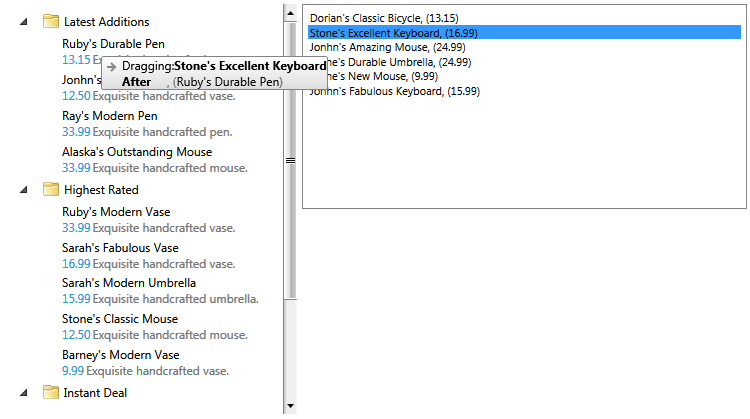
If you take a closer look at the above code snippet, you'll notice that it basically tracks the current drop destination and position. Then based on its type and value, the code decides if the drag operation is allowed, updating the visual representation of the operation at the same time.
With that last piece of code, our application is ready. It can now provide a fluent drag-drop operation between a **RadTreeView** and a **ListBox** control.
> tip Find a runnable project of the previous example in the [WPF Samples GitHub repository](https://github.com/telerik/xaml-sdk/tree/master/TreeView/DragDropTreeViewToControls).
## See Also
* [Drag and Drop](https://www.telerik.com/products/wpf/documentation/controls/radtreeview/features/dragdrop/drag-and-drop)
* [Implement Drag and Drop Between TreeView and ListBox](https://www.telerik.com/products/wpf/documentation/controls/radtreeview/how-to/drag-and-drop/implement-between-treeview-and-listbox)
* [Enable Only Drop Inside](https://www.telerik.com/products/wpf/documentation/controls/radtreeview/how-to/drag-and-drop/enabled-drop-inside-only)
* [Disable Drop at Specific Location](https://www.telerik.com/products/wpf/documentation/controls/radtreeview/how-to/drag-and-drop/disable-drop-specific-location)
* [Auto Expand on Drag Over](https://www.telerik.com/products/wpf/documentation/controls/radtreeview/how-to/drag-and-drop/enable-auto-expand-drag-over)