# WPF TimeSpanPicker Overview
Thank you for choosing Telerik **RadTimeSpanPicker**!
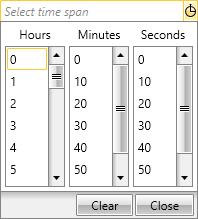
**RadTimeSpanPicker** is a UI component that provides a full control over picking a specific time span and duration using the built-in components for days, hours, minutes, seconds and milliseconds. You could easily define some minimum/maximum ranges and specific value step for the components. **RadTimeSpanPicker** also provides the ability to create custom components to meet any specific user scenarios.
## Key Features
* **TimeSpanComponents** - **RadTimeSpanPicker** supports built-in components for picking days, hours, minutes, seconds and milliseconds. A specific minimum/maximum ranges and value step could be set for each component separately.
* **Styling and Appearance** - You can easily customize the appearance of the control.
* **Watermark** - **RadTimeSpanPicker** allows the user to set a desired watermark content using the **TimeSpanWatermarkContent** property and modify it as needed using the **TimeSpanWatermarkTemplate** property.
* **Events** - Support of routed events and some specific for the control events.
You can check **RadTimeSpanPicker** demos at: .
## Telerik UI for WPF Support and Learning Resources
* [Telerik UI for WPF TimeSpanPicker Homepage](https://www.telerik.com/products/wpf/timespanpicker.aspx)
* [Get Started with the Telerik UI for WPF TimeSpanPicker](https://www.telerik.com/products/wpf/documentation/controls/radtimespanpicker/getting-started)
* [Telerik UI for WPF API Reference](https://docs.telerik.com/devtools/wpf/api/)
* [Getting Started with Telerik UI for WPF Components](https://www.telerik.com/products/wpf/documentation/getting-started/first-steps-nuget)
* [Telerik UI for WPF Virtual Classroom (Training Courses for Registered Users)](https://learn.telerik.com/learn/course/external/view/elearning/16/telerik-ui-for-wpf)
* [Telerik UI for WPF TimeSpanPicker Forums](https://www.telerik.com/forums/wpf)
* [Telerik UI for WPF Knowledge Base](https://docs.telerik.com/devtools/wpf/knowledge-base)
## See Also
* [Getting Started](https://www.telerik.com/products/wpf/documentation/controls/radtimespanpicker/getting-started)
* [Visual Structure](https://www.telerik.com/products/wpf/documentation/controls/radtimespanpicker/visual-structure)