# WPF TimePicker Overview
Thank you for choosing **Telerik RadTimePicker**!
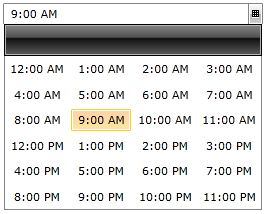
**RadTimePicker** is a convenient way to get rid of boring time parsing and data validation. RadTimePicker is an easy and simple, but yet essential control to improve end-user experience. Moreover, you can control the layout of the popup that shows time values as well as to use the rich data model in WPF
to populate content dynamically.
## Key Features
The RadTimePicker control derives from the RadDateTimePicker control and inherits most of its features. This is a list with short descriptions of the top-of-the-line features of the Telerik **RadTimePicker** control:
* **Powerful Data-binding**: The WPF **RadTimePicker** control can be bound to various datasource types, such as Object, XML and WCF services.
* **Keyboard Navigation**: **RadTimePicker** supports the standard browser navigation paradigm. Once the control has focus, you can press the **Down Arrow** key to show the calendar. The users can go forward/backward over the individual times by pressing the arrow keys. Pressing the **ESC** button will close the picker.
* **Advanced Parser**: You can enter any number or string in the input field of **RadTimePicker** and the entered value will be transformed to a valid time.
* **Styling and Appearance**: **RadTimePicker** can be fully customized. There are also several pre-defined themes that can be used to style the control. See [Editing Control Templates](https://www.telerik.com/products/wpf/documentation/styling-and-appearance/styling-apperance-editing-control-templates).
* **Enhanced Routed Events Framework**: To help your code become even more elegant and concise, we implemented an Enhanced Routed Events Framework for the controls from the **UI for WPF** suite. This gives you more freedom when you design your applications since you can write instance handlers as well as class handlers for the routed events of our controls. [Read more](https://www.telerik.com/products/wpf/documentation/controls/raddatetimepicker/events)
* **Watermark**: The **TimePicker** control allows the user to define and use watermarks in the time field. [Read more](https://www.telerik.com/products/wpf/documentation/controls/raddatetimepicker/features/watermark)
> tip Get started with the control with its [Getting Started](https://www.telerik.com/products/wpf/documentation/controls/radtimepicker/timepicker-populating) help article that shows how to use it in a basic scenario.
> Check out the RadTimePicker demo at:
## Telerik UI for WPF Support and Learning Resources
* [Telerik UI for WPF TimePicker Homepage](https://www.telerik.com/products/wpf/datetimepicker.aspx)
* [Get Started with the Telerik UI for WPF TimePicker](https://www.telerik.com/products/wpf/documentation/controls/radtimepicker/timepicker-populating)
* [Telerik UI for WPF API Reference](https://docs.telerik.com/devtools/wpf/api/)
* [Getting Started with Telerik UI for WPF Components](https://www.telerik.com/products/wpf/documentation/getting-started/first-steps-nuget)
* [Telerik UI for WPF Virtual Classroom (Training Courses for Registered Users)](https://learn.telerik.com/learn/course/external/view/elearning/16/telerik-ui-for-wpf)
* [Telerik UI for WPF TimePicker Forums](https://www.telerik.com/forums/wpf)
* [Telerik UI for WPF Knowledge Base](https://docs.telerik.com/devtools/wpf/knowledge-base)
## See Also
* [Visual Structure](https://www.telerik.com/products/wpf/documentation/controls/radtimepicker/visual-structure)
* [Getting Started](https://www.telerik.com/products/wpf/documentation/controls/radtimepicker/timepicker-populating)
* [Editing Control Templates](https://www.telerik.com/products/wpf/documentation/styling-and-appearance/styling-apperance-editing-control-templates)