# Create Multi-Line Tabs
Multi-line tabs can be created using the **IsBreak** property of the **RadTabItem**. The property is of **Boolean** type and the possible values are **True** or **False**. If it’s **True**, then the next tab items you add will be placed on a new line inserted right above the item which property **IsBreak** is set to **True**; if it’s **False**, no break is inserted.
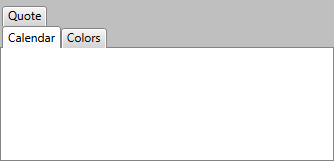
**Example 1: Set an item's IsBreak property**
```XAML
```
In the above example the property **IsBreak** of the tab item "Colors" is set to **True** and the next tab item "Quote" is placed on a new line above all other tab items.
## OverflowMode
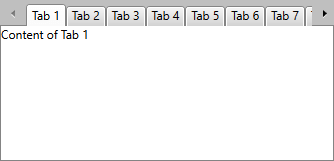
By default, the RadTabControl will display two arrows when the width of the tab items exceeds the available width with which you can bring the rest of the items into view. This is illustrated in **Figure 1**.
> caption RadTabControl with default overflow mode
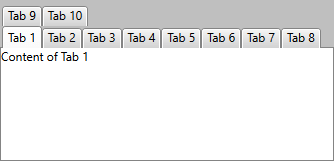
If you would, however, like all items to be in the viewport and appear one above the other in separate rows, you can set the control's **OverflowMode** property to **Wrap**. The result from setting this property can be seen in **Figure 2**.
**Example 2: Set the control's OverflowMode**
```XAML
```
> caption RadTabControl with wrap OverflowMode
## See Also
* [Controlling Behavior](https://www.telerik.com/products/wpf/documentation/controls/radtabcontrol/features/controlling-behavior)
* [How to Change the Position of the Tab Strip of RadTabControl](https://www.telerik.com/products/wpf/documentation/controls/radtabcontrol/howto/how-to-change-the-position-of-the-tab-strip-of-radtabcontrol)