# Margins
The RadSyntaxEditor control contains several panels inside its ControlTemplate, which allow for customizing its look and/or extending its functionality. In order to customize them you can use the **Margins** property, which is of type [SyntaxEditorMargins](https://docs.telerik.com/devtools/wpf/api/telerik.windows.controls.syntaxeditor.ui.margins.syntaxeditormargins).
## Margin Panels
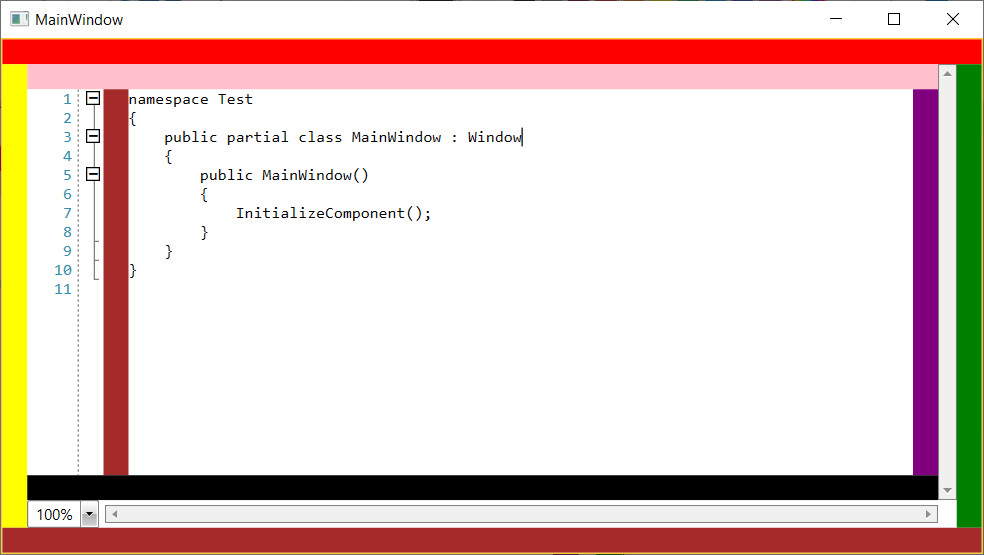
**Example 1** demonstrates how you can add some custom elements around the RadSyntaxEditor and provides a visualization of the default locations for all panels. It also demonstrates the line numbers and [folding tagger](https://www.telerik.com/products/wpf/documentation/controls/radsyntaxeditor/features/taggers/folding-taggers) features, which are implemented with the help of the left scrollable margin.
**Example 1: Defining the RadSyntaxEditor**
```XAML
```
**Example 1: Defining the RadSyntaxEditor**
```C#
public void SetRadSyntaxEditor()
{
using (StreamReader reader = new StreamReader("../../Files/MainWindow.xaml.cs"))
{
this.syntaxEditor.Document = new TextDocument(reader);
}
var foldingTagger = new CSharpFoldingTagger(this.syntaxEditor);
this.syntaxEditor.TaggersRegistry.RegisterTagger(foldingTagger);
this.syntaxEditor.Margins.Left.Add(new Rectangle() { Fill = Brushes.Yellow, Width = 20 });
this.syntaxEditor.Margins.Right.Add(new Rectangle() { Fill = Brushes.Green, Width = 20 });
this.syntaxEditor.Margins.Top.Add(new Rectangle() { Fill = Brushes.Red, Height = 20 });
this.syntaxEditor.Margins.Bottom.Add(new Rectangle() { Fill = Brushes.Brown, Height = 20 });
this.syntaxEditor.Margins.ScrollableLeft.Add(new Rectangle() { Fill = Brushes.Brown, Width = 20 });
this.syntaxEditor.Margins.ScrollableRight.Add(new Rectangle() { Fill = Brushes.Purple, Width = 20 });
this.syntaxEditor.Margins.ScrollableTop.Add(new Rectangle() { Fill = Brushes.Pink, Height = 20 });
this.syntaxEditor.Margins.ScrollableBottom.Add(new Rectangle() { Fill = Brushes.Black, Height = 20 });
}
```
> caption RadSyntaxEditor margins
## Indicators Margin
You can add **indicators** to particular lines of the RadSyntaxEditor control by using the new **IndicatorsMargin\** class.
The generic type parameter **T** determines the type of the created object which must be a **FrameworkElement**. The class also exposes a **UpdateIndicator** method in which you can set the properties of the created indicator element. You can also conditionally style the element as the method also provides the **line number** corresponding to the line that the indicator is drawn on.
The class inherits from the abstract **IndicatorsMarginBase** class which defines the **IndicatorBrush** property used to control the background of the margin and the **Indicators** property which holds a **collection of integers** corresponding to the lines which include an indicator element.
**Example 2** demonstrates how to create a margin which holds a collection of bookmarks and alternate the colors of these bookmarks.
**\[C#] Example 2: Creating a bookmarks margin**
```C#
///
/// A margin holding a collection of bookmarks to highlight lines of the RadSyntaxEditor control.
///
public class BookmarksMargin : IndicatorsMargin
{
private TypeConverter stringToGeometryConverter;
private Geometry bookmarkGeometry;
static BookmarksMargin()
{
BookmarksMargin.BackgroundProperty.OverrideMetadata(typeof(BookmarksMargin), new FrameworkPropertyMetadata(new SolidColorBrush(Color.FromArgb(255, 200, 200, 200))));
}
///
/// Initializes a new instance of the class.
///
/// The RadSyntaxEditor instance.
public BookmarksMargin(RadSyntaxEditor syntaxEditor)
: base(syntaxEditor)
{
this.IndicatorBrush = new SolidColorBrush(Color.FromArgb(255, 70, 70, 70));
this.stringToGeometryConverter = TypeDescriptor.GetConverter(typeof(Geometry));
string data = "M15,5H8C6.9,5,6,5.9,6,7v3h3v11l4-3l4,3V7C17,5.9,16.1,5,15,5z M9,9H7V7c0-0.6,0.4-1,1-1h1V9z";
this.bookmarkGeometry = (Geometry)this.stringToGeometryConverter.ConvertFrom(data);
}
///
/// Called when an indicator needs to be updated. This can happen when the indicator is
/// first created, when it is brought inside or outside of the viewport or when
/// the EditorFontSize property of the RadSyntaxEditor or the IndicatorBrush property
/// of the margin change.
///
/// The Path to update.
/// The line number the indicator is placed on.
protected override void UpdateIndicator(System.Windows.Shapes.Path path, int lineNumber)
{
if (path.Data != this.bookmarkGeometry)
{
path.Data = this.bookmarkGeometry;
}
if (path.Stretch != Stretch.UniformToFill)
{
path.Stretch = Stretch.UniformToFill;
}
if (path.Width != this.Editor.EditorFontSize)
{
path.Width = this.Editor.EditorFontSize;
}
if (path.Height != this.Editor.EditorFontSize)
{
path.Height = this.Editor.EditorFontSize;
}
if (path.Fill != this.IndicatorBrush)
{
path.Fill = this.IndicatorBrush;
}
}
}
```
You can then add the margin to the RadSyntaxEditor as shown in **Example 3**.
**\[C#] Example 3: Adding the BookmarksMargin**
```C#
this.bookmarksMargin = new BookmarksMargin(this.syntaxEditor);
this.syntaxEditor.Margins.ScrollableLeft.Insert(0, this.bookmarksMargin);
```
**Figure 2** shows the final result after some bookmarks have been added.
> caption The bookmarks margin

> You can add new bookmarks both by clicking on the margin in the UI and by programmatically adding integers to its Indicators collection.
## Removing the Line Numbers Panel
To remove the line numbers panel, you can clear the `ScrollableLeft` margins collection.
**\[C#] Removing the line numbers**
```C#
this.syntaxEditor.Document = new Telerik.Windows.SyntaxEditor.Core.Text.TextDocument();
this.syntaxEditor.Margins.ScrollableLeft.Clear();
```
## See Also
* [Taggers](https://www.telerik.com/products/wpf/documentation/controls/radsyntaxeditor/features/taggers/overview)
* [Selection](https://www.telerik.com/products/wpf/documentation/controls/radsyntaxeditor/features/selection)