# Caret
The caret of the RadSyntaxEditor is the vertical "blinking" line that represents the current cursor position of a control that accepts text input. The appearance of the caret can be controlled by the `CaretDisplayMode` property. Its possible values as well as the resulting appearance can be observed in the following list:
* **Normal**: 
* **Block**: 
* **HalfBlock**: 
* **QuarterBlock**: 
**Setting the caret's display mode**
```XAML
```
## Hide the Caret
If you wish to hide the caret, you can do so by setting the `IsCaretVisible` property to **False**. This setting can be used along with the `IsReadOnly` property which disallows users from making changes in the editor.
**Setting the caret's display mode**
```XAML
```
## Caret Brush
Through the `CaretBrush` property, you can change the caret's color to a color of your liking. The default value is **Black**.
**Setting the caret's color**
```XAML
```
> caption RadSyntaxEditor caret with red color

## Auto-Scroll to Caret on Text Change
The RadSyntaxEditor exposes the `AutoScrollToCaretOnTextChange` property which controls whether the document is automatically scrolled to the **CaretPosition** when the text inside the document is changed.
Its default value is **True**, meaning that if the caret is placed in the end of the document, for example, and new text is added, the control will auto-scroll to the new position of the caret when the content changes.
To disable this behavior, you can set the AutoScrollToCaretOnTextChange property to **False**.
**Setting the AutoScrollToCaretOnTextChange property**
```XAML
```
## IME Support
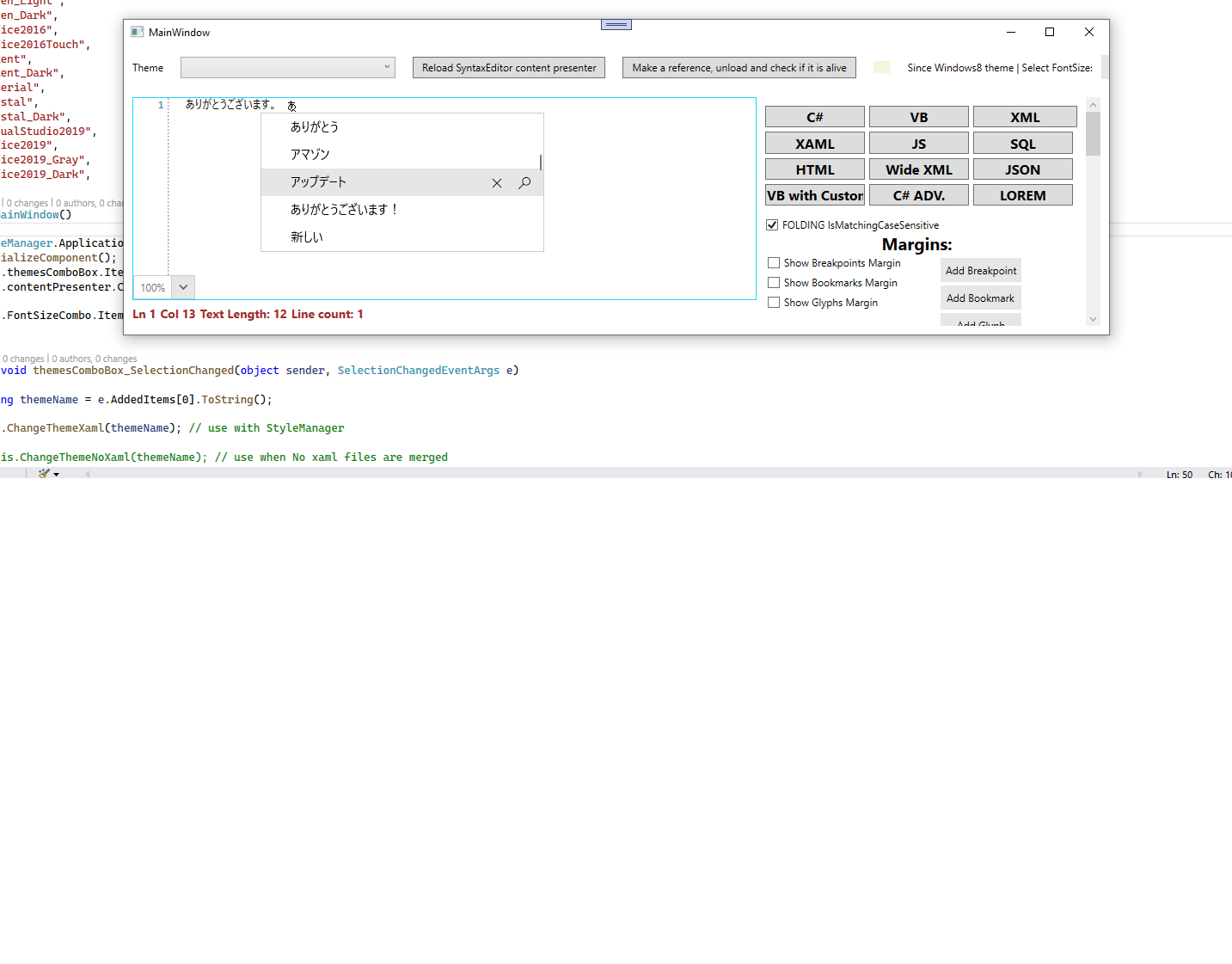
The `RadSyntaxEditor` control provides built-in support for the most commonly used Microsoft IMEs like Chinese IME, Japanese IME, Korean IME and etc. which are shipped with the Windows OS.
To use this feature, set the `UseMonospacedOptimization` property of `RadSyntaxEditor` to `false`.
> caption RadSyntaxEditor displaying japanese IME
## See Also
* [IntelliPrompts](https://www.telerik.com/products/wpf/documentation/controls/radsyntaxeditor/features/intelliprompts)