# Step Item Contents
The RadStepProgressBarItem elements allows you to add steps into the control. This renders a step visual for each RadStepProgressBarItem. Additionally, text or any other UI can be included for each step.
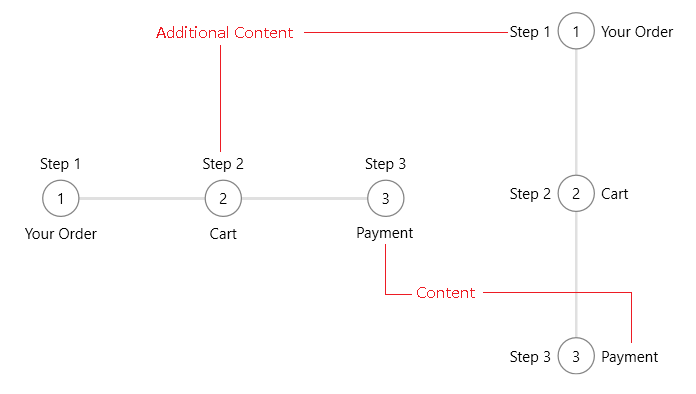
To set additional contents, use the **Content** and **AdditionalContent** properties of RadStepProgressBarItem. The Content renders a presenter on bottom of the step in horizontal orientation or on the right side in vertical orientation. The AdditionalContent renders a presenter on top of the step in horizontal and on the left in vertical orientation.
```XAML
```
> caption RadStepProgressBar in horizontal and vertical orientations
Also, the content and the additional content templates can be determined using [DataTemplateSelectors](https://docs.microsoft.com/en-us/dotnet/api/system.windows.controls.datatemplateselector?view=windowsdesktop-6.0). To do so, use the **ContentTemplateSelector** and **AdditionalContentTemplateSelector** properties of RadStepProgressBarItem.
## Indicator Contents
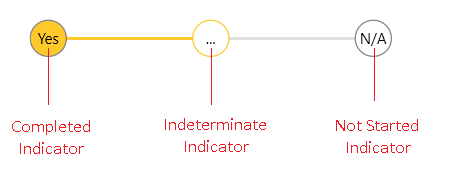
The contents inside the step item shapes can be customized using the corresponding content properties - **NotStartedIndicatorContent**, **IndeterminateIndicatorContent** and **CompletedIndicatorContent**. Additionally, each indicator content property has a associated template property - **NotStartedIndicatorContentTemplate**, **IndeterminateIndicatorContentTemplate** and **CompletedIndicatorContentTemplate**.
The different properties are used based on the current state of the step item - NotStarted, Indeterminate or Completed.
> In order to replace the indicator content when the step item is in Completed and Indeterminate state, you will need to set the the CompletedIndicatorContentTemplate and IndeterminateIndicatorContentTemplate properties.
```XAML
```
> caption RadStepProgressBar with customized state indicator contents
## See Also
* [Getting Started](https://www.telerik.com/products/wpf/documentation/controls/radstepprogressbar/getting-started)
* [Events](https://www.telerik.com/products/wpf/documentation/controls/radstepprogressbar/events)
* [Data Binding](https://www.telerik.com/products/wpf/documentation/controls/radstepprogressbar/data-binding)