# View Specific Properties
> You can check the [Configuration](https://www.telerik.com/products/wpf/documentation/controls/radscheduleview/features/viewdefinitions/configuration) article for more information about the properties that are common for all views.
## DayView and WeekView Specific Properties
Some ViewDefinitions have specific properties. Here is a list of specific properties for DayView and WeekView:
* **EnableSmallAppointmentRendering**: Gets or sets whether appointments with duration smaller than MinorTickLength will be rounded to MinorTickLength.
> When **EnableSmallAppointmentRendering** is enabled, RadScheduleView will display the appointments with zero duration inside DayViewDefinition and WeekViewDefinition.
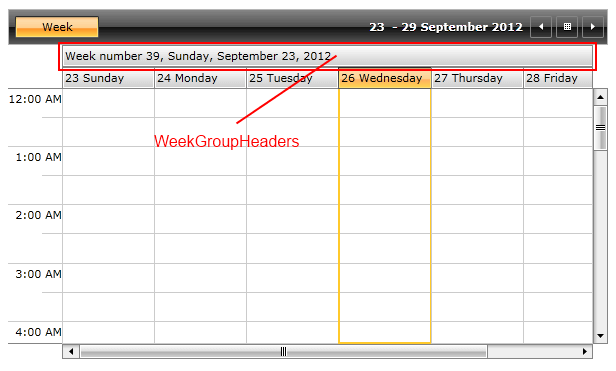
* **ShowWeekGroupHeaders**: Gets or sets whether the WeekHeaders should be visible.
* **WeekGroupHeaderStringFormat**: Gets or sets the format that will be applied to the WeekHeaders. After setting the **ShowWeekGroupHeaders** to **True** you can customize the string format of the week numbers displayed in the Header.
The following code snippet shows how to set the **ShowWeekGroupHeaders** and **WeekGroupHeaderStringFormat** property in WeekView:
```XAML
```
```C#
weekDefinition.ShowWeekGroupHeaders = true;
weekDefinition.WeekGroupHeaderStringFormat = "Week number {0}, {1:D}";
```
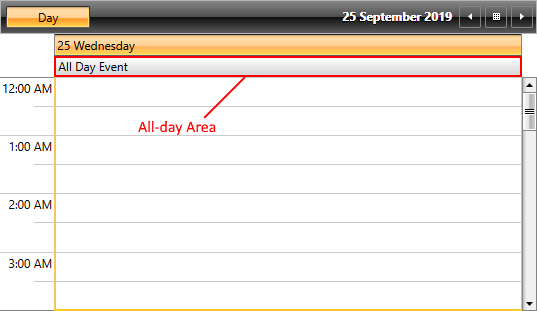
* **ShowAllDayArea**: Gets or sets a value indicating whether the all-day area is visible or not. This area displays appointments which have their **IsAllDayEvent** property set to **True**.
## MonthView specific properties
The MonthView has a single specific property:
**AllowCustomAppointmentSize** (available as of Q2 2014 in UI for WPF – sets whether the appointments with custom size can be displayed in the MonthViewDefinition. By default **AllowCustomAppointmentSize** is set to **False**.

> You can check the [Set Custom Appointment Height](https://www.telerik.com/products/wpf/documentation/controls/radscheduleview/howto/set-custom-appointment-height) article for more details on how to implement appointments with custom height in MonthViewDefinition.
## TimelineView specific properties
Here is a list of the properties that are specific for TimelineView:
* [StretchAppointments](https://www.telerik.com/products/wpf/documentation/controls/radscheduleview/features/viewdefinitions/specificproperties#stretchappointments)
* [ApplyStartEndTimeToEachDay](https://www.telerik.com/products/wpf/documentation/controls/radscheduleview/features/viewdefinitions/specificproperties#applystartendtimetoeachday)
* [TimeRulerGroupStringFormat](https://www.telerik.com/products/wpf/documentation/controls/radscheduleview/features/viewdefinitions/specificproperties#timerulergroupstringformat)
### StretchAppointments
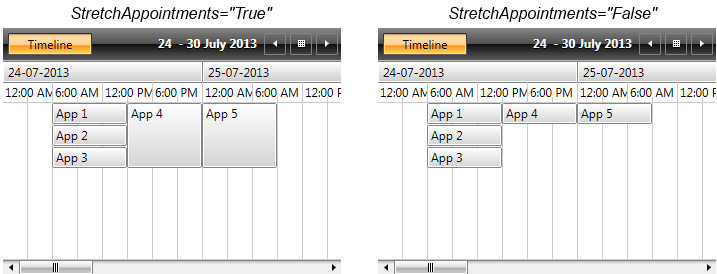
It sets whether the appointments will be stretched to fill all available space in the TimeSlot - by default it is set to **False**.
```XAML
```
### ApplyStartEndTimeToEachDay
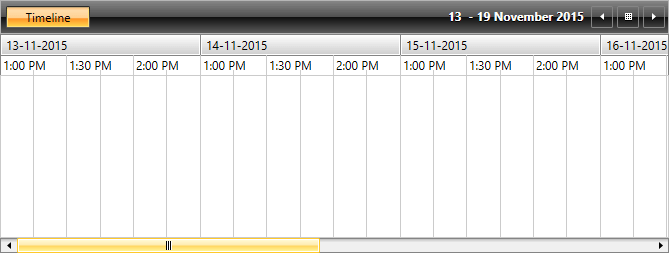
When the **DayStartTime** and **DayEndTime** properties are set to the TimelineViewDefinition, the **DayStartTime** property gets applied only for the first day of the displayed range of days, while the **DayEndTime** only for the last one. In order to apply them for each day of the VisibleDays range, the **ApplyStartEndTimeToEachDay** property (introduced in Q1 2016 of UI for WPF needs to be set to **True**. The **ApplyStartEndTimeToEachDay** is of type bool - its default value is **False**.
The following example illustrates how to set the DayStartTime, DayEndTime and ApplyStartEndTimeToEachDay for the TimelineView:
```XAML
```
```C#
timelineDefinition.DayStartTime = new TimeSpan(13, 00, 0);
timelineDefinition.DayEndTime = new TimeSpan(14, 30, 0);
timelineDefinition.ApplyStartEndTimeToEachDay = true;
```
```VB.NET
timelineDefinition.DayStartTime = New TimeSpan(13, 0, 0)
timelineDefinition.DayEndTime = New TimeSpan(14, 30, 0)
timelineDefinition.ApplyStartEndTimeToEachDay = True
```
> important Please notice that the **DayStartTime** property should always be set to a time earlier than the **DayEndTime**, otherwise the start and end times won't be applied for each day.
The final result is shown on the snapshot below:
### TimeRulerGroupStringFormat
It sets the format applied on the **TimeRulerGroupItem**.