# CurrentTimeIndicator
**RadScheduleView** provides the option to visually mark the current time in the TimeRuler and across the Appointments area through its **ShowCurrentTimeIndicator** property.
This article covers the following topics:
* [Enabling the CurrentTimeIndicator](https://www.telerik.com/products/wpf/documentation/controls/radscheduleview/features/currenttimeindicator#enabling-the-currenttimeindicator)
* [Setting CurrentTimeIndicator Location](https://www.telerik.com/products/wpf/documentation/controls/radscheduleview/features/currenttimeindicator#setting-currenttimeindicator-location)
* [Styling CurrentTimeIndicator](https://www.telerik.com/products/wpf/documentation/controls/radscheduleview/features/currenttimeindicator#styling-currenttimeindicator)
## Enabling the CurrentTimeIndicator
In order to display the current time indicator, you must set the **ShowCurrentTimeIndicator** property of the RadScheduleView as in **Example 1**.
**Example 1: Enable CurrentTimeIndicator**
```XAML
```
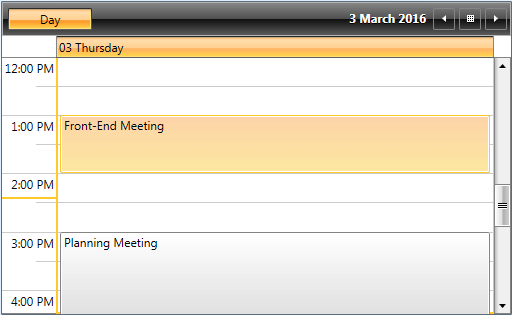
Running the code from **Example 1** will result in RadScheduleView with current time marked as shown in **Figure 1**.
> caption Enable CurrentTimeIndicator
## Setting CurrentTimeIndicator Location
As of R2 2016, you can show the CurrentTimeIndicator not only in the TimeRuler of the ScheduleView, but also across the Appointments area through the **CurrentTimeIndicatorLocation** property as shown in **Example 2**. **CurrentTimeIndicatorLocation** property is of type enum and can receive the following values:
* **TimeRulerArea** – the default value, the indicator is shown inside the TimeRuler.
* **AppointmentsArea** – the indicator is shown only through the Appointments panel.
* **WholeArea** – the indicator is shown on both the TimeRuler and Appointments panel.
**Example 2: Set CurrentTimeIndicatorLocation**
```XAML
```
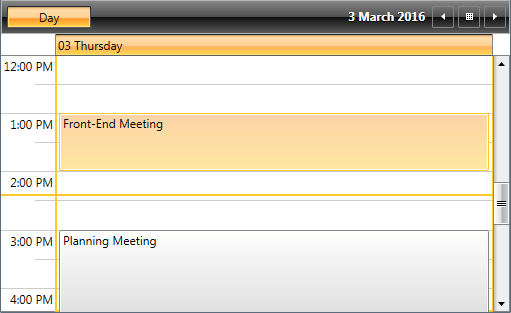
**Figure 2** shows current time marked across the whole area of RadScheduleView.
> caption Set CurrentTimeIndicatorLocation
## Styling CurrentTimeIndicator
You could change the look of CurrentTimeIndicator by setting the **CurrentTimeIndicatorStyle** and **CurrentTimeIndicatorAppointmentsAreaStyle** properties of the ScheduleView.
**CurrentTimeIndicatorStyle** is applied to the part of the CurrentTimeIndicator in the TimeRuler, while **CurrentTimeIndicatorAppointmentsAreaStyle** is applied to the part in the Appointments area.
**Example 3** demonstrates how both Styles are defined and **Example 4** shows how the Style properties should be set to the ScheduleView.
**Example 3: Define CurrentTimeIndicator Styles**
```XAML
```
**Example 4: Set CurrentTimeIndicator Style Properties**
```XAML
```
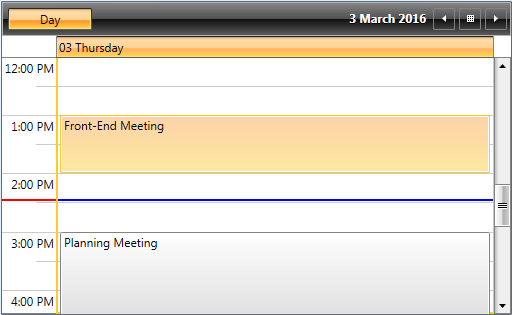
If you run the application at this stage, you will see RadScheduleView with CurrentTimeIndicator styled in different colors as shown in **Figure 3**.
> caption Custom CurrentTimeIndicator styles
Additionally, you could set the **AllowCustomSize** property of the CurrentTimeIndicator in order to allow rendering elements with bigger size. For example, if you need the part in the TimeRuler area to be thicker, you can customize the **CurrentTimeIndicatorStyle** as shown in **Example 5**.
**Example 5: Set AllowCustomSize**
```XAML
```
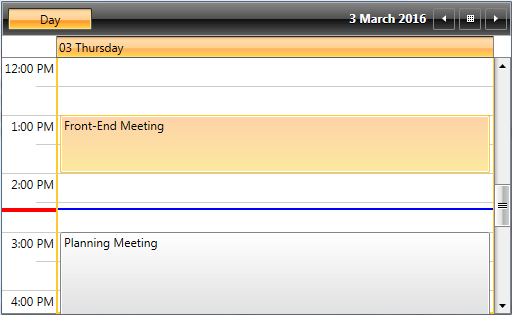
Running the application will lead to the result shown in **Figure 4**.
> caption CurrentTimeIndicator with AllowCustomSize set
> tip For more advanced customizations, see the ScheduleView [Custom CurrentTimeIndicator Style](https://github.com/telerik/xaml-sdk/tree/master/ScheduleView/CustomCurrentTimeIndicatorStyle) example in our XAML SDK Repository.