# Ribbon DropDownButton
The **RadRibbonDropDownButton** represents an extension of the **RadDropDownButton**. It provides an easier interaction with the **RadRibbonView** control. What is special about the **RadRibbonDropDownButton** is that upon activation it can display a popup area. Any content of any kind can be nested inside the popup area.
> To learn more about the **RadDropDownButton** control read its documentation.
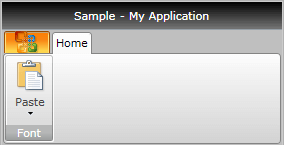
Here is a sample definition of a **RadRibbonDropDownButton** without having any drop down content defined:
```XAML
```
> tip As all buttons in the RadRibbonView's set slightly expose the same functionality, take a look at the [Overview](https://www.telerik.com/products/wpf/documentation/controls/radribbonview/features/ribbon-controls/ribbon-buttons/buttons-overview) topic.
This button has its initial size set to **Large** and its text label set to **"Paste"**.
## Setting the Drop Down Content
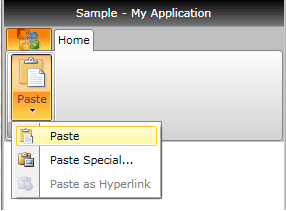
To set the popup content you have to simply set the **DropDownContent** property of the button. Here is an example of a **RadRibbonDropDownButton** with three menu items inside its drop down.
```XAML
```
## Handling the Drop Down Events
Besides the **Click** event, the **RadRibbonDropDownButton** exposes several drop down related events:
* **DropDownClosed** - fires after the popup area has been closed.
* **DropDownOpening** - fires before the popup area gets opened.
* **DropDownOpened** - fires after the popup area has been opened.
```XAML
```
```C#
private void RadRibbonDropDownButton_DropDownClosed(object sender, RoutedEventArgs e)
{
}
private void RadRibbonDropDownButton_DropDownOpened(object sender, RoutedEventArgs e)
{
}
private void RadRibbonDropDownButton_DropDownOpening(object sender, RoutedEventArgs e)
{
}
```
```VB.NET
Private Sub RadRibbonDropDownButton_DropDownClosed(sender As Object, e As RoutedEventArgs)
End Sub
Private Sub RadRibbonDropDownButton_DropDownOpened(sender As Object, e As RoutedEventArgs)
End Sub
Private Sub RadRibbonDropDownButton_DropDownOpening(sender As Object, e As RoutedEventArgs)
End Sub
```
## See Also
* [Editing Control Templates](https://www.telerik.com/products/wpf/documentation/styling-and-appearance/styling-apperance-editing-control-templates)