# Precision

Users can use the **Precision** property to control the rating precision. The property have three predefined values:

* **Item** - you can rate with whole item/star

* **Half** - you can rate with half item/star

* **Exact** - you can rate with custom precision

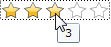
**Example 1: Setting the Precision property to Item**

```XAML
<telerik:RadRating Precision="Item"
	                   ToolTipService.ToolTip="{Binding RelativeSource={RelativeSource Self}, Path=Value}" />
```

> caption Result from example 1

![RadRating with Precision](https://www.telerik.com/products/wpf/documentation/assets/904dceaefafa9e403b42378bab0778e6/rating_precision_item.png)

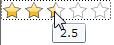
**Example 2: Setting the Precision to Half**

```XAML
<telerik:RadRating Precision="Half"
	                   ToolTipService.ToolTip="{Binding RelativeSource={RelativeSource Self}, Path=Value}" />
```

> caption Result from example 2

![RadRating with Precision](https://www.telerik.com/products/wpf/documentation/assets/6c6de3fc1779cbb763f881bc586b9da8/rating_precision_half.png)

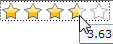
**Example 3: Setting the Precision to Exact**

```XAML
<telerik:RadRating Precision="Exact"
	                   ToolTipService.ToolTip="{Binding RelativeSource={RelativeSource Self}, Path=Value}" />
```

> caption Result from example 3

![RadRating with Precision](https://www.telerik.com/products/wpf/documentation/assets/b4adf2326c01145af0853f0e146c722a/rating_precision_exact.png)