# Orientation
`RadProgressBar` has an `Orientation` property which can be set to either **Horizontal** or **Vertical**. The two allowed values specify the direction in which the control is being "filled".
**Setting the Orientation property to Horizontal**
```XAML
```
**Setting the Orientation property to Horizontal**
```C#
RadProgressBar progressBar = new RadProgressBar();
progressBar.Orientation = System.Windows.Controls.Orientation.Horizontal;
```
```VB.NET
Dim progressBar As New RadProgressBar()
progressBar.Orientation = System.Windows.Controls.Orientation.Horizontal
```

**Setting the Orientation property to Vertical**
```XAML
```
**Setting the Orientation property to Vertical**
```C#
RadProgressBar progressBar = new RadProgressBar();
progressBar.Orientation = System.Windows.Controls.Orientation.Vertical;
```
```VB.NET
Dim progressBar As New RadProgressBar()
progressBar.Orientation = System.Windows.Controls.Orientation.Vertical
```
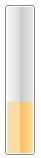
> Whenever you change the **Orientation** property, it will make sense to also change the height and width of the control since the property only changes the direction in which **RadProgressBar** is filled.