# Minimization

You can use the **Minimization** feature of the **RadOutlookBar** to create more user friendly and "MS Outlook look and feel" applications. The following properties are related to this feature:

* **IsMinimizable** – boolean property that allows you to choose whether the **RadOutlookBar** can be minimized or not. The default value of the property is True.

* **IsMinimized** - boolean property that allows you to choose whether the **RadOutlookBar** should be minimized or not. The default value of the property is False.

* **MinimizedWidth** – double property that represents the width that will be set to the **RadOutlookBar**, when it is minimized. The default value of the property is 30.

* **MinimizedWidthThreshold** – double property that represents at what width the **RadOutlookBar** will go in minimized state, when it is resized via the vertical resizer

* **IsVerticalResizerVisible** – boolean property that allows you to show or hide the vertical resizer

* **VerticalResizerAlignment** – property of type **ResizerAlignment** that has two predefined values – **Left**, **Right**. With this property you can choose where to be placed the vertical resizer

## Setting the IsMinimizable property

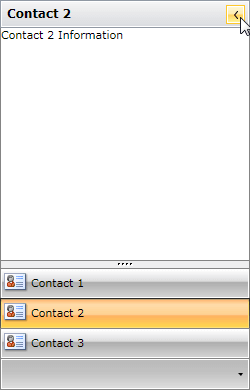
The default value of the **IsMinimizable** property is **True**:

```XAML
<telerik:RadOutlookBar Width="250"
	                       Height="390">
    <telerik:RadOutlookBarItem Header="Contact 1" Icon="../Images/OutlookBar/contactsBig.png">
        <TextBlock Text="Contact 1 Information" />
    </telerik:RadOutlookBarItem>
    <telerik:RadOutlookBarItem Header="Contact 2" 
	                               Icon="../Images/OutlookBar/contactsBig.png"
	                               IsSelected="True">
        <TextBlock Text="Contact 2 Information" />
    </telerik:RadOutlookBarItem>
    <telerik:RadOutlookBarItem Header="Contact 3" Icon="../Images/OutlookBar/contactsBig.png">
        <TextBlock Text="Contact 3 Information" />
    </telerik:RadOutlookBarItem>
</telerik:RadOutlookBar>
```

![WPF RadOutlookBar Default Minimization](https://www.telerik.com/products/wpf/documentation/assets/c9ad23fee86068d9bd0d31950b1fba92/outlook_minimization_isminimizabledef.png)

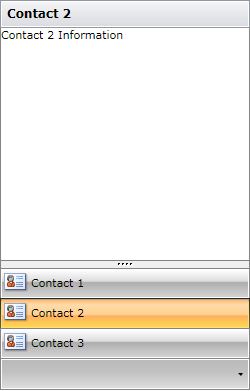
Setting the **IsMinimizable** property to **False** will disable the **Minimization** feature of the **RadOutlookBar**:

```XAML
<telerik:RadOutlookBar Width="250"
	                       Height="390"
	                       IsMinimizable="False">
    <telerik:RadOutlookBarItem Header="Contact 1" Icon="../Images/OutlookBar/contactsBig.png">
        <TextBlock Text="Contact 1 Information" />
    </telerik:RadOutlookBarItem>
    <telerik:RadOutlookBarItem Header="Contact 2" 
	                               Icon="../Images/OutlookBar/contactsBig.png"
	                               IsSelected="True">
        <TextBlock Text="Contact 2 Information" />
    </telerik:RadOutlookBarItem>
    <telerik:RadOutlookBarItem Header="Contact 3" Icon="../Images/OutlookBar/contactsBig.png">
        <TextBlock Text="Contact 3 Information" />
    </telerik:RadOutlookBarItem>
</telerik:RadOutlookBar>
```

![WPF RadOutlookBar Minimization Disabled](https://www.telerik.com/products/wpf/documentation/assets/5011481345114651cb2caa37cb678732/outlook_minimization_isminimizablefalse.png)

## Setting the IsMinimized property

The **IsMinimized** property allows you to manually control the state of the **RadOutlookBar**. When set to the **RadOutlookBar** is minimized:

```XAML
<telerik:RadOutlookBar Width="250"
	                       Height="390"
	                       IsMinimized="True">
    <telerik:RadOutlookBarItem Header="Contact 1" Icon="../Images/OutlookBar/contactsBig.png">
        <TextBlock Text="Contact 1 Information" />
    </telerik:RadOutlookBarItem>
    <telerik:RadOutlookBarItem Header="Contact 2" 
	                               Icon="../Images/OutlookBar/contactsBig.png"
	                               IsSelected="True">
        <TextBlock Text="Contact 2 Information" />
    </telerik:RadOutlookBarItem>
    <telerik:RadOutlookBarItem Header="Contact 3" Icon="../Images/OutlookBar/contactsBig.png">
        <TextBlock Text="Contact 3 Information" />
    </telerik:RadOutlookBarItem>
</telerik:RadOutlookBar>
```

![WPF RadOutlookBar Minimized](https://www.telerik.com/products/wpf/documentation/assets/c2312c3ccaf20003abad4fa35610bf5d/outlook_minimization_isminimizedtrue.png)

## Setting the MinimizedWidth property

The default value of the **MinimizedWidth** property is 30. However, you can change that size to better fit your scenario:

```XAML
<telerik:RadOutlookBar Width="250"
	                       Height="390"
	                       IsMinimized="True"
	                       MinimizedWidth="60">
    <telerik:RadOutlookBarItem Header="Contact 1" Icon="../Images/OutlookBar/contactsBig.png">
        <TextBlock Text="Contact 1 Information" />
    </telerik:RadOutlookBarItem>
    <telerik:RadOutlookBarItem Header="Contact 2" 
	                               Icon="../Images/OutlookBar/contactsBig.png"
	                               IsSelected="True">
        <TextBlock Text="Contact 2 Information" />
    </telerik:RadOutlookBarItem>
    <telerik:RadOutlookBarItem Header="Contact 3" Icon="../Images/OutlookBar/contactsBig.png">
        <TextBlock Text="Contact 3 Information" />
    </telerik:RadOutlookBarItem>
</telerik:RadOutlookBar>
```

![WPF RadOutlookBar with Minimized Width](https://www.telerik.com/products/wpf/documentation/assets/d493657ada6dfabf7eaa53e6e51ab7d0/outlook_minimization_minimizedwidth.png)

## Resizing RadOutlookBar via the vertical resizer

You can also take advantage of the vertical resizer to change the state of the **RadOutlookBar**. By default when the size of the **RadOutlookBar** exceeds 34, it's restored. Otherwise the control is minimized.
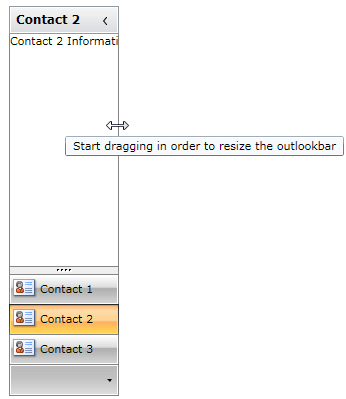
![WPF RadOutlookBar Resizing with Resizer](https://www.telerik.com/products/wpf/documentation/assets/8ad11249dc57f6995f91d89c3a37b9d4/outlook_minimization_resizer.png)

Furthermore, you can set the **MinimizedWidthThreshold** to control when to change the **RadOutlookBar** state, when it is resized via the vertical resizer.