# MaskedNumericInput
The **RadMaskedNumericInput** represents the basic control that can be used to restrict numeric user input.
In order to use the **RadMaskedNumericInput** control in your projects you have to add references to the following assemblies:
* **Telerik.Licensing.Runtime**
* **Telerik.Windows.Controls**
* **Telerik.Windows.Controls.Input**
* **Telerik.Windows.Data**
You can find more info [here](http://www.telerik.com/help/wpf/installation-installing-controls-dependencies-wpf.html).
> tip With the 2025 Q1 release, the Telerik UI for WPF has a new licensing mechanism. You can learn more about it [here](https://www.telerik.com/products/wpf/documentation/installation/licensing/installing-license-key).
## Declaratively defined MaskedNumericInput
Here is a simple definition of a **RadMaskedNumericInput** control:
**Example 1: Define RadMaskedNumericInput in XAML**
```XAML
```

## Data Binding
RadMaskedNumericInput's **Value** property is of type **nullable double (double?)** and you have to bind it to ViewModel's property of type double or nullable double (if you need to set null).
> important Binding to **object** is not support and may result in unpredictable behavior.
**Example 2: Define the view model**
```XAML
public class ViewModel : ViewModelBase
{
private double? amount;
public ViewModel()
{
this.Аmount = 12345;
}
public double? Amount
{
get { return this.amount; }
set
{
if(this.amount != value)
{
this.amount = value;
this.OnPropertyChanged("Amount");
}
}
}
}
```
**Example 3: Binding the Value property**
```XAML
```
## FormatString property
You can further format the entered value by setting the **FormatString** property. It uses [Standard Numeric Format Strings](http://msdn.microsoft.com/en-us/library/dwhawy9k.aspx) and [Custom Numeric Format Strings](http://msdn.microsoft.com/en-us/library/0c899ak8.aspx) to further format the **Text** property.
### In Mask scenario
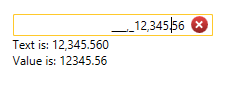
When **Mask** property is set the **FormatString** property will be applied to the **Text** property of MaskedNumericInput control.
**Example 2: Setting the FormatString property in Mask scenario**
```XAML
```
### In No-Mask scenario
In **No-Mask** scenario the **FormatString** property will be applied to the **Value** property of MaskedNumericInput control.
**Example 3: Setting the FormatString property in No-Mask scenario**
```XAML
```

## See Also
* [Getting Started](https://www.telerik.com/products/wpf/documentation/controls/radmaskedinput/getting-started)
* [Masked Input Extensions](https://www.telerik.com/products/wpf/documentation/controls/radmaskedinput/features/extensions)
* [Common Features](https://www.telerik.com/products/wpf/documentation/controls/radmaskedinput/features/common)
* [MaskedCurrencyInput](https://www.telerik.com/products/wpf/documentation/controls/radmaskedinput/features/maskedinput-controls/currency)
* [MaskedTextInput](https://www.telerik.com/products/wpf/documentation/controls/radmaskedinput/features/maskedinput-controls/text)
* [MaskedDateTimeInput](https://www.telerik.com/products/wpf/documentation/controls/radmaskedinput/features/maskedinput-controls/datetime)