# MaskedInputExtensions
The **MaskedInputExtensions** class allows you to further customize the **MaskedInput** controls controlled input.
* [Control the Minimum and Maximum value](https://www.telerik.com/products/wpf/documentation/controls/radmaskedinput/features/extensions#control-the-minimum-and-maximum-value)
* [Control the Minimum and Maximum length of RadMaskedTextInput](https://www.telerik.com/products/wpf/documentation/controls/radmaskedinput/features/extensions#control-the-minimum-and-maximum-length-of-radmaskedtextinput)
* [Use the culture settings to configure the number of digits after the decimal symbol](https://www.telerik.com/products/wpf/documentation/controls/radmaskedinput/features/extensions#use-the-culture-settings-to-configure-the-number-of-digits-after-the-decimal-symbol)
* [Define the SelectionStart when the sign of the value is changed](https://www.telerik.com/products/wpf/documentation/controls/radmaskedinput/features/extensions#define-the-selectionstart-when-the-sign-of-the-value-is-changed)
* [Allow minus sign on zero value](https://www.telerik.com/products/wpf/documentation/controls/radmaskedinput/features/extensions#allow-minus-sign-on-zero-value)
* [Allow minus on null values](https://www.telerik.com/products/wpf/documentation/controls/radmaskedinput/features/extensions#allow-minus-on-null-values)
* [Tab navigation](https://www.telerik.com/products/wpf/documentation/controls/radmaskedinput/features/extensions#tab-navigation)
* [Set the caret position of RadMaskedTextInput](https://www.telerik.com/products/wpf/documentation/controls/radmaskedinput/features/extensions#set-the-caret-position-in-a-radmaskedtextinput)
* [Allow Null Values](https://www.telerik.com/products/wpf/documentation/controls/radmaskedinput/features/extensions#allow-null-values)
> The MaskedInputExtensions class can be accessed in XAML through the following namespace:\
> `xmlns:maskedInput="clr-namespace:Telerik.Windows.Controls.MaskedInput;assembly=Telerik.Windows.Controls.Input"`
## Control the Minimum and Maximum Value
* The **MaskedInputExtensions.Maximum** property allows you to define the maximum value that can be entered in the **RadMaskedNumericInput** and **RadMaskedCurrencyInput** controls.
**Example 1: Setting MaskedInputExtensions.Maximum attached property**
```XAML
```
* The **MaskedInputExtensions.Minimum** property allows you to define the minimum value that can be entered in the **RadMaskedNumericInput** and **RadMaskedCurrencyInput** controls. You can use it to restrict the user input to positive numbers only.
**Example 2: Setting MaskedInputExtensions.Minimum attached property**
```XAML
```
## Control the Minimum and Maximum Length of RadMaskedTextInput
* The **MaskedInputExtensions.MaxTextLength** property allows you to define the maximum length of the input entered in the **RadMaskedTextInput** control.
**Example 3: Setting MaskedInputExtensions.MaxTextLength attached property**
```XAML
```
> caption MaskedInputExtensions.MaxTextLength attached property example
```

```
* The **MaskedInputExtensions.MinTextLength** property allows you to define the minimum length of the input entered in the **RadMaskedTextInput** control.
**Example 4: Setting MaskedInputExtensions.MinTextLength attached property**
```XAML
```
## Use the Culture Settings to Configure the Number of Digits After the Decimal Symbol
The **MaskedInputExtensions.UseCultureDigits** property allows you to configure the **RadMaskedNumericInput** and **RadMaskedCurrencyInput** controls whether to use the **Culture** settings to define the number of digits that should be displayed after the decimal symbol.
If you set the **MaskedInputExtensions.UseCultureDigits** property to **True**, the number of digits displayed after the decimal symbol will depend on the culture settings.
**Example 5: Setting MaskedInputExtensions.UseCultureDigits attached property**
```XAML
```
> Please keep in mind that when you set the **RadMaskedInputExtensions.UseCultureDigits** property to **True**, if you want to define a **Mask** for the control, it has to be set after the **.UseCultureDigits** property in the definition of the **RadMaskedInput** control.
## Define the SelectionStart When the Sign of the Value is Changed
When you change the sign of a value entered in the **RadMaskedNumericInput** and/or the **RadMaskedCurrencyInput** control you may need to move the cursor at the beginning of the control. You can implement such a scenario using the **RadMaskedInputExtensions.SelectionStartOnSignChanged** property.
It is an enumeration of type **SelectionStartOnSignChanged** that exposes the following values:
* **Beginning** - when the sign of the value is changed, the caret is moved at the beggining of the control.
* **Unchanged** - when the sign of the value is changed, the caret isn't moved. This is the default behavior of the **RadMaskedNumericInput** and **RadMaskedCurrencyInput** controls.
**Example 6: Setting MaskedInputExtensions.SelectionStartOnSignChanged attached property**
```XAML
```
## Allow Minus Sign on Zero Value
The **RadMaskedInputExtensions** expose an **AllowMinusOnZeroValues** attached property. It controls whether the minus sign ("-") in front of the zero (0 or 0.0) value can be visualized. If you set it to **False**, users will not be allowed to enter minus when the Value property of the control equals zero.
The major difference that this property makes is when you initially have a negative number entered and you change it to zero. When the **AllowMinusOnZeroValues** is set to **False**, the minus sign will not be preserved; otherwise the minus will remain.
> The default value of the property is **True**.
## Allow Minus on Null Values
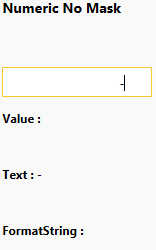
The **MaskedInputExtensions.AllowMinusOnNullValue** property allows you to display the minus sign when the value of the control is set to **Null** and you press the OemMinus/Subtract key on the keyboard. The default value of the attached property is set to **False**, which means that the described behavior is disabled by default.
**Example 7: Setting MaskedInputExtensions.AllowMinusOnNullValue attached property**
```XAML
```
> This property is designed to work only for the **RadMaskedNumericInput** and **RadMaskedCurrencyInput** controls with an empty mask (Mask="")
When the property is set to **True** and the **Value** is set to **null**, the minus symbol will be included in the Text property, however, the value will remain null. You can see the example in *Figure 2*.
> caption MaskedInputExtensions.AllowMinusOnNullValue attached property example
By default, the minus sign cannot be deleted on press of the **Delete** or the **Backspace** key. To change this behavior, you will need to create a custom masked input class that derives from either the RadMaskedNumeric or RadMaskedCurrencyInput control and override its CanModifyChar, HandleDeleteKeyNoMask and HandleBackKeyNoMask methods. This approach is demonstrated in the [MinusKeyCustomizations](https://github.com/telerik/xaml-sdk/tree/master/MaskedInput/MinusKeyCustomizations) SDK example.
> To take full advantage of a culture-specific parsing/formatting when using no mask (Mask=""), you should also set the FormatString property. In the numeric input control use `n, n0, n1,..., etc.` and in currency input `c, c0, c1, c2,..., etc.`
## Tab Navigation
The keyboard navigation of the RadMaskedInput suite of controls can be controlled by three properties: the native **IsTabStop**, the **SectionsNavigationMode** and the attached **IsEditorTabStop** properties, as shown in Example 7.
**Example 8: Setting MaskedInputExtensions.IsEditorTabStop attached property**
```XAML
```
You can find more information about the keyboard navigation in the [Keyboard and Mouse Support](https://www.telerik.com/products/wpf/documentation/controls/radmaskedinput/features/keyboard-mouse) help article.
## Set the Caret Position in a RadMaskedTextInput
The **MaskedInputExtensions.CaretToEndOfTextOnFocus** property allows you to configure the RadMaskedTextInput control, whether to place the caret at the beginning of the text or at the end of it, when the control has focus. If you set it to **True**, the caret will be placed at the end of the text, as shown in Example 8.
**Example 9: Setting MaskedInputExtensions.CaretToEndOfTextOnFocus attached property**
```XAML
```
> This property is designed to work only for the RadMaskedTextInput control.
## Allow Null Values
By default the RadMaskedNumericInput and RadMaskedCurrencyInput don't allow you to set *null* to their Value property. Instead the *null* value is coerced to *0*. To alter this behavior and allow *null* values you can set the **MaskedInputExtensions.AllowNull** attached property to **True**.
**Example 10: Setting MaskedInputExtensions.AllowNull attached property**
```XAML
```
> This property is designed to work only for the RadMaskedNumericInput and RadMaskedCurrencyInput controls.
## See Also
* [Common Features](https://www.telerik.com/products/wpf/documentation/controls/radmaskedinput/features/common)
* [Keyboard navigation](https://www.telerik.com/products/wpf/documentation/controls/radmaskedinput/features/keyboard-mouse)
* [MaskedNumericInput](https://www.telerik.com/products/wpf/documentation/controls/radmaskedinput/features/maskedinput-controls/numeric)
* [MaskedCurrencyInput](https://www.telerik.com/products/wpf/documentation/controls/radmaskedinput/features/maskedinput-controls/currency)
* [MaskedTextInput](https://www.telerik.com/products/wpf/documentation/controls/radmaskedinput/features/maskedinput-controls/text)
* [MaskedDateTimeInput](https://www.telerik.com/products/wpf/documentation/controls/radmaskedinput/features/maskedinput-controls/datetime)