# Common
This article lists features that are common between the **RadMaskedInput** controls.
* [No-Mask Functionality](https://www.telerik.com/products/wpf/documentation/controls/radmaskedinput/features/common#no-mask-functionality)
* [Input Behavior](https://www.telerik.com/products/wpf/documentation/controls/radmaskedinput/features/common#input-behavior)
* [Text and TextMode](https://www.telerik.com/products/wpf/documentation/controls/radmaskedinput/features/common#text-and-textmode-properties)
* [ValueToTextConverter](https://www.telerik.com/products/wpf/documentation/controls/radmaskedinput/features/common#valuetotextconverter)
* [Add/Remove the ClearButton](https://www.telerik.com/products/wpf/documentation/controls/radmaskedinput/features/common#add-remove-the-clearbutton)
* [IsLastPositionEditable](https://www.telerik.com/products/wpf/documentation/controls/radmaskedinput/features/common#islastpositioneditable)
* [TextBoxStyle](https://www.telerik.com/products/wpf/documentation/controls/radmaskedinput/features/common#textboxstyle)
## No-Mask Functionality
You can take advantage of the 'no-mask' functionality of the **RadMaskedTextInput,RadMaskedNumericInput** and the **RadMaskedCurrenyInput** controls by setting the **Mask** property to **""** like so:
**Example 1: Setting no-mask functionality**
```XAML
```
This feature creates **RadMaskedInput** controls that allow unlimited input. And as the **Mask** property is empty, the controls won't expect a certain number of characters and this is why they will automatically update to fit the user input.
> tip The 'no-mask' functionality will remove the restrictions usually applied by the **Mask** property on the type and the number of input characters in each of the controls. Still you can set the **FormatString** property to control the input in the **RadMaskedInput** controls when they don't specify a **Mask**. For example you can use the [Standard Numeric Format Strings](http://msdn.microsoft.com/en-us/library/dwhawy9k.aspx) and [Custom Numeric Format Strings](http://msdn.microsoft.com/en-us/library/0c899ak8.aspx) to control the input in the **RadMaskedNumericInput** and the **RadMaskedCurrencyInput**. This means that if you need to restrict the number of digits after the decimal point to 2 in a **RadMaskedNumericInput**, you can set its **FormatString** property to **"n2"**:
``
## Input Behavior
The **RadMaskedInput** controls allow you to specify the characters input behavior using the **InputBehavior** property. The property is an enumeration of type **InputBehavior** and exposes the following values:
* **Replace**: Inputs characters on the right of the current caret position.
* **Insert**: Inserts characters before the caret's current position for as long as there are empty positions to fill. When there are no empty positions to fill on left of the caret, then the characters are added on right of the caret.
> You can change the **InputBehavior** using the **Insert** key. Also please keep in mind that the **InputBehavior** reflects the behavior of the **Backspace** and **Delete** keys
## Text and TextMode properties
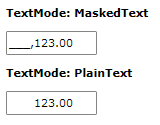
The **RadMaskedInput** controls expose a **Text** property that gets the value displayed in the control when it isn't focused. The value of this property depends on the **TextMode** enumeration, that exposed the following values:
* **MaskedText**: When this mode is enabled the **Text** property value represents the formatted **Value** including the placeholder characters.
* **PlainText**: When this mode is enabled the **Text** property value represents the formatted **Value** without the placeholder characters.
**Example 2: Setting TextMode property in XAML**
```XAML
```
## ValueToTextConverter
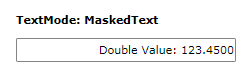
The **RadMaskedInput** controls allow you to set an **IValueConverter** to change the **Text** property depending on the **Value**. The following example will illustrate a sample implementation of the ValueToTextConverter property.
Let's start by defining an **IValueConverter**:
**Example 3: Implementing IValueConverter interface**
```C#
public class NumericValueToTextConverter : IValueConverter
{
public object Convert(object value, Type targetType, object parameter, System.Globalization.CultureInfo culture)
{
if (value != null)
{
double doubleValue = 0d;
decimal decimalValue = 0m;
if (double.TryParse(value.ToString(), System.Globalization.NumberStyles.Number, culture, out doubleValue))
{
return "Double Value: " + doubleValue.ToString("n4");
}
else if (decimal.TryParse(value.ToString(), System.Globalization.NumberStyles.Any, culture, out decimalValue))
{
return "Decimal Value: " + decimalValue.ToString("c4");
}
else return value.ToString();
}
else
{
return value;
}
}
public object ConvertBack(object value, Type targetType, object parameter, System.Globalization.CultureInfo culture)
{
throw new NotImplementedException();
}
}
```
```VB.NET
Public Class NumericValueToTextConverter
Implements IValueConverter
Public Function Convert(value As Object, targetType As Type, parameter As Object, culture As System.Globalization.CultureInfo) As Object Implements IValueConverter.Convert
If value IsNot Nothing Then
Dim doubleValue As Double = 0.0
Dim decimalValue As Decimal = 0D
If Double.TryParse(value.ToString(), System.Globalization.NumberStyles.Number, culture, doubleValue) Then
Return "Double Value: " & doubleValue.ToString("n4")
ElseIf Decimal.TryParse(value.ToString(), System.Globalization.NumberStyles.Any, culture, decimalValue) Then
Return "Decimal Value: " & decimalValue.ToString("c4")
Else
Return value.ToString()
End If
Else
Return value
End If
End Function
Public Function ConvertBack(value As Object, targetType As Type, parameter As Object, culture As System.Globalization.CultureInfo) As Object Implements IValueConverter.ConvertBack
Return value
'Throw New NotImplementedException()
End Function
End Class
```
Now we can define the **NumericValueToTextConverter** as a resource in our application and apply it to the **RadMaskedNumericInput** properties.
**Example 5: Setting the IValueConverter to the ValueToTextConverter property in XAML**
```XAML
```
## Add/Remove the ClearButton
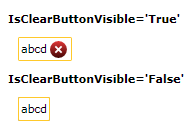
The default **Template** of the **RadMaskedInput** controls defines a **ClearButton** that allows the user to clear the input. You can hide this button by setting the **IsClearButtonVisible** property to **False**.
**Example 6: Setting the IsClearButtonVisible property**
```XAML
```
## IsLastPositionEditable
The **IsLastPositionEditable** property indicates whether the last position in the **RadMaskedInput** controls can be modified or not. If the property is set to **True**, the user will be able to edit the value in the last available position of the control. This is the default behavior of the **RadMaskedInput** controls. However, if you need to restrict the user from changing this value, you can set the **IsLastPositionEditable** property to **False**.
## TextBoxStyle
The **RadMaskedInput** controls have a `TextBoxStyle` property which allows you to modify the style of the underlying text box element representing the input. The property is of type `Style` which targets `PreviewInputTextBox`.
**Example 7: Setting TextBoxStyle**
```XAML
```
## See Also
* [MaskedNumericInput](https://www.telerik.com/products/wpf/documentation/controls/radmaskedinput/features/maskedinput-controls/numeric)
* [MaskedCurrencyInput](https://www.telerik.com/products/wpf/documentation/controls/radmaskedinput/features/maskedinput-controls/currency)
* [MaskedTextInput](https://www.telerik.com/products/wpf/documentation/controls/radmaskedinput/features/maskedinput-controls/text)
* [MaskedDateTimeInput](https://www.telerik.com/products/wpf/documentation/controls/radmaskedinput/features/maskedinput-controls/datetime)
* [Mask Tokens](https://www.telerik.com/products/wpf/documentation/controls/radmaskedinput/features/mask-tokens)