# WPF Map Overview
Thank you for choosing Telerik **RadMap**!
Visualize rich geographical information with Telerik **RadMap**, zoom and pan smoothly to any corner of the earth. If you want to give geographical context to your data – that’s easy. **RadMap** allows adding any elements or shapes to it. The control supports items virtualization through web services to guarantee blazing fast performance.
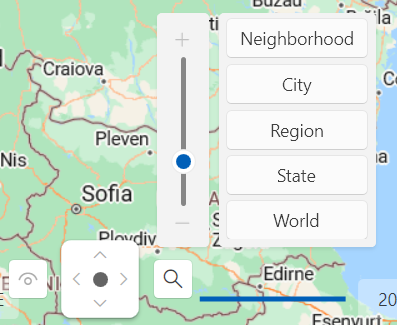
**RadMap's** key features include:
* **Map Sources** - with Telerik **RadMap** you can visualize rich geographical information from external geo imagery sources. Currently the **RadMap** supports Azure Map Source, empty provider, OpenStreetMap provider and also offers custom provider extensibility options.
* **Pan and Zoom** - Telerik **RadMap** supports panning and zooming through the mouse, the keyboard and the navigational controls.
* **Map Views** - Telerik **RadMap** provides 3 different views: Road View, Aerial View and Bird’s Eye View.
* **Navigation Controls** - **RadMap** has 3 navigation controls which give your users more flexibility when using the control: navigation control, command bar for switching between the three views of the map and zoom bar control for switching the zoom level. Also, **RadMap** provides out-of-the-box scale control so you can easily track the distance on the currently selected zoom level.
* **Information Layer** - the information layer allows you to add any **FrameworkElements** and **MapShape** objects on the map, setting their geographical coordinates. For example you can use pie charts that visualize a city’s demographics in terms of age groups and show the charts on the map, linking the charts to the respective cities.
* **Dynamic Layer**- the dynamic layer takes the information layer one step further allowing items virtualization using web services. This means that items are only loaded when the region of the map they belong to is visible. The result is a blazing fast **RadMap**.
* **KML Data Import**- **RadMap** provides support for stunning map overlays through its KML-import feature. Once you have the desired set of features (place marks, images, polygons, textual descriptions, etc.) encoded in KML, you can easily import the data and visualize it through the **RadMap** control.
* **Routing**: The control supports routing. You can do this via the Azure Maps services and the `VirtualizationLayer`. For an example, check this [article](https://www.telerik.com/products/wpf/documentation/knowledge-base/kb-map-azuremapprovider-routing).
* **Search/Geocode**: RadMap supports searching locations. You can do this via the Azure Maps services and the `VirtualizationLayer`. You can check this [article](https://www.telerik.com/products/wpf/documentation/knowledge-base/kb-map-azuremapprovider-geocoding) to see an example for this functionality.
Do not miss the online demos at:
## Telerik UI for WPF Support and Learning Resources
* [Telerik UI for WPF Map Homepage](https://www.telerik.com/products/wpf/map.aspx)
* [Get Started with the Telerik UI for WPF Map ](https://www.telerik.com/products/wpf/documentation/controls/radmap/getting-started)
* [Telerik UI for WPF API Reference](https://docs.telerik.com/devtools/wpf/api/)
* [Getting Started with Telerik UI for WPF Components](https://www.telerik.com/products/wpf/documentation/getting-started/first-steps-nuget)
* [Telerik UI for WPF Virtual Classroom (Training Courses for Registered Users)](https://learn.telerik.com/learn/course/external/view/elearning/16/telerik-ui-for-wpf)
* [Telerik UI for WPF Map Forums](https://www.telerik.com/forums/wpf)
* [Telerik UI for WPF Knowledge Base](https://docs.telerik.com/devtools/wpf/knowledge-base)
## See Also
* [Visual Structure](https://www.telerik.com/products/wpf/documentation/controls/radmap/visual-structure)
* [Getting Started](https://www.telerik.com/products/wpf/documentation/controls/radmap/getting-started)
* [Editing Control Templates](https://www.telerik.com/products/wpf/documentation/styling-and-appearance/styling-apperance-editing-control-templates)
* [Events](https://www.telerik.com/products/wpf/documentation/controls/radmap/events)