# KML Data Import
The **RadMap** provides support for stunning map overlays through its KML-import feature. Once you have the desired set of features (place marks, images, polygons, textual descriptions, etc.) encoded in KML, you can easily import the data and visualize it through the **RadMap** control. In this way you can easily visualize complex shapes like country's borders on the map and fill the separate shapes with different colors in order to achieve a sort of grouping.
> tip To learn more about the **KML** you can read [here](http://code.google.com/apis/kml/documentation/).
## Supported KML Elements
List of supported KML elements by the **RadMap** control:
1. Point
2. LineString
3. Polygon (including outerBoundaryIs and innerBoundaryIs)
4. Styles: IconStyle (including HotSpot), LineStyle, PolyStyle
5. BalloonStyle (partially)
6. ExtendedData
7. Partial support for MultiGeometry tag.
> If unsupported elements are present in the source KML file, they are ignored by the KML layer and won't appear in the map or scene display.
## Reading KML files with RadMap
To read your data you have to use the **MapShapeReader** class. To learn more about its general usage read the [Shape Reader](https://www.telerik.com/products/wpf/documentation/controls/radmap/features/information-layer/shape-reder) topic.
To pass the desired KML file you have to use the **Source** property of the **MapShapeReader** and pass the **Uri** to the desired .kml file to it. This will automatically generate shapes according to the data inside the file.
```XAML
```
```C#
this.informationLayer.Reader = new MapShapeReader();
(this.informationLayer.Reader as MapShapeReader).Source = new Uri("/MyApp;component/Data/bulgaria.kml", UriKind.RelativeOrAbsolute);
```
```VB.NET
Me.informationLayer.Reader = New MapShapeReader()
Me.informationLayer.Reader.Source = New Uri("/MyApp;component/Data/bulgaria.kml", UriKind.RelativeOrAbsolute)
```
## Manual Shape Reading
The **RadMap** allows you to manually read the file, by which you are able to get the shapes collection, without to automatically insert it into the layer. For this purpose you have to use the **KMLReader** static class.
First of all read the Shapefile as a resource stream. Note that the file must have its **BuildAction** set to **Resource**. After that call the static **Read()** method of the **KMLReader** class and pass the resource stream to it. It returns a list of **FrameworkElement** objects, which you can directly add to the **InformationLayer** of the **RadMap**.
```XAML
```
```C#
private void LoadKMLData()
{
StreamResourceInfo streamResource = Application.GetResourceStream(new Uri("/MyApp;component/Data/bulgaria.kml", UriKind.RelativeOrAbsolute));
List elements = KmlReader.Read(streamResource.Stream);
foreach (FrameworkElement element in elements)
{
this.informationLayer.Items.Add(element);
}
}
```
```VB.NET
Private Sub LoadKMLData()
Dim streamResource As StreamResourceInfo = Application.GetResourceStream(New Uri("/MyApp;component/Data/bulgaria.kml", UriKind.RelativeOrAbsolute))
Dim elements As List(Of FrameworkElement) = KmlReader.Read(streamResource.Stream)
For Each element As FrameworkElement In elements
Me.informationLayer.Items.Add(element)
Next element
End Sub
```
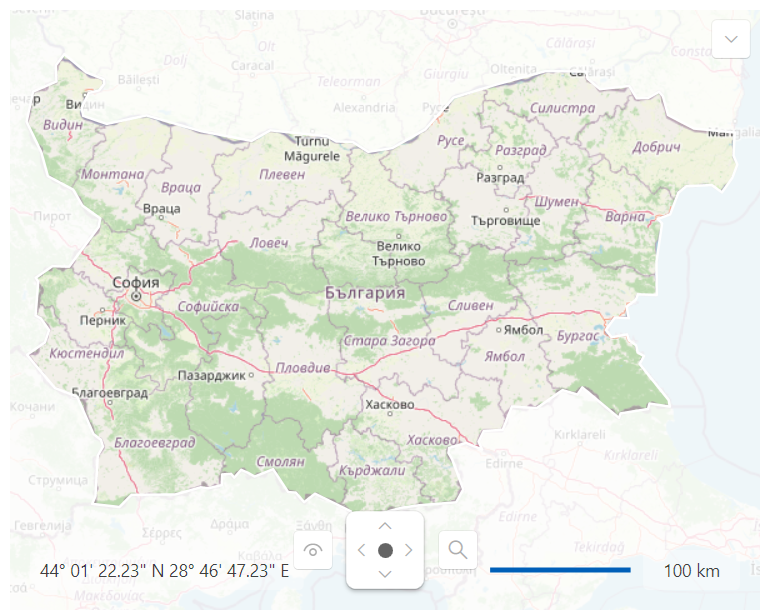
Here is a snapshot of the result:
## See Also
* [Dynamic Layer](https://www.telerik.com/products/wpf/documentation/controls/radmap/features/dynamic-layer)
* [Navigation](https://www.telerik.com/products/wpf/documentation/controls/radmap/features/navigation)
* [Map Shapes](https://www.telerik.com/products/wpf/documentation/controls/radmap/features/information-layer/map-shapes)