# Extended Data
The **MapShape** object exposes a property called **ExtendedData**. It allows you to attach additional data to the shape. For example, if a shape represents a country on the map, you can use the **ExtendedData** property to attach information about the country such as Area, Capitol, Population etc. Later this data can be accessed through the **ExtendedData** property.
> tip To learn more about the **MapShape** objects read [here](https://www.telerik.com/products/wpf/documentation/controls/radmap/features/information-layer/map-shapes).
> The **ExtendedData** represents a set of properties and their values. To access a value you have to use the property name as a key.
This topic will explain the following:
* [Extended Data and MapShapeReader](https://www.telerik.com/products/wpf/documentation/controls/radmap/features/information-layer/extended-data#extended-data-and-mapshapereader)
* [Manual Extended Data creation](https://www.telerik.com/products/wpf/documentation/controls/radmap/features/information-layer/extended-data#manual-extended-data-creation)
* [Extended Data Converter](https://www.telerik.com/products/wpf/documentation/controls/radmap/features/information-layer/extended-data#extended-data-converter)
## Extended Data and MapShapeReader
When generating shapes automatically from the various data formats via **MapShapeReader**, the **Extended Data** gets automatically extracted from the files and stored inside the **ExtendedData** property. This way you can directly use it where needed.
> tip To learn more about the **MapShapeReader** object read [here](https://www.telerik.com/products/wpf/documentation/controls/radmap/features/information-layer/shape-reder).
## Manual Extended Data creation
In case you are manually generating the shapes inside a layer, you have to manually wrap and pass the data to the ExtendedData property. This one by using the **ExtendedData** and the **ExtendedPropertySet** classes. Here is an example:
```XAML
```
```C#
// Create extended property set.
// It can be shared between the number
// of the map shapes.
ExtendedPropertySet propertySet = new ExtendedPropertySet();
propertySet.RegisterProperty("Name", "City Name", typeof(string), String.Empty);
propertySet.RegisterProperty("Population", "Population", typeof(int), 0);
MapEllipse sofiaEllipse = new MapEllipse()
{
ShapeFill = new MapShapeFill()
{
Stroke = new SolidColorBrush(Colors.Red),
StrokeThickness = 2,
Fill = new SolidColorBrush(Colors.Transparent)
},
Width = 20,
Height = 20,
Location = new Location(42.6957539183824, 23.3327663758679),
};
// Create extended data for the ellipse
// using existing property set.
ExtendedData sofiaData = new ExtendedData(propertySet);
// Set the extended properties.
sofiaData.SetValue("Name", "Sofia");
sofiaData.SetValue("Population", 1300000);
// Assign extended data to the map shape.
sofiaEllipse.ExtendedData = sofiaData;
this.informationLayer.Items.Add(sofiaEllipse);
```
```VB.NET
' Create extended property set.'
' It can be shared between the number'
' of the map shapes.'
Dim propertySet As New ExtendedPropertySet()
propertySet.RegisterProperty("Name", "City Name", GetType(String), String.Empty)
propertySet.RegisterProperty("Population", "Population", GetType(Integer), 0)
Dim sofiaEllipse As New MapEllipse() With {.ShapeFill = New MapShapeFill() With {.Stroke = New SolidColorBrush(Colors.Red), .StrokeThickness = 2, .Fill = New SolidColorBrush(Colors.Transparent)}, .Width = 20, .Height = 20, .Location = New Location(42.6957539183824, 23.3327663758679)}
' Create extended data for the ellipse'
' using existing property set.'
Dim sofiaData As New ExtendedData(propertySet)
' Set the extended properties.'
sofiaData.SetValue("Name", "Sofia")
sofiaData.SetValue("Population", 1300000)
' Assign extended data to the map shape.'
sofiaEllipse.ExtendedData = sofiaData
Me.informationLayer.Items.Add(sofiaEllipse)
```
## Extended Data Converter
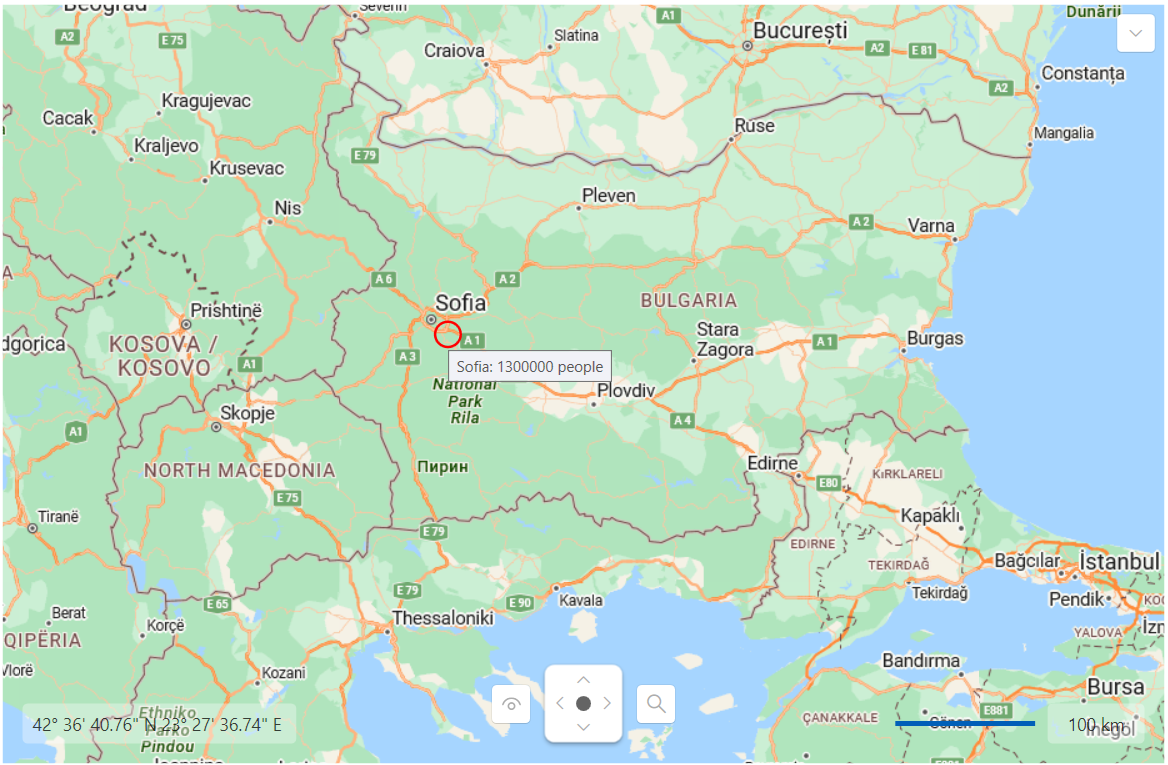
To access the data stored in the **ExtendedData** property simply bind directly to it and use the **ExtendedDataConverter** class, that comes out of the box with the **RadMap**. To get the desired value you have to also pass the name of the respective property from the set as the **ConverterParameter**. Here is an example, based on the one in the previous section:
> tip You can pass a string to the ConvertParameter that combines the values of two or more properties from the Extended Data.
```XAML
```
```C#
ExtendedPropertySet propertySet = new ExtendedPropertySet();
propertySet.RegisterProperty("Name", "City Name", typeof(string), String.Empty);
propertySet.RegisterProperty("Population", "Population", typeof(int), 0);
MapEllipse sofiaEllipse = new MapEllipse()
{
ShapeFill = new MapShapeFill()
{
Stroke = new SolidColorBrush(Colors.Red),
StrokeThickness = 2,
Fill = new SolidColorBrush(Colors.Transparent)
},
Width = 20,
Height = 20,
Location = new Location(42.6957539183824, 23.3327663758679),
};
ExtendedData sofiaData = new ExtendedData(propertySet);
sofiaData.SetValue("Name", "Sofia");
sofiaData.SetValue("Population", 1300000);
sofiaEllipse.ExtendedData = sofiaData;
// Assign tooltip which uses the extended properties.
ToolTip tooltip = new ToolTip();
Binding tooltipBinding = new Binding()
{
Converter = new ExtendedDataConverter(),
ConverterParameter = "{Name}: {Population} people",
Source = sofiaEllipse.ExtendedData
};
tooltip.SetBinding(ContentProperty, tooltipBinding);
ToolTipService.SetToolTip(sofiaEllipse, tooltip);
this.informationLayer.Items.Add(sofiaEllipse);
```
```VB.NET
Dim propertySet As New ExtendedPropertySet()
propertySet.RegisterProperty("Name", "City Name", GetType(String), String.Empty)
propertySet.RegisterProperty("Population", "Population", GetType(Integer), 0)
Dim sofiaEllipse As New MapEllipse() With {.ShapeFill = New MapShapeFill() With {.Stroke = New SolidColorBrush(Colors.Red), .StrokeThickness = 2, .Fill = New SolidColorBrush(Colors.Transparent)}, .Width = 20, .Height = 20, .Location = New Location(42.6957539183824, 23.3327663758679)}
Dim sofiaData As New ExtendedData(propertySet)
sofiaData.SetValue("Name", "Sofia")
sofiaData.SetValue("Population", 1300000)
sofiaEllipse.ExtendedData = sofiaData
' Assign tooltip which uses the extended properties.'
Dim _tooltip As New ToolTip()
Dim tooltipBinding As New Binding() With {.Converter = New ExtendedDataConverter(), .ConverterParameter = "{Name}: {Population} people", .Source = sofiaEllipse.ExtendedData}
_tooltip.SetBinding(ContentProperty, tooltipBinding)
ToolTipService.SetToolTip(sofiaEllipse, _tooltip)
Me.informationLayer.Items.Add(sofiaEllipse)
```
Here is a snapshot of the result: