# Row/Column Headers
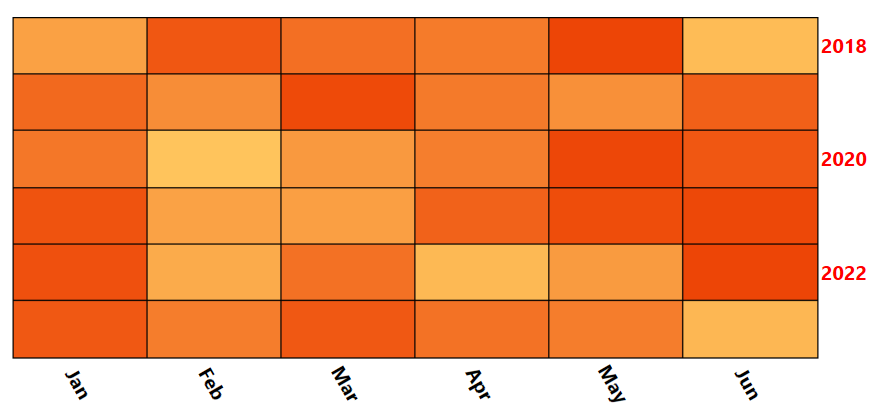
The Row/Column headers of the RadHeatMap can be further customized through the **RowHeaderSettings** and **ColumnHeaderSettings** properties.
## Row Headers
The customization of the row headers is possible through the **RowHeaderSettings** property of the RadHeatMap. This property is of type **HeatMapRowHeaderSettings** object. Except for exposing the common properties for styling the labels, the **HeatMapRowHeaderSettings** expose an additional one to change the position of the label to the right side of the RadHeatMap.
* **LabelsPanelPosition**: A property of type **HeatMapRowLabelsPanelPosition** that gets or sets the row headers position. This is an enumeration and it allows the following values:
* **Left**: The row labels will be position on the left side of the RadHeatMap. (Default value)
* **Right**: The row labels will be position on the right side of the RadHeatMap.
**Example 1: Modifying row headers**
```XAML
```
## Column Headers
The customization of the column headers is possible through the **ColumnHeaderSettings** property of the RadHeatMap. This property is of type **HeatMapColumnHeaderSettings** object. Except exposing the common properties (LabelStyle, HoveredLabelStyle, LabelFormat, etc.) for styling the labels, the **HeatMapColumnHeaderSettings** provide two additional properties to change the position of the column headers and to rotate the labels.
* **LabelsPanelPosition**: A property of type **HeatMapColumnLabelsPanelPosition** that gets or sets the column headers position. This is an enumeration and it allows the following values:
* **Top**: The column headers will be position at the top of the RadHeatMap. (Default value)
* **Bottom**: The column headers will be position at the bottom of the RadHeatMap.
* **LabelRotationAngle**: A property of type double that gets or sets the rotation angle applied to the label.
**Example 2: Modifying column headers**
```XAML
```
### Example
For demonstration purposes, we will use a simple class that will represent one cell of the RadHeatMap control. This class will expose three properties:
* **Row:** А string property which gets or sets the row name of the corresponding cell.
* **Column:** А string property which gets or sets the column name of the corresponding cell.
* **Value:** Аn integer property which gets or sets the value of the corresponding cell.
**Example 3: Creating the model**
```C#
public class TempInfo
{
public int Year { get; set; }
public string Month { get; set; }
public double Temperature { get; set; }
}
```
```VB.NET
Public Class TempInfo
Public Property Year As Integer
Public Property Month As String
Public Property Temperature As Double
End Class
```
To fill the RadHeatMap with sample data we can create a list of *TempInfo* objects and set it as DataContext of the control.
**Example 4: Populating the RadHeatMap control**
```C#
public partial class MainWindow : Window
{
public MainWindow()
{
this.InitializeComponent();
this.PrepareData();
}
private void PrepareData()
{
int year = 2018;
string[] months = new string[6] { "Jan", "Feb", "Mar", "Apr", "May", "Jun" };
var randomNumberGenerator = new Random();
var source = new ObservableCollection();
for (int i = 0; i < months.Length; i++)
{
for (int k = 0; k < 6; k++)
{
var info = new TempInfo() { Year = year + k, Month = months[i], Temperature = randomNumberGenerator.Next(10, 300) };
source.Add(info);
}
}
this.DataContext = source;
}
}
```
```VB.NET
Public Partial Class MainWindow
Inherits Window
Public Sub New()
Me.InitializeComponent()
Me.PrepareData()
End Sub
Private Sub PrepareData()
Dim year As Integer = 2018
Dim months As String() = New String(5) {"Jan", "Feb", "Mar", "Apr", "May", "Jun"}
Dim randomNumberGenerator = New Random()
Dim source = New ObservableCollection(Of TempInfo)()
For i As Integer = 0 To months.Length - 1
For k As Integer = 0 To 6 - 1
Dim info = New TempInfo() With {
.Year = year + k,
.Month = months(i),
.Temperature = randomNumberGenerator.[Next](10, 300)
}
source.Add(info)
Next
Next
Me.DataContext = source
End Sub
End Class
```
After having the sample data ready, we can go in the XAML code and modify row/column headers.
**Example 4: Customizing the Row/Column Headers**
```XAML
```
> caption RadHeatMap with customized row/column headers
## See Also
* [Getting Started](https://www.telerik.com/products/wpf/documentation/controls/radheatmap/getting-started)
* [Labels](https://www.telerik.com/products/wpf/documentation/controls/radheatmap/labels)
* [Selection](https://www.telerik.com/products/wpf/documentation/controls/radheatmap/selection)
* [Populating With Data](https://www.telerik.com/products/wpf/documentation/controls/radheatmap/populating-with-data)