# Styling the GridViewNewRow
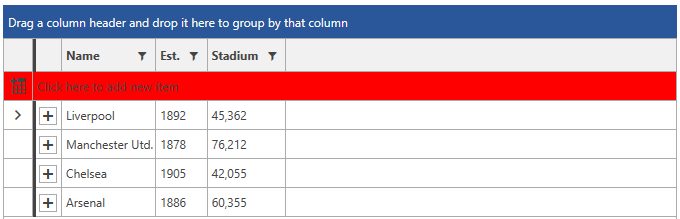
In this article we will show how you can explicitly or implicitly style the GridViewNewRow.
## Targeting the GridViewNewRow Element
In order to style the GridViewNewRow, you should create an appropriate style targeting the **GridViewNewRow** element.
You have two options:
* To create an empty style and set it up on your own.
* To copy the default style of the control and modify it.
> To learn how to modify the default GridViewNewRow style, please refer to the [Modifying Default Styles](https://www.telerik.com/products/wpf/documentation/controls/radgridview/styles-and-templates/modifying-default-styles) article.
**Example 1: Styling the GridViewNewRow implicitly**
```XAML
```
**Example 2: Styling the GridViewNewRow explicitly**
```XAML
```
> If you're using [Implicit Styles](https://www.telerik.com/products/wpf/documentation/styling-and-appearance/styling-apperance-setting-a-theme-overview), you should base your style on the **GridViewNewRowStyle**.
> caption RadGridView with styled GridViewNewRow in the Office 2016 theme
## See Also
* [Styling Rows](https://www.telerik.com/products/wpf/documentation/controls/radgridview/styles-and-templates/styling-a-row)
* [Alternating Rows](https://www.telerik.com/products/wpf/documentation/controls/radgridview/rows/alternating-rows)
* [Styling the Row Details](https://www.telerik.com/products/wpf/documentation/controls/radgridview/styles-and-templates/styling-row-details)
* [Styling the Group Row](https://www.telerik.com/products/wpf/documentation/controls/radgridview/styles-and-templates/styling-group-row)
* [Styling the Header Row](https://www.telerik.com/products/wpf/documentation/controls/radgridview/styles-and-templates/styling-header-row)