# RowStyleSelector
This article illustrates how to conditionally style rows through RadGridView's [RowStyleSelector](https://www.telerik.com/products/wpf/documentation/controls/radgridview/style-selectors/rowstyleselector#rowstyleselector) and [AlternateRowStyleSelector](https://www.telerik.com/products/wpf/documentation/controls/radgridview/style-selectors/rowstyleselector#alternaterowstyleselector) properties.
## RowStyleSelector
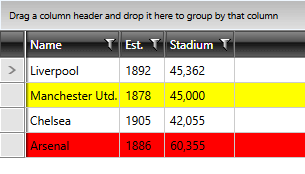
Assume we have RadGridView bound to a collection of Clubs. Each Club has a property StadiumCapacity. What we want to achieve is to set the background color of the rows to **Red if the capacity > 50 000 or Yellow otherwise**:
> caption The expected result

To do so follow these steps:
1. Create a new class which inherits the **StyleSelector** class (which resides in the
**System.Windows.Controls** assembly).
2. Override its **SelectStyle** method. Based on your conditions - you return the proper Style that will be applied to the framework element (row in our case).
**Example 1: The StadiumCapacityStyle class**
```C#
public class StadiumCapacityStyle : StyleSelector
{
public override Style SelectStyle(object item, DependencyObject container)
{
if (item is Club)
{
Club club = item as Club;
if (club.StadiumCapacity > 50000)
{
return BigStadiumStyle;
}
else
{
return SmallStadiumStyle;
}
}
return null;
}
public Style BigStadiumStyle { get; set; }
public Style SmallStadiumStyle { get; set; }
}
```
```VB.NET
Public Class StadiumCapacityStyle
Inherits StyleSelector
Public Overrides Function SelectStyle(item As Object, container As DependencyObject) As Style
If TypeOf item Is Club Then
Dim club As Club = TryCast(item, Club)
If club.StadiumCapacity > 50000 Then
Return BigStadiumStyle
Else
Return SmallStadiumStyle
End If
End If
Return Nothing
End Function
Public Property BigStadiumStyle() As Style
Get
Return m_BigStadiumStyle
End Get
Set
m_BigStadiumStyle = Value
End Set
End Property
Private m_BigStadiumStyle As Style
Public Property SmallStadiumStyle() As Style
Get
Return m_SmallStadiumStyle
End Get
Set
m_SmallStadiumStyle = Value
End Set
End Property
Private m_SmallStadiumStyle As Style
End Class
```
In this case we have two different styles that could be applied:
* **BigStadiumStyle**
* **SmallStadiumStyle**.
Depending on the underlying data you cab select which style to apply.
3.In the XAML file define the style selector as a resource and set the properties of the **BigStadiumStyle** and **SmallStadiumStyle**:
**Example 2: Set the different styles for the style selector**
```XAML
```
> The **"my:"** prefix before **StadiumCapacityStyle** specifies the mapping for the namespace of the project: **xmlns:my="**
If you are using our [Implicit Themes](https://www.telerik.com/products/wpf/documentation/styling-and-appearance/styling-apperance-setting-a-theme-overview), you should base the style on the one defined for the corresponding theme:
**Example 3: Base the style when using implicit styles**
```XAML
```
4.Finally, set the **RowStyleSelector** property:
**Example 4: Set RadGridView's RowStyleSelector**
```XAML
```
> Since the virtualization of the control is turned on by default, it is not recommended to work with the visual elements (i.e. GridViewRow) and their properties. You should not set properties of GridViewRow inside SelectStyle method. [Read mode on UI Virtualization](https://www.telerik.com/products/wpf/documentation/controls/radgridview/features/ui-virtualization).
> tip You can download a runnable project of the previous example from our online SDK repository [here](https://github.com/telerik/xaml-sdk/), the example is listed as **GridView/RowStyleSelector**.
## AlternateRowStyleSelector
If you've set the **AlternationCount** property, you can apply conditional styles only on the [alternating rows](https://www.telerik.com/products/wpf/documentation/controls/radgridview/rows/alternating-rows) by specifying an **AlternateRowStyleSelector**.
**Example 5: Set RadGridView's AlternateRowStyleSelector**
```XAML
```
**Figure 2** shows the result of using the same StyleSelector from the previous example, but setting it as the AlternateRowStyleSelector for the RadGridView.
> caption The alternating rows styled using the AlternateRowStyleSelector property
## See Also
* [Styling Rows](https://www.telerik.com/products/wpf/documentation/controls/radgridview/styles-and-templates/styling-a-row)
* [UI Virtualization](https://www.telerik.com/products/wpf/documentation/controls/radgridview/features/ui-virtualization)