# GroupFooterRowStyleSelector
The **GroupFooterRowStyleSelector** property of RadGridView can be used to style group footer rows differently based on a specific condition.
> important Bear in mind that the **GroupFooterRowStyle** takes precedence over the **GroupFooterRowStyleSelector** and will overwrite it if both are defined simultaneously.
To do so, first create a new class that inherits the **StyleSelector** class and override its **SelectStyle** method:
**Example 1: The GroupFooterRowStyleSelector class**
```C#
public class GroupFooterRowStyleSelector : StyleSelector
{
public override Style SelectStyle(object item, DependencyObject container)
{
var group = item as QueryableCollectionViewGroup;
if (group != null)
{
if (group.ItemCount > 1)
{
return BigGroupStyle;
}
else
{
return SmallGroupStyle;
}
}
return null;
}
public Style BigGroupStyle { get; set; }
public Style SmallGroupStyle { get; set; }
}
```
```VB.NET
Public Class GroupFooterRowStyleSelector
Inherits StyleSelector
Public Overrides Function SelectStyle(item As Object, container As DependencyObject) As Style
Dim group = TryCast(item, CollectionViewGroup)
If group IsNot Nothing Then
If group.ItemCount > 1 Then
Return BigGroupStyle
Else
Return SmallGroupStyle
End If
End If
Return Nothing
End Function
Public Property BigGroupStyle() As Style
Get
Return m_BigGroupStyle
End Get
Set
m_BigGroupStyle = Value
End Set
End Property
Private m_BigGroupStyle As Style
Public Property SmallGroupStyle() As Style
Get
Return m_SmallGroupStyle
End Get
Set
m_SmallGroupStyle = Value
End Set
End Property
Private m_SmallGroupStyle As Style
End Class
```
In the XAML file, define the style selector as a resource and set the properties of the **BigGroupStyle** and **SmallGroupStyle**:
**Example 2: Setting the BigGroupStyle and SmallGroupStyle**
```XAML
```
> The **"my:"** prefix before **GroupFooterRowStyleSelector** specifies the mapping for the namespace of the project: **xmlns:my="..."**
Finally, set the **GroupFooterRowStyleSelector** property:
**Example 3: Setting the GroupFooterRowStyleSelector property**
```XAML
```
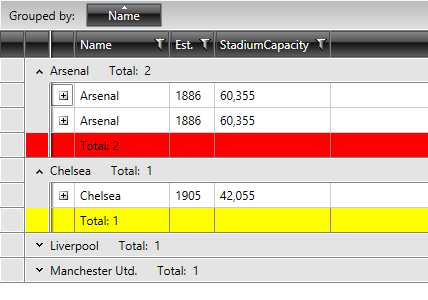
And here is the final result:
> caption The group footer rows styled using the GroupFooterRowStyleSelector property
## See Also
* [Styling Group Row](https://www.telerik.com/products/wpf/documentation/controls/radgridview/styles-and-templates/styling-group-row)
* [Styling Group Footers](https://www.telerik.com/products/wpf/documentation/controls/radgridview/styles-and-templates/styling-group-footers)