# External Row Details
> The External RowDetails functionality is available only if the **SelectionUnit** is **FullRow** or **Mixed**. For the **Mixed SelectionUnit** the selection has to be applied through the **row indicator**.
In order to display Row Details outside of the **RadGridView**, place a **DetailsPresenter** control somewhere around your **RadGridView**. The only thing that you need to do in order to synchronize the **DetailsPresenter** with the **RadGridView** is to connect its **DetailsProvider** property to the **RowDetailsProvider** property of the **RadGridView**.
> tip The **DetailsPresenter** control used for displaying external details is exactly the same control internally used by the **RadGridView** rows.
The **RowDetailsProvider** takes care to passing the needed data (the data template, the row details style and etc) to the presenter. It doesn't matter if it is internal or external. Each time a different row is selected or the template is changed, the grid will communicate this change via its **RowDetailsProvider** property and update the connected **DetailsPresenter** automatically.
Also, you may want to set the **RowDetailsVisibilityMode** property of the grid view to **Collapsed** in order to prevent the row details to show both inside and outside the **RadGridView**.
**Example 1: Setting the RowDetailsVisibilityMode to Collapsed**
```XAML
```
**Example 2: Setting the DetailsProvider**
```C#
this.ExternalPresenter.DetailsProvider = this.radGridView.RowDetailsProvider;
```
```VB.NET
Me.ExternalPresenter.DetailsProvider = Me.radGridView.RowDetailsProvider
```
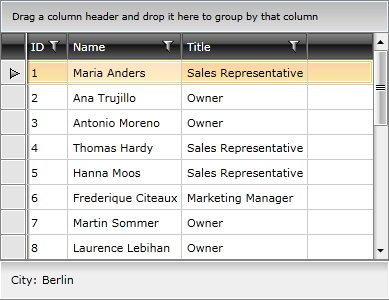
> You can see that the **RowDetailsTemplate** must be defined in the **RadGridView** as it is passed by the **RowDetailsProvider** to both the internal and the external presenter. The same applies for the **RowDetailsStyle**.
## See Also
* [RowDetails Overview](https://www.telerik.com/products/wpf/documentation/controls/radgridview/row-details/overview)
* [Toggle RowDetails Column](https://www.telerik.com/products/wpf/documentation/controls/radgridview/columns/columntypes/column-types-toggle-rowdetails-column)
* [Row Details Template](https://www.telerik.com/products/wpf/documentation/controls/radgridview/row-details/template)
* [Row Details Visibility](https://www.telerik.com/products/wpf/documentation/controls/radgridview/row-details/visibility)
* [Customizing the Row Details](https://www.telerik.com/products/wpf/documentation/controls/radgridview/row-details/customizing-the-row-details)