# Loading Data from WCF Services
The purpose of this tutorial is to show you how to populate **RadGridView** with data from a **WCF Service**:
> This tutorial will use the **Northwind** database, which can be downloaded from [here](http://www.microsoft.com/downloads/details.aspx?FamilyID=06616212-0356-46A0-8DA2-EEBC53A68034\&displaylang=en).
Before proceeding further with this tutorial you need to create a new application and add a **RadGridView** declaration in your XAML:
```XAML
```
## Plain Method Calls
* Add a reference to your WCF Service.
* Switch to the code-behind and create a new instance of your WCF Service client.
```C#
WcfServiceClient serviceClient = new WcfServiceClient();
```
```VB.NET
Private serviceClient As New WcfServiceClient()
```
> tip For more information about how to add a reference to a WCF Service and how to create a new instance of a WCF Service client, take a look at the [Consuming WCF Service](http://www.telerik.com/help/wpf/consuming-data-wcf-service.html) topic.
* The gridview control will be populated with all **Customers** from the **Northwind** database. Add the following code which will make the initial load of the objects.
```C#
private void BeginRequest()
{
serviceClient.LoadCustomersCompleted += new EventHandler(serviceClient_LoadCustomersCompleted);
serviceClient.LoadCustomersAsync();
}
private void serviceClient_LoadCustomersCompleted(object sender, LoadCustomersCompletedEventArgs e)
{
var customers = e.Result;
this.radGridView.ItemsSource = customers;
}
```
```VB.NET
Private Sub BeginRequest()
AddHandler serviceClient.LoadCustomersCompleted, AddressOf serviceClient_LoadCustomersCompleted
serviceClient.LoadCustomersAsync()
End Sub
Private Sub serviceClient_LoadCustomersCompleted(ByVal sender As Object, ByVal e As LoadCustomersCompletedEventArgs)
Dim customers = e.Result
Me.radGridView.ItemsSource = customers
End Sub
```
```C#
this.radGridView.ItemsSource = serviceClient.LoadCustomers();
```
```VB.NET
Me.radGridView.ItemsSource = serviceClient.LoadCustomers()
```
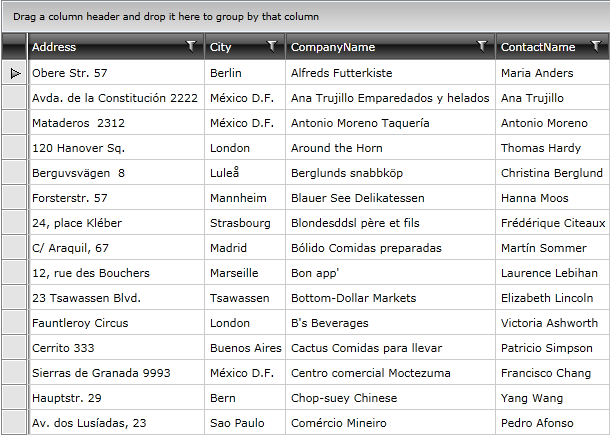
Run your demo, the result can be seen on the next image:
## Using MVVM Approach
This section will show you how to populate your **RadGridView** control in a MVVM manner. The **RadGridView** will be bound to a data source object, that has a property **Customers**. When the control is loaded all customers from the Customers table in the Northwind database are loaded asynchronously.
* Create a new class named **NorthwindDataSource**.
```C#
public class NorthwindDataSource
{
}
```
```VB.NET
Public Class NorthwindDataSource
End Class
```
* Add a reference to your WCF Service
* In the **NorthwindDataSource** class add a reference to an **ObservableCollection of Customers**.
* In the **NorthwindDataSource** class add a reference to your WCF Service client:
```C#
public class NorthwindDataSource
{
private SampleWcfServiceClient serviceClient;
public NorthwindDataSource()
{
serviceClient = new SampleWcfServiceClient();
this.Customers = new ObservableCollection();
}
public ObservableCollection Customers
{
get;
set;
}
}
```
```VB.NET
Public Class NorthwindDataSource
Private serviceClient As SampleWcfServiceClient
Public Sub New()
serviceClient = New SampleWcfServiceClient()
Me.Customers = New ObservableCollection(Of Customer)()
End Sub
Public Property Customers() As ObservableCollection(Of Customer)
End Class
```
> tip For more information about how to add a reference to a WCF Service and how to create a new instance of a WCF Service client, take a look at the [Consuming WCF Service](http://www.telerik.com/help/wpf/consuming-data-wcf-service.html) topic.
* Add the following code in the constructor of the **NorthwindDataSource**. It will make the initial load of all **Customers** from the database:
```C#
serviceClient.LoadCustomersCompleted += new EventHandler(serviceClient_LoadCustomersCompleted);
serviceClient.LoadCustomersAsync();
```
```C#
foreach (Customer c in serviceClient.LoadCustomers())
{
this.Customers.Add(c);
}
```
```VB.NET
AddHandler serviceClient.LoadCustomersCompleted, AddressOf serviceClient_LoadCustomersCompleted
serviceClient.LoadCustomersAsync()
```
```VB.NET
For Each c As Customer In serviceClient.LoadCustomers()
Me.Customers.Add(c)
Next c
```
```C#
if (e.Error == null && e.Result != null)
{
foreach (Customer c in e.Result)
{
this.Customers.Add(c);
}
}
```
```VB.NET
If e.Error Is Nothing AndAlso e.Result IsNot Nothing Then
For Each c As Customer In e.Result
Me.Customers.Add(c)
Next c
End If
```
* Declare the **NorthwindDataSource** object as a resource in your application.
```XAML
```
* Update your **RadGridView** declaration - set the **ItemsSource** property.
```XAML
```
Run your demo, the result can be seen on the next picture:

> tip If you need to define the columns manually take a look at the [Defining Columns](https://www.telerik.com/products/wpf/documentation/controls/radgridview/columns/defining-columns) topic.
## See Also
* [Using in-memory Data](https://www.telerik.com/products/wpf/documentation/controls/radgridview/populating-with-data/in-memory-date)
* [Loading Data from XML](https://www.telerik.com/products/wpf/documentation/controls/radgridview/populating-with-data/loading-data-from-xml)
* [Loading Data from ADO.NET Services](https://www.telerik.com/products/wpf/documentation/controls/radgridview/populating-with-data/loading-data-from-adonet-services)