# Loading Data from ADO.NET Services
The purpose of this tutorial is to show you how to populate a **RadGridView** with data from an **ADO.NET Data Service** in two ways:
* A straight-forward way - plain method calls
* Using MVVM approach.
> This tutorial will use the **Northwind** database, which can be downloaded from [here](https://github.com/microsoft/sql-server-samples/tree/master/samples/databases/northwind-pubs).
Before proceeding further with this tutorial you need to create a new application and add a **RadGridView** declaration in your XAML:
```XAML
```
## Plain Method Calls
* Add a reference to your ADO.NET Data Service.
* Switch to the code-behind and add a reference to the **NorthwindEntities** object.
```C#
NorthwindEntities dbContext = new NorthwindEntities(new Uri("GridViewDataService.svc", UriKind.Relative));
```
```VB.NET
Private dbContext As New NorthwindEntities(New Uri("GridViewDataService.svc", UriKind.Relative))
```
```C#
NorthwindEntities dbContext2 = new NorthwindEntities(new Uri("Enter your service address here"));
```
```VB.NET
Private dbContext2 As New NorthwindEntities(New Uri("Enter your service address here"))
```
> tip For more information about how to add a reference to an ADO.NET Data Service and how to create a new instance of the exposed entity, take a look at the [Consuming ADO.NET Data Service](http://www.telerik.com/help/wpf/consuming-data-ado-net-data-service.html) topic.The gridview control will be populated with all **Customers** from the **Northwind** database. Add the following code which will make the initial load of the objects.
```C#
private void BeginRequest()
{
DataServiceQuery query = dbContext.CreateQuery("Customers");
query.BeginExecute(RequestCompleted, query);
}
private void RequestCompleted(IAsyncResult asyncResult)
{
DataServiceQuery query = asyncResult.AsyncState as DataServiceQuery;
var customers = query.EndExecute(asyncResult).ToList();
this.radGridView.ItemsSource = customers;
}
```
```VB.NET
Private Sub BeginRequest()
Dim query As DataServiceQuery(Of Customer) = dbContext.CreateQuery(Of Customer)("Customers")
query.BeginExecute(AddressOf RequestCompleted, query)
End Sub
Private Sub RequestCompleted(ByVal asyncResult As IAsyncResult)
Dim query As DataServiceQuery(Of Customer) = TryCast(asyncResult.AsyncState, DataServiceQuery(Of Customer))
Dim customers = query.EndExecute(asyncResult).ToList()
Me.radGridView.ItemsSource = customers
End Sub
```
```C#
this.radGridView.ItemsSource = dbContext.Customers.Execute().ToList();
```
```VB.NET
Me.radGridView.ItemsSource = dbContext.Customers.Execute().ToList()
'
```
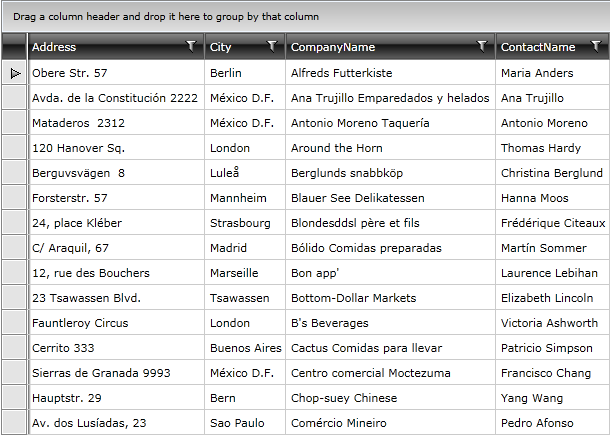
Run your demo, the result can be seen on the next image:
## Using MVVM Approach
This section will show you how to populate your **RadGridView** control in a MVVM manner. **RadGridView** will be bound to a data source object, that has a property **Customers**. When the control is loaded all customers from the Customers table in the Northwind database are loaded.
* Create a new class named **NorthwindDataSource**.
```C#
public class NorthwindDataSource
{
}
```
```VB.NET
Public Class NorthwindDataSource
End Class
```
* Add a reference to your ADO.NET Data Service.
* In the **NorthwindDataSource** class add a reference to an **ObservableCollection** of **Customers**.
* In the **NorthwindDataSource** class add a reference to the **NorthwindEntities** object:
```C#
public class NorthwindDataSource
{
private static NorthwindEntities northwindEntity;
public NorthwindDataSource()
{
northwindEntity = new NorthwindEntities(new Uri("GridViewDataService.svc", UriKind.Relative));
this.Customers = new ObservableCollection();
}
public ObservableCollection Customers
{
get;
set;
}
}
```
```VB.NET
Public Class NorthwindDataSource
Private Shared northwindEntity As NorthwindEntities
Public Sub New()
northwindEntity = New NorthwindEntities(New Uri("GridViewDataService.svc", UriKind.Relative))
Me.Customers = New ObservableCollection(Of Customer)()
End Sub
Public Property Customers() As ObservableCollection(Of Customer)
End Class
```
```C#
public class NorthwindDataSource
{
private static NorthwindEntities northwindEntity;
public NorthwindDataSource()
{
northwindEntity = new NorthwindEntities(new Uri("Enter your service address here"));
this.Customers = new ObservableCollection();
}
public ObservableCollection Customers
{
get;
set;
}
}
```
```VB.NET
Public Class NorthwindDataSource
Private Shared northwindEntity As NorthwindEntities
Public Sub New()
northwindEntity = New NorthwindEntities(New Uri("Enter your service address here"))
Me.Customers = New ObservableCollection(Of Customer)()
End Sub
Public Property Customers() As ObservableCollection(Of Customer)
End Class
```
* Add the following code in the constructor of the **NorthwindDataSource**. It will make the initial load of all **Customers** from the database:
```C#
northwindEntity.Customers.BeginExecute(
(IAsyncResult result) => EntitiesLoaded(result, this.Customers),
northwindEntity.Customers);
```
```VB.NET
northwindEntity.Customers.BeginExecute(Function(result As IAsyncResult) EntitiesLoaded(Of Customer)(result, Me.Customers), northwindEntity.Customers)
```
```C#
foreach (Customer c in northwindEntity.Customers.Execute())
{
this.Customers.Add(c);
}
```
```VB.NET
For Each c As Customer In northwindEntity.Customers.Execute()
Me.Customers.Add(c)
Next c
```
```C#
private static void EntitiesLoaded(IAsyncResult result, Collection entities)
{
DataServiceQuery query = result.AsyncState as DataServiceQuery;
foreach (T entity in query.EndExecute(result))
{
entities.Add(entity);
}
}
```
```VB.NET
Private Shared Sub EntitiesLoaded(Of T)(ByVal result As IAsyncResult, ByVal entities As Collection(Of T))
Dim query As DataServiceQuery(Of T) = TryCast(result.AsyncState, DataServiceQuery(Of T))
For Each entity As T In query.EndExecute(result)
entities.Add(entity)
Next entity
End Sub
```
* Declare the **NorthwindDataSource** object as a resource in your application.
```XAML
```
* Update your **RadGridView** declaration - set the **ItemsSource** property.
```XAML
```
Run your demo, the result can be seen on the next picture:

> tip If you need to define the columns manually take a look at the [Defining Columns](https://www.telerik.com/products/wpf/documentation/controls/radgridview/columns/defining-columns) topic.
## See Also
* [Using in-memory Data](https://www.telerik.com/products/wpf/documentation/controls/radgridview/populating-with-data/in-memory-date)
* [Loading Data from XML](https://www.telerik.com/products/wpf/documentation/controls/radgridview/populating-with-data/loading-data-from-xml)
* [Loading Data from WCF Services](https://www.telerik.com/products/wpf/documentation/controls/radgridview/populating-with-data/loading-data-from-wcf-services)