# Modifying Group Panel
**RadGridView** exposes two properties - **GroupPanelBackground** and **GroupPanelForeground** which allow you to make basic modifications of the **Group Panel** (area).
> tip The **GridView** also exposes two style properties - **GroupPanelStyle** and **GroupPanelItemStyle**. To learn how to use them in order to style the **Group Panel** read [here](https://www.telerik.com/products/wpf/documentation/controls/radgridview/styles-and-templates/styling-the-group-panel).
> [Here](https://www.telerik.com/products/wpf/documentation/controls/radgridview/general-information/visual-structure) you can read more information about the visual structure of the **RadGridView**.
## Setting the GroupPanelBackground
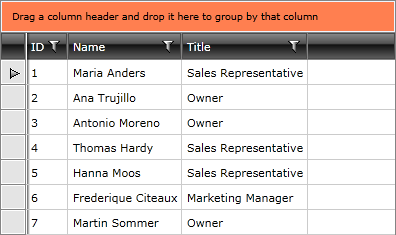
In the following example the group panel background is set to YellowGreen.
```XAML
```
## Setting the GroupPanelForeground
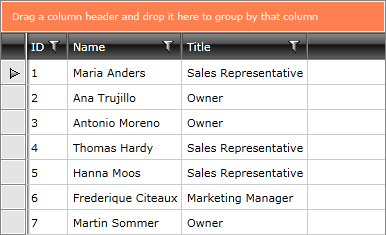
Similarly to group panel's background you may also change the group panel's foreground. Consider the following example.
```XAML
```
And the result is:
Check out the following topics which explain in great details the **RadGridView**'s grouping functionality.
* Learn the [basic](https://www.telerik.com/products/wpf/documentation/controls/radgridview/grouping/basics) of the grouping behavior.
* Using group [aggregates](https://www.telerik.com/products/wpf/documentation/controls/radgridview/grouping/aggregates).
* [Implement](https://www.telerik.com/products/wpf/documentation/controls/radgridview/grouping/programmatic-grouping) programmatic grouping.
* Use [group footers](https://www.telerik.com/products/wpf/documentation/controls/radgridview/grouping/group-footers) for displaying summaries.
## See Also
* [Style Group Panel](https://www.telerik.com/products/wpf/documentation/controls/radgridview/styles-and-templates/styling-the-group-panel)
* [Basic Filtering](https://www.telerik.com/products/wpf/documentation/controls/radgridview/filtering/basic)
* [Programmatic Filtering](https://www.telerik.com/products/wpf/documentation/controls/radgridview/filtering/programmatic)
* [Multiple Selection](https://www.telerik.com/products/wpf/documentation/controls/radgridview/selection/multiple-selection)