# Group Aggregates
When you are using [programmatic grouping](https://www.telerik.com/products/wpf/documentation/controls/radgridview/grouping/programmatic-grouping), you can add aggregate functions to the group rows. These functions allow you to display information about the data in the group such as first item, last item, count of items etc.
There are two main types of aggregate functions available which in turn serve as the base for the concrete implementations.
* **EnumerableAggregateFunction**: Represents an AggregateFunction that uses aggregate extension methods provided in [Enumerable](https://docs.microsoft.com/en-us/dotnet/api/system.linq.enumerable).
* **CountFunction**: Returns the **number of all items** in the column.
* **FirstFunction**: Returns the **first element** in the column according to the current sorting.
* **LastFunction**: Returns the **last element** in the column according to the current sorting.
* **EnumerableSelectorAggregateFunction**: Represents an AggregateFunction that uses aggregate extension methods provided in [Enumerable](https://docs.microsoft.com/en-us/dotnet/api/system.linq.enumerable) and uses its **SourceField** property as a member selector. If the SourceField property is not explicitly set, then the property specified for the **DataMemberBinding** of the column will be used.
* **AverageFunction**: Returns the **average** of the values in the column.
* **MaxFunction**: Returns the **maximum** value of the cell values in the column.
* **MinFunction**: Returns the **minimum** value of the cell values in the column.
* **SumFunction**: Returns the **sum** of all cell values in the column.
> tip You can also create your own custom functions similar to these by inheriting **Telerik.Windows.Data.EnumerableAggregateFunction** or **EnumerableSelectorAggregateFunction** class. An example can be found in the **Custom Aggregate Function** RadGridView example from our [demos](https://demos.telerik.com/wpf/).
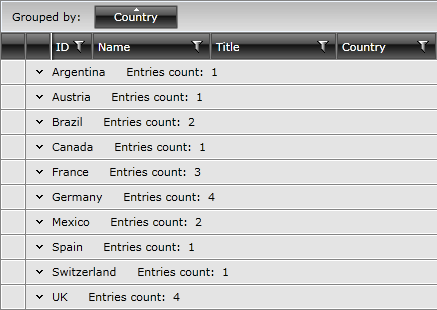
Each aggregate function has a caption and a result, which are displayed next to the group title.
**Example 1: Defining a GroupDescriptor with AggregateFunction**
```XAML
...
```
**Example 2: Defining a GroupDescriptor with AggregateFunction programmatically**
```C#
CountFunction f = new CountFunction();
f.Caption = "Entries Count: ";
GroupDescriptor countryDescriptor = new GroupDescriptor();
countryDescriptor.Member = "Country";
countryDescriptor.SortDirection = ListSortDirection.Ascending;
countryDescriptor.AggregateFunctions.Add(f );
this.radGridView.GroupDescriptors.Add(countryDescriptor );
```
```VB.NET
Dim f As New CountFunction()
f.Caption = "Entries Count: "
Dim countryDescriptor As New GroupDescriptor()
countryDescriptor.Member = "Country"
countryDescriptor.SortDirection = ListSortDirection.Ascending
countryDescriptor.AggregateFunctions.Add(f)
Me.radGridView.GroupDescriptors.Add(countryDescriptor)
```
> caption RadGridView with group aggregates
You can add multiple functions to the **AggregateFunctions** collection and they will be visualized one after another.
**Example 3: Defining a GroupDescriptor with multiple AggregateFunctions**
```XAML
...
```
**Example 4: Defining a GroupDescriptor with multiple AggregateFunctions programmatically**
```C#
CountFunction f = new CountFunction();
f.Caption = "Entries Count: ";
FirstFunction f1 = new FirstFunction();
f.Caption = "FirstEntry: ";
GroupDescriptor countryDescriptor = new GroupDescriptor();
countryDescriptor.Member = "Country";
countryDescriptor.SortDirection = ListSortDirection.Ascending;
countryDescriptor.AggregateFunctions.Add(f );
countryDescriptor.AggregateFunctions.Add(f1 );
this.radGridView.GroupDescriptors.Add(countryDescriptor );
```
```VB.NET
Dim f As New CountFunction()
f.Caption = "Entries Count: "
Dim f1 As New FirstFunction()
f.Caption = "FirstEntry: "
Dim countryDescriptor As New GroupDescriptor()
countryDescriptor.Member = "Country"
countryDescriptor.SortDirection = ListSortDirection.Ascending
countryDescriptor.AggregateFunctions.Add(f)
countryDescriptor.AggregateFunctions.Add(f1)
Me.radGridView.GroupDescriptors.Add(countryDescriptor)
```
> caption RadGridView with GroupDescriptor and AggregateFunctions defined
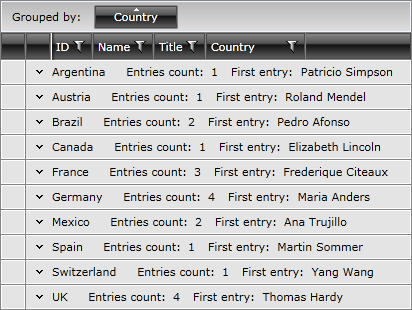
> The **FirstFunction** will display the value returned by the **ToString()** method of your business object.
## Show Group Header Aggregates
You can also add [aggregate functions on a column level](https://www.telerik.com/products/wpf/documentation/controls/radgridview/columns/aggregate-functions).
**Example 5: Aggregate functions on a column level**
```XAML
```
In this case, you can show the aggregate results for a particular group in a special row just below the group header row. This row is divided into cells which are aligned with the respective columns and show the aggregate results for the particular column.
This feature can be controlled by applying a **Style** targeting the **GroupHeaderRow** and setting its **ShowGroupHeaderColumnAggregates** property to **True**. As the GroupHeaderRow is only used in the **Flat** [GroupRenderMode](https://www.telerik.com/products/wpf/documentation/controls/radgridview/grouping/groupingmodes) of the control, this feature is only available in this mode.
**Example 6: Settng the ShowGroupHeaderColumnAggregates property of the GroupHeaderRow**
```XAML
```
> caption Aggregates aligned with columns
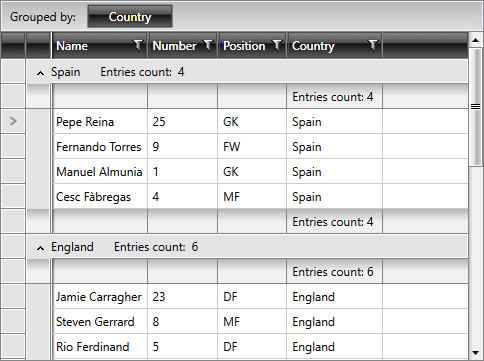
> The type of this row is **GridViewGroupFooterRow**, the same as the one shown when the **ShowGroupFooters** of the RadGridView control is set to **True**. The cells in turn are of the **GridViewGroupFooterCell** type.
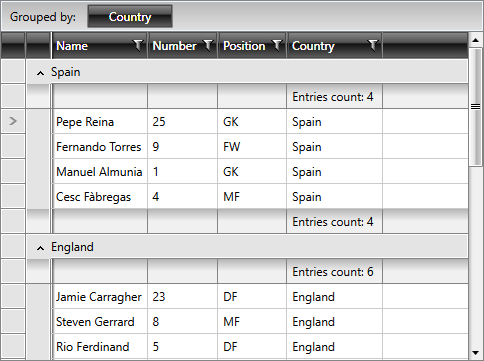
When using this feature, it is likely that you don't need the default group row aggregates to be shown any more. You can hide them by setting the **ShowHeaderAggregates** property of the GroupHeaderRow to **False**.
**Example 7: Setting the ShowHeaderAggregates property of GroupHeaderRow to False**
```XAML
```
> caption RadGridView with ShowHeaderAggregates set to false
## Align Aggregates in GroupHeaderRow
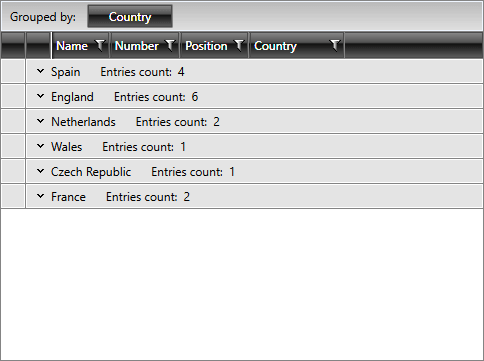
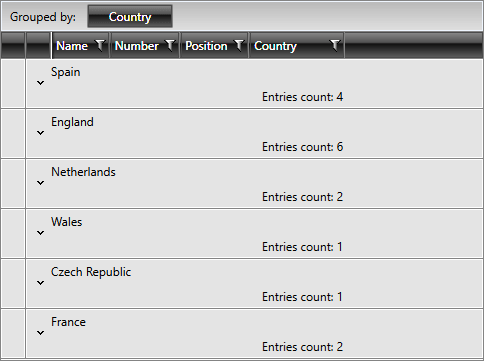
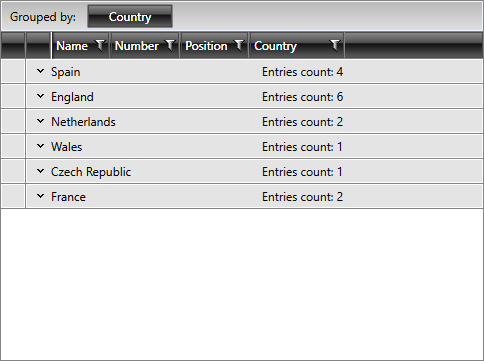
The aggregate results are shown right next to the group key by default. Via the **ColumnAggregatesAlignment** property of the RadGridView, you can place the results below the column for which they are defined. The property has the following possible values:
* **NoAlignment**: Aggregate results are not aligned to columns.
* **BelowGroupKey**: Aggregate results are aligned to columns and placed below the group key.
* **NextToGroupKey**: Aggregate results are aligned to columns and placed on the same row as the group key.
> caption RadGridView with ColumnAggregatesAlignment set to NoAlignment
> caption RadGridView with ColumnAggregatesAlignment set to BelowGroupKey
> caption RadGridView with ColumnAggregatesAlignment set to NextToGroupKey
## See Also
* [Aggregate Functions](https://www.telerik.com/products/wpf/documentation/controls/radgridview/columns/aggregate-functions)
* [Basic Grouping](https://www.telerik.com/products/wpf/documentation/controls/radgridview/grouping/basics)
* [Programmatic Grouping](https://www.telerik.com/products/wpf/documentation/controls/radgridview/grouping/programmatic-grouping)
* [Group Footers](https://www.telerik.com/products/wpf/documentation/controls/radgridview/grouping/group-footers)