# Merged Cells
As of **Q3 2014 we have introduced support for merged cells in RadGridView** control. As a result consecutive/serial cells with equal values can be merged vertically or horizontally.
> Merging the cells is only available with **GridViewDataColumn**.
> The only condition for two or more cells to be merged is for them to have equal values. You cannot enforce cells that do not have equal values to be merged.
For the purpose of this article, the data in RadGridView is populated similarly to as explained in [Getting Started with RadGridView](https://www.telerik.com/products/wpf/documentation/controls/radgridview/getting-started/getting-started2) article.
## MergedCellsDirection
When the RadGridView is setup, you can configure it to display the merged cells by specifying a proper value for the **MergedCellsDirection** property. It accepts the following values:
* **None**
* **Vertical**
* **Horizontal**
> important Merged Cells are only supported with **GroupRenderMode=”Flat”**. You can check the [Rendering Modes](https://www.telerik.com/products/wpf/documentation/controls/radgridview/grouping/groupingmodes) article for further details on it.
> Currently, frozen columns are not supported while having merged cells enabled. An exception will be thrown: "Cell merging is not supported when frozen columns are enabled.”.
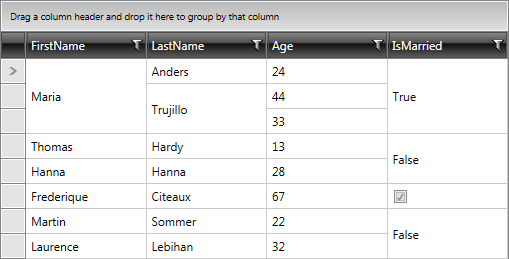
**Example 1: Configure RadGridView to merge cells vertically**
```XAML
```
> caption RadGridView with vertically merged cells
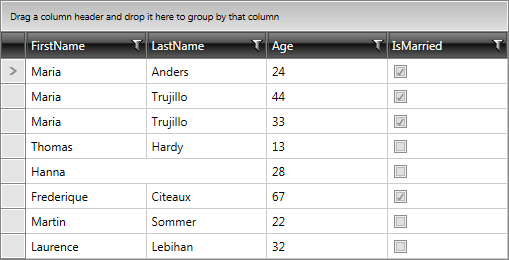
Similarly, you can set the cells to be merged horizontally configuring RadGridView with **MergedCellsDirection.Horizontal**.
**Example 2: Configure RadGridView to merge cells horizontally**
```XAML
```
> caption RadGridView with horizontally merged cells
## IsCellMergingEnabled
You can also configure merging for GridViewDataColumn through setting its **IsCellMergingEnabled** property. For example:
**Example 3: Configure cell merging per column**
```XAML
```
> Please note RadGridView's definition in **Example 3** is specific to illustrate it
> caption RadGridView with configured cell merging per column

## Merged Cells and RowDetails
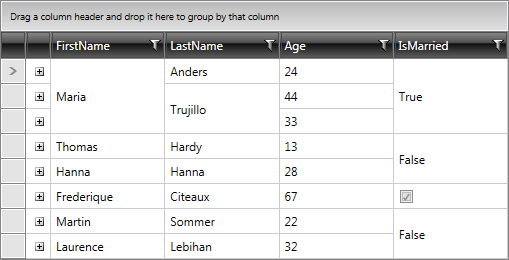
Merged cells are also supported when there are [RowDetails](https://www.telerik.com/products/wpf/documentation/controls/radgridview/row-details/overview)/[Hierarchy](https://www.telerik.com/products/wpf/documentation/controls/radgridview/hierarchical-gridview/hierachy-overview) defined for RadGridView.
**Example 4: Define RowDetailsTemplate**
```XAML
```
**Example 5: Specify RowDetailsTemplate for RadGridView**
```XAML
```
> caption RadGridView with merged cells and RowDetails defined
> caption RadGridView with merged cells and RowDetails expanded
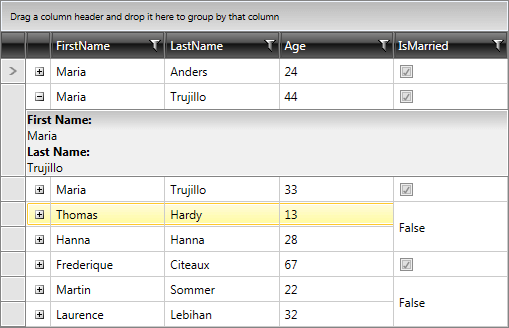
> Once the row details are expanded, the merged cell will be separated into two different subsets. The particular cell that is part of the expanded row will be considered as a single one instead.
## Known Limitations
* Validation is currently not fully supported. Some scenarios are covered when RadGridView is configured with **ValidatesOnDataErrors="InEditMode"**.
* Selection is currently not supported for the merged cells. When selecting a row, all the cells except for the merged one will show as selected.
* Frozen columns are not supported while having merged cells enabled. "Cell merging is not supported when frozen columns are enabled.” is to be thrown.
## See Also
* [Styling Merged Cells](https://www.telerik.com/products/wpf/documentation/controls/radgridview/styles-and-templates/styling-mergedcell)
* [Editing Control Templates](https://www.telerik.com/products/wpf/documentation/styling-and-appearance/styling-apperance-editing-control-templates)