# Validation Events
The validation events are meant to support the data validation of the user input. They occur when the new content entered by the user is about to be committed.
Currently the validation occurs on row and cell level. To get notified, you can use the following events exposed by the **RadGridView** control:
* [Validation Events Lifecycle](https://www.telerik.com/products/wpf/documentation/controls/radgridview/events/validation#validation-events-lifecycle)
* [CellValidating](https://www.telerik.com/products/wpf/documentation/controls/radgridview/events/validation#cellvalidating-event)
* [CellValidated](https://www.telerik.com/products/wpf/documentation/controls/radgridview/events/validation#cellvalidated-event)
* [RowValidating](https://www.telerik.com/products/wpf/documentation/controls/radgridview/events/validation#rowvalidating-event)
* [RowValidated](https://www.telerik.com/products/wpf/documentation/controls/radgridview/events/validation#rowvalidated-event)
## Validation Events Lifecycle
It is important to know that each one of the validation events is fired only when the user is trying to commit new data in the **RadGridView** control. They do not occur when the **RadGridView** loads data.
The **CellValidating** event occurs always before the **CellValidated** event when the edited cell is about to lose its focus. If the focus is moved to a cell in the same row, then no other events occur. If the focus is moved to a cell in another row, then both **RowValidating** and **RowValidated** are fired, containing the whole row data, including the new and the old values of the edited cells.
Both **CellValidating** and **RowValidating** events allow you to stop the commit process by setting the boolean property **IsValid** to **False**.
## CellValidating Event
The **CellValidating** event occurs when a cell is about to commit new content. It is always raised before the **CellValidated** event, which is described in the next section. **CellValidating** gives you the power to stop the commit process on a cell level obeying some internal rules of your application. For example, a cell might contain only values between 0 and 12, and all other values are considered invalid.
The parameters passed to the validating event handler are two:
* The `sender` argument contains the **RadGridView**. This argument is of type object, but can be cast to the **RadGridView** type.
* The event arguments of type **Telerik.Windows.Controls.GridViewCellValidatingEventArgs**. Some of its important properties are:
* **Cell**: The committed cell.
* **Row**: The committed row to which the cell belongs.
* **IsValid**: This property controls the commit process. If you set it to **False** the process will stop, the data will not be committed and **CellValidated** will not be raised.
* **NewValue**: The new value that is about to be committed.
* **OldValue**: The old value that will be replaced.
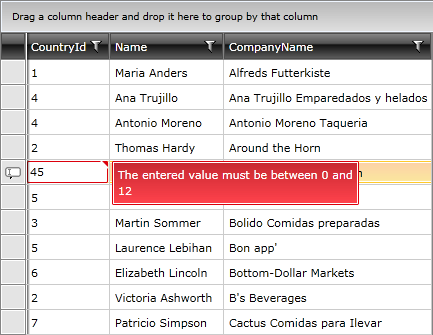
* **ErrorMessage**: Custom text message used to hint the user about the type of validation error. For example '*The entered value must be between 0 and 12*'.
You can subscribe to the **CellValidating** event declaratively or in code-behind like this:
```XAML
```
```C#
this.radGridView.CellValidating += radGridView_CellValidating;
```
```VB.NET
AddHandler Me.radGridView.CellValidating, AddressOf radGridView_CellValidating
```
> tip To stop the commit process of a cell just set the **IsValid** property of the **GridViewCellValidatingEventArgs** to **False**.
The code snippet below checks whether the value entered in the "CountryId" column falls between 0 and 12. If the rule is not satisfied then the commit process is cancelled.
```C#
private void radGridView_CellValidating(object sender, GridViewCellValidatingEventArgs e)
{
if (e.Cell.Column.UniqueName == "CountryId")
{
int newValue = Int32.Parse(e.NewValue.ToString());
if (newValue < 0 || newValue > 12)
{
e.IsValid = false;
e.ErrorMessage = "The entered value must be between 0 and 12";
}
}
}
```
```VB.NET
Private Sub radGridView_CellValidating(ByVal sender As Object, ByVal e As GridViewCellValidatingEventArgs)
If e.Cell.Column.UniqueName = "CountryId" Then
Dim newValue As Integer = Int32.Parse(e.NewValue.ToString())
If newValue < 0 OrElse newValue > 12 Then
e.IsValid = False
e.ErrorMessage = "The entered value must be between 0 and 12"
End If
End If
End Sub
```
And here is how the error message is displayed:
## CellValidated Event
The **CellValidated** event occurs when the cell has validated the new content. It is raised after the **CellValidating** event (when the **IsValid** is not set to False), described in the previous section.
The parameters passed to the validated event handler are two:
* The `sender` argument contains the **RadGridView**. This argument is of type object, but can be cast to the **RadGridView** type.
* The event arguments of type **Telerik.Windows.Controls.GridViewCellValidatedEventArgs**.
You can subscribe to the **CellValidated** event declaratively or in code-behind like this:
```XAML
```
```C#
this.radGridView.CellValidated += radGridView_CellValidated;
```
```VB.NET
AddHandler Me.radGridView.CellValidated, AddressOf radGridView_CellValidated
```
## RowValidating Event
The **RowValidating** event occurs when a row is loaded in the visual tree of the application. The event is raised before [RowValidated](https://www.telerik.com/products/wpf/documentation/controls/radgridview/events/validation#rowvalidated-event). RowValidating gives you the power to stop the commit process on a row level following some internal rules of your application. For example, it might not be allowed for a row to contain equal values in two specific columns as well as any other kind of relations between the values of a single row.
The parameters passed to the validating event handler are two:
* The `sender` argument contains the **RadGridView**. This argument is of type object, but can be cast to the **RadGridView** type.
* The event arguments of type **Telerik.Windows.Controls.GridViewRowValidatingEventArgs**. Some of its important properties are:
* **Row**: The committed row. You may use the Item property of the row to work with the new values.
* **IsValid**: Controls the commit process. If you set it to **False** the process will stop, the data will not be committed and **RowValidated** will not be raised.
* **OldValues**: The old values that will be replaced.
* **EditOperationType**: The type of the edit validation. The property is of type GridViewEditOperationType and determines the type of operation that happened - **Edit**, **Insert** or **None**.
**Edit** operation means that validated row has been edited.
**Insert** operation means that a new row was inserted.
**None** operation means that no data operation has been performed. This type appears when the GridViewRow elements are loaded in the visual tree of the application. Usually, this happens on load of the RadGridView control and when the rows get scrolled.
You can subscribe to the **RowValidating** event declaratively or in code-behind like this:
```XAML
```
```C#
this.radGridView.RowValidating += radGridView_RowValidating;
```
```VB.NET
AddHandler Me.radGridView.RowValidating, AddressOf radGridView_RowValidating
```
To stop the commit process just set the **IsValid** property of the **GridViewRowValidatingEventArgs** to **False**, like this:
```C#
private void radGridView_RowValidating(object sender, GridViewRowValidatingEventArgs e)
{
e.IsValid = false;
}
```
```VB.NET
Private Sub radGridView_RowValidating(ByVal sender As Object, ByVal e As GridViewRowValidatingEventArgs)
e.IsValid = False
End Sub
```
In versions prior to R1 2020, the event was firing only when a new row was inserted or edited. In later versions, the event fires each time a GridViewRow gets loaded. This can happen on loaded of RadGridView and also when scrolling the rows. In those situations, you can avoid executing your code defined in the RowValidating event, by setting the **EditOperationType** property of the event arguments to **None**.
```C#
private void radGridView_RowValidating(object sender, GridViewRowValidatingEventArgs e)
{
if (e.EditOperationType == Telerik.Windows.Controls.GridView.GridViewEditOperationType.None)
{
return;
}
else
{
// execute the validation
}
}
```
```VB.NET
Private Sub radGridView_RowValidating(ByVal sender As Object, ByVal e As GridViewRowValidatingEventArgs)
If e.EditOperationType = Telerik.Windows.Controls.GridView.GridViewEditOperationType.None Then
Return
Else
'execute the validation
End If
End Sub
```
## RowValidated Event
The **RowValidated** event occurs when the row has validated the new content. It is raised after [RowValidating](https://www.telerik.com/products/wpf/documentation/controls/radgridview/events/validation#rowvalidating-event), but only when the **IsValid** is not set to False.
The parameters passed to the validated event handler are two:
* The `sender` argument contains the RadGridView. This argument is of type object, but can be cast to the RadGridView type.
* The event arguments of type **Telerik.Windows.Controls.GridViewRowValidatedEventArgs**.
You can subscribe to the **RowValidated** event declaratively or in code-behind like this:
```XAML
```
```C#
this.radGridView.RowValidated += radGridView_RowValidated;
```
```VB.NET
AddHandler Me.radGridView.RowValidated, AddressOf radGridView_RowValidated
```
## See Also
* [Validating](https://www.telerik.com/products/wpf/documentation/controls/radgridview/features/managing-data-validation)
* [Editing Events](https://www.telerik.com/products/wpf/documentation/controls/radgridview/events/edit)
* [RadGridView Events Overview](https://www.telerik.com/products/wpf/documentation/controls/radgridview/events/overview)