# Resizing Columns
Columns inside the **RadGridView** are resizable by default. The user is able to easily change the column width by positioning the mouse over the columns vertical grid line and dragging it until the desired size is achieved.
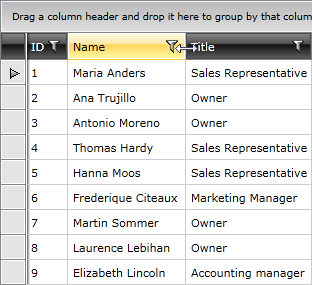
To resize a column in code, you can use its **Width** property. For example:
**Example 1: Setting a column with fixed width**
```XAML
```
## Disabling Resizing
There are two ways to disable the resizing.\
**1.** The first one is by setting the **CanUserResizeColumns** property to **False**.
**Example 2: Disable resizing for all columns within a RadGridView**
```XAML
```
This will disable resizing on **RadGridView** level, which means that all of the columns won't be resizable.
**2.** If you want to disable resizing only for a particular column, use the **IsResizable** property of the column.
**Example 3: Disable resizing for a specific column**
```XAML
```
## Resizing Events
When the user resizes a column, the **ColumnWidthChanging** event is fired and if it is not canceled the **ColumnWidthChanged** event fires after the resize is completed. Read more [here](https://www.telerik.com/products/wpf/documentation/controls/radgridview/events/column-resize-event).
> The user can resize columns only if **CanUserResizeColumns** is set to **True** (this is its default value).
## See Also
* [Reordering Columns](https://www.telerik.com/products/wpf/documentation/controls/radgridview/columns/reordering-columns)
* [Frozen Columns](https://www.telerik.com/products/wpf/documentation/controls/radgridview/columns/frozen-columns)
* [Bound/Unbound Columns](https://www.telerik.com/products/wpf/documentation/controls/radgridview/columns/bound-unbound-columns)