# Aggregate Functions
You can display aggregated information for the data in a column by adding aggregate functions to the **AggregateFunctions** collection of the column. The aggregate functions are included in **Telerik.Windows.Data** assembly.
## Available Aggregate Functions
There are two main types of aggregate functions available which in turn serve as the base for the concrete implementations.
* **EnumerableAggregateFunction**: Represents an AggregateFunction that uses aggregate extension methods provided in [Enumerable](https://docs.microsoft.com/en-us/dotnet/api/system.linq.enumerable).
* **CountFunction**: Returns the **number of all items** in the column.
* **FirstFunction**: Returns the **first element** in the column according to the current sorting.
* **LastFunction**: Returns the **last element** in the column according to the current sorting.
* **EnumerableSelectorAggregateFunction**: Represents an AggregateFunction that uses aggregate extension methods provided in [Enumerable](https://docs.microsoft.com/en-us/dotnet/api/system.linq.enumerable) and uses its **SourceField** property as a member selector. If the SourceField property is not explicitly set, then the property specified for the **DataMemberBinding** of the column will be used.
* **AverageFunction**: Returns the **average** of the values in the column.
* **MaxFunction**: Returns the **maximum** value of the cell values in the column.
* **MinFunction**: Returns the **minimum** value of the cell values in the column.
* **SumFunction**: Returns the **sum** of all cell values in the column.
Check the [Custom Aggregate Functions](https://www.telerik.com/products/wpf/documentation/controls/radgridview/columns/custom-aggregate-functions) article to see how to implement custom aggregate functions by inheriting the `EnumerableAggregateFunction` and `EnumerableSelectorAggregateFunction` classes.
## Adding an Aggregate Function
Aggregate functions can be added in xaml or in code behind. **Examples 1 and 2** demonstrate both approaches. Note, that the RadGridView is populated with data as demonstrated in the [Getting Started](https://www.telerik.com/products/wpf/documentation/controls/radgridview/getting-started/getting-started2) article.
**Example 1: Populating the AggregateFunctions collection in xaml**
```XAML
```
**Example 2: Populating the AggregateFunctions collection in code**
```C#
var countFunction = new CountFunction() { Caption = "Number of clubs: " };
var maxCapacityFunction = new MaxFunction() { Caption = "Maximum capacity: ", SourceField = "StadiumCapacity" };
var column = this.clubsGrid.Columns["Name"];
column.AggregateFunctions.Add(countFunction);
column.AggregateFunctions.Add(maxCapacityFunction);
```
```VB.NET
Dim countFunction = New CountFunction() With {.Caption = "Number of clubs: "}
Dim maxCapacityFunction = New MaxFunction() With {
.Caption = "Maximum capacity: ",
.SourceField = "StadiumCapacity"
}
Dim column = Me.clubsGrid.Columns("Name")
column.AggregateFunctions.Add(countFunction)
column.AggregateFunctions.Add(maxCapacityFunction)
```
> caption RadGridView with ShowColumnFooters set to true
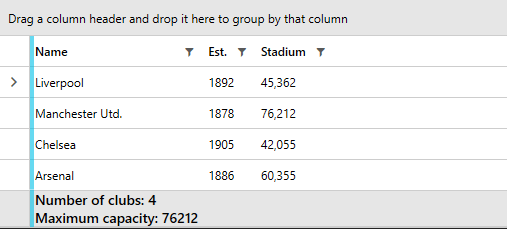
> You need to set the **ShowColumnFooters** and **ShowGroupFooters** properties to **True** in order to display aggregates under the columns and grouped rows respectively.
> If omitted, the **SourceField** property of the aggregate functions is automatically set to the **DataMemberBinding** of the column.
> RadGridView uses **System.Linq** to generate a proper **Expression** to do the calculation based on aggregate function defined and type of the bound data. Note that if an expression cannot be automatically generated, an exception will be thrown.
## Autogenerated Columns
If your columns are auto-generated, you can subscribe to the **AutoGeneratingColumn** event and populate the AggregateFunctions collection as demonstrated in **Example 3**.
**Example 3: Configuring column on AutoGeneratingColumn**
```C#
private void clubsGrid_AutoGeneratingColumn(object sender, GridViewAutoGeneratingColumnEventArgs e)
{
var dataColumn = e.Column as GridViewBoundColumnBase;
if (dataColumn.DataMemberBinding.Path.Path == "Name")
{
var countFunction = new CountFunction() { Caption = "Number of clubs: " };
e.Column.AggregateFunctions.Add(countFunction);
}
}
```
```VB.NET
Private Sub clubsGrid_AutoGeneratingColumn(ByVal sender As Object, ByVal e As GridViewAutoGeneratingColumnEventArgs)
Dim dataColumn = TryCast(e.Column, GridViewBoundColumnBase)
If dataColumn.DataMemberBinding.Path.Path = "Name" Then
Dim countFunction = New CountFunction() With {.Caption = "Number of clubs: "}
e.Column.AggregateFunctions.Add(countFunction)
End If
End Sub
```
## ResultFormatString
You can specify a format string for the aggregate results by setting the **ResultFormatString** property of an aggregate function.
**Example 4: Specifying ResultFormatString**
```XAML
```
The code from **Example 4** will display the aggregate results in the currency format with two digits after the decimal separator.
## Update Results
If you need to recalculate the aggregate results, you can call the **CalculateAggregates** method of the control as shown in **Example 5**.
**Example 5: Invoke CalculateAggregates() method**
```C#
private void Button1_Click(object sender, RoutedEventArgs e)
{
this.radGridView.CalculateAggregates();
}
```
```VB.NET
Private Sub Button1_Click(ByVal sender As Object, ByVal e As RoutedEventArgs)
Me.radGridView.CalculateAggregates()
End Sub
```
> Note that group aggregates will not be updated using this approach. Please check this [troubleshooting article](https://www.telerik.com/products/wpf/documentation/controls/radgridview/troubleshooting/aggregates-not-updated#column-group-aggregates) on how to refresh them.
## Modify Displayed Aggregates
You can modify the default template of the displayed aggregates by setting the **Footer** property of the column as per your specific requirements.
**Example 6: Overriding GridViewDataColumn.Footer**
```XAML
```
> caption A GridViewDataColumn with a custom footer
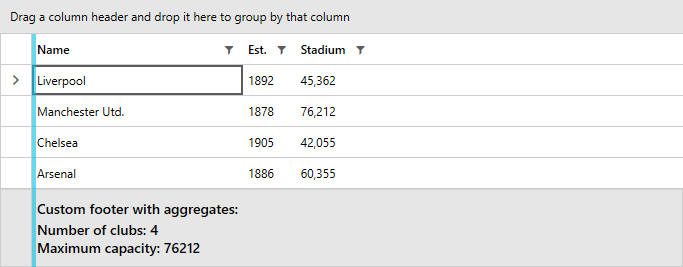
> Note that the Footer's DataContext is of type [AggregateResultsList](https://docs.telerik.com/devtools/wpf/api/telerik.windows.controls.gridview.aggregateresultslist).
## Group Aggregates
Aggregate functions can also be defined per group. To find out more, take a look at the [Group Aggregates](https://www.telerik.com/products/wpf/documentation/controls/radgridview/grouping/aggregates) article.
## Default AggregateFunctions for a Custom Column
If you want to have a default aggregate function for the custom column which is **not added in XAML**, you need to add it after the initialization of the column. This can be done by overriding the **EndInit** method of [FrameworkContentelement](https://msdn.microsoft.com/en-us/library/system.windows.frameworkcontentelement\(v=vs.110\).aspx).
**Example 7: Adding a default AggregateFunction**
```C#
public class MyColumn : GridViewDataColumn
{
public MyColumn()
{
}
public override void EndInit()
{
this.AggregateFunctions.Add(new SumFunction());
base.EndInit();
}
}
```
```VB.NET
Public Class MyColumn
Inherits GridViewDataColumn
Public Sub New()
End Sub
Public Overrides Sub EndInit()
Me.AggregateFunctions.Add(New SumFunction())
MyBase.EndInit()
End Sub
End Class
```
## See Also
* [Custom Aggregate Functions](https://www.telerik.com/products/wpf/documentation/controls/radgridview/columns/custom-aggregate-functions)
* [Group Aggregates](https://www.telerik.com/products/wpf/documentation/controls/radgridview/grouping/aggregates)
* [Group Footers](https://www.telerik.com/products/wpf/documentation/controls/radgridview/grouping/group-footers)
* [Aggregates are not shown](https://www.telerik.com/products/wpf/documentation/controls/radgridview/troubleshooting/aggregates-not-shown)
* [Aggregates are not updated](https://www.telerik.com/products/wpf/documentation/controls/radgridview/troubleshooting/aggregates-not-updated)
* [Style aggregate results displayed in the GroupHeaderRow](https://www.telerik.com/products/wpf/documentation/knowledge-base/kb-gridview-style-aggregate-results-in-group-header)