# Implementing View-ViewModel
The purpose of this tutorial is to show you how to bind a **RadGanttView** with a ViewModel.
> Before reading this tutorial you should get familiar with the [Data Binding](https://www.telerik.com/products/wpf/documentation/controls/radganttview/populating-with-data/overview) support of the **RadGanttView** control.
* Add a new **RadGanttView** declaration in your XAML:
```XAML
```
* Create a new class named **MyViewModel**:
```C#
public class MyViewModel
{
}
```
* In the **MyViewModel** class add Tasks property. We will bind the **TasksSource** property of the **RadGanttView** to this property.
```C#
public class MyViewModel : PropertyChangedBase
{
private ObservableCollection tasks;
public ObservableCollection Tasks
{
get
{
return tasks;
}
set
{
tasks = value;
OnPropertyChanged(() => Tasks);
}
}
}
```
* All we have to do is to initialize the tasks field:
```C#
public MyViewModel()
{
var date = DateTime.Now;
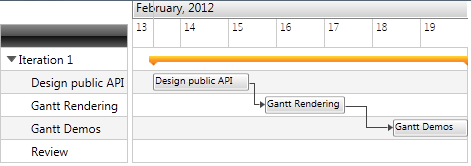
var ganttAPI = new GanttTask() { Start = date, End = date.AddDays(2), Title = "Design public API" };
var ganttRendering = new GanttTask() { Start = date.AddDays(2).AddHours(8), End = date.AddDays(4), Title = "Gantt Rendering" };
var ganttDemos = new GanttTask() { Start = date.AddDays(5), End = date.AddDays(7), Title = "Gantt Demos" };
var milestone = new GanttTask() { Start = date.AddDays(7), End = date.AddDays(7).AddHours(1), Title = "Review", IsMilestone = true };
ganttRendering.Dependencies.Add(new Dependency() { FromTask = ganttAPI });
ganttDemos.Dependencies.Add(new Dependency() { FromTask = ganttRendering });
var iterationTask = new GanttTask(date, date.AddDays(7), "Iteration 1")
{
Children = { ganttAPI, ganttRendering, ganttDemos, milestone }
};
this.tasks = new ObservableCollection() { iterationTask };
}
```
* The ViewModel is complete. Now, let's return to the View. Add TasksSource property to the definition of the **GanttView**:
```XAML
```
* Finally, set the DataContext:
```C#
this.DataContext = new MyViewModel();
```
And the result is: